account management
4 Topics
VPR Updates Ending for Tenable Security Center 6.4 and Earlier
Hi everyone! Please be aware Tenable Security Center 6.4 and earlier will no longer receive Vulnerability Priority Rating (VPR) updates, effective on November 1, 2026. What this means New plugins for new CVEs will not have a VPR score. VPR changes will not propagate to existing plugins. VPR scores that existed at the time of deprecation remain in the tool but are no longer refreshed. What to do Upgrade to a supported version of Security Center to continue receiving current VPR scores. Version 6.4 reached end of life on June 30, 2026. Questions about upgrading? Reply below or contact Tenable Support. -Team Tenable49Views0likes0Comments
How Do I Find the Account's Customer Success Manager (CSM)?
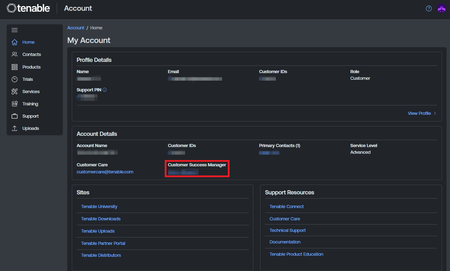
Applies To Account Management Operating System(s) N/A Description If the account is assigned a Customer Success Manager, their name and email address can be found in the Tenable Account Management Portal. Information To locate the contact information for an account's Customer Success Manager (CSM): 1. Log in to Tenable Account Management Portal: https://account.tenable.com/ 2. On the Home page, locate the name of your CSM under Account Details 3. Clicking on it will bring up a ‘mailto’ directed to the CSM's email address74Views0likes0CommentsAction Required: Preparation for January 2026 Tenable Security Center Feed Update
We are writing to announce an important upcoming change to the Tenable Security Center feed data. Starting in mid-January 2026, the size of Tenable Security Center feeds will increase due to the addition of new Vulnerability Priority Rating (VPR) data; this data will be available in Tenable Security Center 6.8, anticipated for release later in Q1 2026. This update ensures you continue to receive comprehensive vulnerability data, but it requires immediate action to ensure your environment is prepared. What you need to do To prevent the feed size from causing PHP memory exhaustion in your environment, please follow the resolution path for your specific version: Versions 6.5.1 – 6.7.2: Patch 202601.1 is now available. Applying this patch will automatically modify the PHP configuration to increase the memory limit. Versions Prior to 6.5.1: Follow the instructions outlined in this Knowledge Base article to modify the PHP configuration. Note: Tenable Security Center consoles with less than 8 GB RAM may need to have their hardware resources updated. Review Tenable Security Center hardware recommendations Why this matters Taking action now allows you to adopt a proactive approach to this feed expansion, ensuring your nightly updates continue seamlessly. Prevent SC Feed Update Failures: Without this fix, SC Feed updates may fail and log an "Allowed memory size... exhausted" error or terminate abnormally with error status '255'. Protect Disk Space: Failing feed updates can leave behind orphaned files in /opt/sc/data/feed.XXXXX folders, which may build up and cause disk space issues over time. Access our related documentation to learn more: Tenable Security Center Patch 202601.1 (2026-01-06) Knowledge Base: Tenable Security Center Feed Update Failing with "terminated abnormally with error status '255'" Due to PHP Memory Exhaustion7.6KViews4likes0Comments
Customer Care Guide
To effectively work with Tenable Customer Care, here's a breakdown of the process and key information: Identify Your Need: Technical Issues: If you're experiencing problems with Tenable products (scanning errors, installation issues, product not working as expected), you'll need Technical Support. Non-Technical Issues: For help with order fulfillment, managing account contacts, Tenable Connect login errors, and permissions, contact Customer Care. Account Onboarding and Renewals: Larger accounts and accounts with complex products will be assigned a Customer Success Manager, who can assist further with onboarding, renewals, product adoption, professional services, training, sales questions, or strategic best practices. If your account has a Customer Success Manager, their contact information is displayed on the Account Management landing page. Log in to Tenable Connect: The primary way to interact with Tenable support is through the Tenable Connect portal: https://connect.tenable.com You'll likely need to log in or register for an account if you haven't already. You will already have an account if: You are named on the Order Fulfillment email You have logged in to Tenable Community or Tenable Connect before Opening a Customer Care Case (for Non-Technical Issues): Visit the Customer Care page on the Tenable Connect: https://connect.tenable.com Fill out the form with your name, email, subject, and a detailed description of your request. You can submit a non-technical Customer Care request without logging in to Tenable Connect. You can also submit a non-technical Customer Care request by emailing [email protected]. Provide identifying information for you, your account, and your product. Your email address Your account’s Customer ID number Product activation code, UUID, or the order number from your Order Fulfillment email. Provide a detailed description of the issue, including: The behavior you expect. The behavior you are experiencing. Any error messages. Steps you've already taken. Specify the product you are having trouble with. Customer Care will email your reply by the end of the next business day. The Customer Care team is not currently phone-enabled. Best Practices for Working with Tenable Support: Be clear and concise when describing your issue. Provide as much detail as possible, including steps to reproduce the problem, error messages, and the impact on your work. Include relevant logs and diagnostic information if applicable. Respond promptly to any requests for further information from the support team. Keep track of your case number for easy reference. If you have a critical technical issue (P1), call your regional Technical Support phone number for the fastest response. By following these steps, you can effectively engage with Tenable Customer Care and Tenable Technical Support to get the assistance you need. Remember to use Tenable Connect as your primary point of contact for most issues.5.9KViews1like0Comments