audit & compliance
6 Topics
New Windows DACL Compliance Check Types Now Available
Summary Tenable is pleased to announce the release of three new atomic compliance check types for Windows auditing: FILE_DACL, REGISTRY_DACL, and SERVICE_DACL. These check types give audit authors a cleaner, more expressive way to assess discretionary access control list (DACL) permissions on files, registry keys, and services. Change These check types improve upon FILE_ACL, REGISTRY_ACL, and SERVICE_ACL check types. The rename to DACL reflects the correct Windows security terminology and aligns with how permission auditing is actually described in benchmarks and hardening guidance. The Audits & Compliance team will be using these check types for all published audits going forward and will be updating existing content to use them. Impact Easier check writing - Each permission check is a single, self-contained atomic check. There is no need to pair a check with a companion ACL structure. The access control criteria are expressed directly in the check itself, reducing the surface area for authoring errors. Easier tailoring - Because all relevant information lives within the atomic check block, policy customization is straightforward. Reviewers, implementers, and content consumers can read exactly what a check requires without cross-referencing a separate structure in the .audit file. Documentation - Usage and examples are available in the Nessus Compliance Checks Reference: FILE_DACL https://docs.tenable.com/nessus/compliance-checks-reference/Content/FILE_DACL.htm REGISTRY_DACL https://docs.tenable.com/nessus/compliance-checks-reference/Content/REGISTRY_DACL.htm SERVICE_DACL https://docs.tenable.com/nessus/compliance-checks-reference/Content/SERVICE_DACL.htm Target Release Date August 27, 2026
New Dell OS10 Compliance Plugin and Audit files
Summary Customers can now measure compliance against Dell OS10 devices with new plugin ID Dell OS10 Compliance Checks (275781) on Tenable Vulnerability Management and Nessus. This plugin is published as a part of the Policy Compliance template and will use the existing SSH credential type. The plugin will retrieve all target data using "show" commands and will evaluate actual values against a given audit policy. Three audits implementing the DISA STIG will be released along with the plugin: DISA Dell OS10 Switch Layer 2 Switch STIG v1r1 20 checks DISA Dell OS10 Switch NDM STIG v1r1 39 checks DISA Dell OS10 Switch Router STIG v1r1 42 checks These audits contain a total of 101 checks. Some examples include: OS10-NDM-000010 The Dell OS10 Switch must limit the number of concurrent sessions to an organization-defined number for each administrator account and/or administrator account type. OS10-NDM-000410 The Dell OS10 Switch must enforce password complexity by requiring that at least one uppercase character be used. OS10-L2S-000240 The Dell OS10 Switch must not use the default VLAN for management traffic. OS10-RTR-001040 The Dell OS10 Router must be configured to suppress Router Advertisements on all external IPv6-enabled interfaces. Additional Notes For those that are interested in creating custom audit content for their environment, please see the plugin documentation for all supported keywords and uses at https://docs.tenable.com/nessus/compliance-checks-reference/Content/dell-os10.htm. Target Release Date Nessus/Tenable.VM - Immediate Tenable.sc - To be determinedCompliance Windows Command Execution Enhancement
Summary The Windows Compliance Check plugin is implementing an updated library to run commands on Windows targets. The enhancements will include the following benefits. The plugin will improve on its handling of command timeouts. There were issues when long running commands would timeout on the scanner but leave temporary files on the target. This update will force long running checks to close when timing out and remove temporary files. The recently released improved resource management controls for Windows plugins on agents will now be extended to running audits. Potential Impacts: Tenable has gone to great lengths to ensure that the content that it publishes will operate and produce the same results that it always has. Customized audits may exhibit some changes due to the introduced job control of the command execution. These changes tend to be compliance checks that generate different results (failure instead of passing), or the actual values of the check have different text that would affect baseline scans. If custom content does exhibit these issues, strategies to work with the new library can be found in Compliance WMI Library Enhancement. Tenable Plugins 21156 - Windows Compliance Checks Target Release Date February 9, 2026
CyberArk for Palo Alto Networks PAN-OS and F5
Summary Tenable is pleased to announce that customers can now use CyberArk for privilege access management with both the Palo Alto Networks PAN-OS and F5 credentials. Scope Customers utilizing Tenable Vulnerability Management and Nessus Manager now have the capability to configure vulnerability scans with the PAN-OS credential utilizing CyberArk as an authentication method. Similarly to PAN-OS, the F5 credential has also been updated with CyberArk as an option for providing authentication credentials for compliance checks scans. Supported PAM Integration in this Release: CyberArk Plugins The below integration plugins provide essential information for validating the successful acquisition of authentication credentials from CyberArk by both the F5 and PAN-OS integrations. Integration Plugins Integration Status Debugging Log Report Impact Customers will now see CyberArk as credential PAM options within the F5 and Palo Alto Networks PAN-OS credentials. For any issues related to the use of PAM authentication with F5, please refer to the new log in the Debugging Log Report. Example - If using F5 with CyberArk support, the file will display as “f5_settings.nbin~CyberArk”. For any issues related to the use of PAM authentication with Palo Alto Networks PAN-OS, please refer to the new log in the Debugging Log Report. Example - If using F5 with CyberArk support, the file will display as “palo_alto_settings.nasl~CyberArk” Release Date January 21, 2026 for Tenable VM and Nessus TBD: Tenable Security Center
PCI Agent Scan Template now available!
As a result of the PCI DSS 4.x specification release, credentialed scanning is now a requirement for the PCI internal scanning. In response, Tenable has created the Tenable PCI Agent scan template, which can be used to scan your network via the PCI Internal Nessus Agent scan template in Tenable Vulnerability Management. For systems where agents cannot be installed, the defined approach in PCI DSS 11.3.1.2 (by way of the Internal PCI Network Scan scan template) is still applicable. The internal PCI network scan (uncredentialed network scan) is still required to cover vulnerabilities related to network services by port scans. Please visit LINK for details on scan configuration and also LINK for configuration of the PCI Agent.94Views1like1Comment
Azure Cloud Infrastructure Scanning for Government
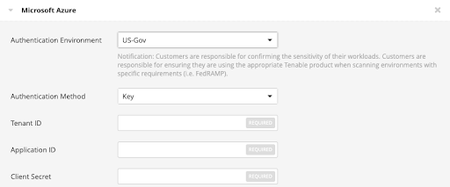
Summary As CISA BOD 25-01: Implementing Secure Practices for Cloud Services is being implemented, Tenable customers need a method to scan their cloud configuration for compliance. Tenable has enabled the ability to authenticate against the US Government national cloud in Microsoft Azure. Authentication Environment To accomplish the scanning of national clouds in Microsoft Azure, the Microsoft Azure credential has been enhanced to include the Authentication Environment preference. This preference has the default value of "Global", with an added value of "US-Gov". To use the credential in the US Government national cloud, Tenable customers will need access to the cloud being specified and have setup application access to the instance by following the procedures in Configure Azure for a Compliance Scan. Tenable Plugins 79357 - Microsoft Azure Compliance Checks Target Release Date Immediate