plugins and research
30 Topics
Improvement To Plugin 142960 “HSTS Missing From HTTPS Server (RFC 6797)”
Summary Plugin 142960 now validates the identity of an HTTPS service in line with the current RFC 9525 as opposed to the obsolete RFC 6125. When a service's TLS certificate contains Subject Alternative Name (SAN) entries, the plugin compares the target hostname against those SANs only and no longer considers the certificate's Common Name (CN). If the certificate has no SANs, the plugin falls back to using the CN, so coverage for legacy certificates is unchanged. Background Plugin 142960 checks whether a detected web server supports HTTP Strict Transport Security (HSTS). Before it evaluates the service, the plugin must confirm that the service's TLS certificate covers the identity of the host. This confirms that the server is authorized to answer for that host, and that the finding describes the target host and not whichever service happened to respond on its behalf. If the identity check fails, the plugin cannot evaluate the service. Until now, the plugin performed this check by comparing the resolvable hostname against the CN of the certificate presented on the relevant port. If the CN covered the hostname, the service was evaluated for HSTS. RFC 9525, which supersedes the identity-matching guidance in RFC 6125 (which allowed for the checking of CNs) states that when a certificate carries one or more SAN entries, hostname identity must be validated against those SANs only. The CN must not be used for this purpose, even if it matches the hostname. The RFC gives several reasons: the CN is ambiguous, it cannot hold multiple identifiers, and its use leads to security and parsing inconsistencies. This change was prompted by a case in which a host's service could only be identified through the SAN of its certificate and not through the CN. Research into that case led to RFC 9525, and the update follows its guidance. Changes Service identity validation in plugin 142960 now works as follows: If SANs were enumerated from the service's TLS certificate, the hostname is compared against the SANs only. The CN is not used, even when it matches the hostname. If no SANs were enumerated from the certificate, the plugin uses the CN to validate the service identity, as it did before. Impact For services whose certificates include SANs, the outcome of the identity check depends only on the SAN values. A service whose SANs cover the hostname but whose CN does not will now be validated and evaluated for HSTS. A service whose CN matches the hostname but whose SANs do not will no longer pass validation, so the plugin will not evaluate it. Services with certificates that have no SANs are evaluated as before. Affected Plugins 142960 - HSTS Missing From HTTPS Server (RFC 6797) Targeted Release Date Monday, October 12, 2026Component Installs Require Paranoid Checks (DEPRECATED)
Update - March 4, 2026 After considering customer feedback, we. have decided to re-evaluate these changes and come up with a better way of handling Component installs. For the latest information, please refer to the new release highlight: Improvement: Handling Component Installs for Vulnerability Assessment Summary With this update, products that are deemed to be components of another application, will now require the scan to be run in paranoid mode to trigger generic vulnerability detection plugins. In this context, “generic vulnerability detection plugins” refers to plugins that cover advisories published by the component vendor (e.g., plugin ID 242325, SQLite < 3.50.2 Memory Corruption) rather than the operating system or “parent” application that distributes the component, either as a part of the operating system or a dependent tool of the parent application. Overview Tenable covers software that can be either installed as base level software, or be included as component software of a larger product installation. Base level software can be updated without any impact to the base product functionality. Component software is typically updated as part of the vendor update for the larger packaged product, and the individual components are not updatable. Non-paranoid scans will report base software vulnerabilities that are actionable. Paranoid scans will report on base software vulnerabilities as well component software vulnerabilities that are not actionable, but still package a potentially vulnerable version of the component. To enhance the accuracy of our vulnerability detection and provide users with greater control over scan results, we are implementing an update affecting how we flag vulnerabilities in software components. Our detection plugins for OpenSSL, Curl, LibCurl, Apache HTTPD, Apache Tomcat, SQLite, PHP, Python packages and Node.js modules can now identify when these packages are installed as components of another parent application (e.g., SQLite bundled with Trend Micro’s Deep Security Agent), rather than as standalone installs. Key Changes: Non-Paranoid Scans: Scans running in the default mode will no longer flag generic vulnerability detection plugins for these component installs. This is because vulnerabilities in components generally cannot be patched directly; users must wait for the parent application's vendor to issue an update. OS Vendor Advisories Unaffected: This change does not affect plugins for OS vendor security advisories that cover the same vulnerabilities (e.g., plugin ID 243452, RHEL 9 : sqlite (RHSA-2025:12522)). Paranoid Scans: For scans running in paranoid mode, generic vulnerability detection plugins will still trigger for component installs if the detected version is lower than the expected fixed version. Expected Impact: Customers running non-paranoid scans should anticipate seeing a reduction in potential vulnerability findings for OpenSSL, Curl, LibCurl, Apache HTTPD, Apache Tomcat, SQLite, PHP, Python packages and Node.js modules that are installed as components. Technical Details: The changes are entirely contained within two shared libraries, vcf.inc and vdf.inc, utilized by the affected plugins. This update impacts approximately 750 plugins specific to OpenSSL, Curl, LibCurl, Apache HTTPD, Apache Tomcat, and SQLite. Targeted Release Date: Friday, February 6, 2026
New Windows DACL Compliance Check Types Now Available
Summary Tenable is pleased to announce the release of three new atomic compliance check types for Windows auditing: FILE_DACL, REGISTRY_DACL, and SERVICE_DACL. These check types give audit authors a cleaner, more expressive way to assess discretionary access control list (DACL) permissions on files, registry keys, and services. Change These check types improve upon FILE_ACL, REGISTRY_ACL, and SERVICE_ACL check types. The rename to DACL reflects the correct Windows security terminology and aligns with how permission auditing is actually described in benchmarks and hardening guidance. The Audits & Compliance team will be using these check types for all published audits going forward and will be updating existing content to use them. Impact Easier check writing - Each permission check is a single, self-contained atomic check. There is no need to pair a check with a companion ACL structure. The access control criteria are expressed directly in the check itself, reducing the surface area for authoring errors. Easier tailoring - Because all relevant information lives within the atomic check block, policy customization is straightforward. Reviewers, implementers, and content consumers can read exactly what a check requires without cross-referencing a separate structure in the .audit file. Documentation - Usage and examples are available in the Nessus Compliance Checks Reference: FILE_DACL https://docs.tenable.com/nessus/compliance-checks-reference/Content/FILE_DACL.htm REGISTRY_DACL https://docs.tenable.com/nessus/compliance-checks-reference/Content/REGISTRY_DACL.htm SERVICE_DACL https://docs.tenable.com/nessus/compliance-checks-reference/Content/SERVICE_DACL.htm Target Release Date August 27, 2026
Research Release Highlight - VMware ESXi 7.0 SEoL Update
Summary Tenable is updating the VMware ESX / ESXi Unsupported Version Detection plugin (56997) to track the vendor's End of General Support (EoGS) date rather than the End of Technical Guidance (EoTG) date. Change Before this update, Plugin 56997 determined unsupported status for VMware vSphere/ESXi 7.0 using the vendor's End of Technical Guidance (EoTG) date of April 2, 2027. EoTG marks the point at which the vendor's support becomes best-effort only; it does not reflect when the vendor actually stops shipping security patches. After this update, Plugin 56997 will use the vendor's End of General Support (EoGS) date instead, which is when the vendor discontinues security patches and critical bug fixes. This date for VMware vSphere/ESXi 7.0 EoGS is October 2, 2025. Impact Customers running VMware vSphere/ESXi 7.0 outside of the EoGS support window will now see a correct “unsupported” finding from Plugin 56997. This will introduce new critical findings into scan results for customers who have the unsupported version. Hosts that had previously been identified as unsupported should see no change to those findings. Detection plugins 56997 - VMware ESX / ESXi Unsupported Version Detection Target Release Date November 2, 2026Research Release Highlight: HTTP/3 Detection Support in NASL Plugins
Summary This update introduces a significant infrastructure enhancement for NASL plugins, enabling support for the HTTP/3 protocol. While the underlying framework now supports HTTP/3, there are currently no plugins that leverage the HTTP/3 protocol. Individual plugins will be updated by Tenable as appropriate to utilize this capability over time. Change The core of this update will allow NASL plugins to dynamically negotiate and utilize either HTTP/1 or HTTP/3 for requests. We are releasing http3_detect.nasl (Plugin ID: Pending) as the initial plugin to leverage this new framework, providing the foundation for future protocol-aware detections over UDP. To utilize HTTP/3, customers must explicitly enable 'UDP port scanning', 'Search for SSL/TLS/DTLS services' and set an appropriate port range in ‘Search for DTLS on’ within their scan policy settings. Care should be taken as UDP port scanning can significantly slow down scans. Customer Impact Existing plugins remain unaffected and will continue to operate over HTTP/1 unless specifically updated by the Tenable Research team. The introduction of http3_detect.nasl serves as the first step in broader protocol support without impacting current scan performance for non-UDP focused scans. Target Release Date August 10, 2026Improvement to Printer OS Fingerprinting
Updated: April 3, 2026 Summary Scanned printers will now have an OS artefact surfaced in their scan host metadata if the target has been identified as a printer when the “Scan Network Printers” policy option is disabled. This change will not cause any additional asset licenses to be consumed within Tenable VM or Tenable Security Center. Background Printers are notoriously unstable scan targets. Oftentimes, they can behave erratically when scanned, so some users prefer to avoid scanning them altogether. At present, there is a switch in the scan policies to prevent further scanning of a host when it's identified as a printer. To enable this setting, go to Settings -> Host Discovery -> Fragile devices - Scan Network Printers (Currently, this is a checkbox setting, default value “off”). With that said, how can the scanner know the target is a printer if it cannot be scanned? In reality, the scanner still performs very basic fingerprinting (usually via SNMP) in order to gather enough information to make an educated guess at the device type. When the scan target is thought to be a printer, it essentially gets marked as “Host/dead" in the scan KB. When this happens, the scanner will not perform any further active scanning. Changes With this update, the fingerprint used to identify the printer as such, will now be stored in the scan Knowledge Base (KB) so it can be processed by os_fingerprint2.nasl ("Post-scan OS Identification", plugin ID 83349) and surfaced as metadata in the scan result. The relevant policy setting located at Settings -> Host Discovery -> Fragile devices -> Scan Network Printers. With this update, the printer's OS information will now be surfaced if it is available, regardless of the selected value for this setting. Impact Users can now see the OS information for their printer devices that would have otherwise gone unreported if the scan is not configured to “Scan Network Printers”. As plugin ID 83349 generates no plugin output, only an “operating-system” tag will be added to the scan result (and stored in an exported .nessus file). This information will be visible only the in “Host/Asset Details” section of the Tenable product UI, i.e: Tenable Nessus: Scans -> [Folder] -> [Individual Scan Result] - > Host Details -> OS (sidebar) Tenable Vulnerability Management: Explore -> Assets -> [Asset] -> Details -> Operating System Scans -> Vulnerability Management Scans -> [Individual Scan Result] -> Scan Details -> Asset Details -> Operating System Tenable Security Center: Analysis -> IP Summary -> [IP address] -> System Information -> OS Scans -> Scan Results -> [Individual Scan Result] -> IP Summary -> [IP address] -> System Information -> OS Note, we expect this information to surface mainly in individual scan results. It would only be present in cumulative asset details if a licensed asset already exists for the target in question. This update will not cause additional assets to be created or consume any additional licenses. Affected Plugins 83349 - os_fingerprint2.nasl 11933 - dont_scan_printers.nasl 22481 - dont_scan_settings.nasl Targeted Release Date Wednesday, March 4, 20261.3KViews2likes2Comments
NuGet Package Enumeration Updates
Summary Tenable has updated the NuGet package enumeration plugins to improve detection of installed NuGet packages on Linux/Unix scan targets. Change Before this update, the NuGet package enumeration plugins did not attempt to associate detected packages with an RPM or DEB package managed by the Linux distribution. This could cause packages to report vulnerabilities both based on a Linux distribution vendor's advisory and a CVE advisory from the NuGet package maintainer. After this update, these issues have been addressed. NuGet packages on Linux assets will be assessed to determine if they are managed by a Linux distribution's package manager, and if so, will be marked as “Managed” and will not report a vulnerability, unless the Show potential false alarms setting is enabled for the scan. Impact Most customers will notice improved accuracy in NuGet package vulnerability reporting. Scan results may show changes in detected vulnerabilities based on how packages were previously assessed. Affected plugins 190687 - NuGet Installed Packages (Linux / Unix) Target Release Date June 1, 2026Plugin output for language library enumeration
Summary The plugins that enumerate Node.js, Python, and Ruby packages will now list the discovered packages in their output. Change Before this update, Tenable had updated some of the “language library” enumeration plugins - specifically for Node.js, Python, and Ruby - so that they would no longer list the discovered packages in the plugin output. This was a performance-related decision. When scanning assets with a substantial number of discovered packages, Tenable found that in many cases the size of the findings set would be so large that it would exhaust the memory allocated to the plugin and cause the plugin to crash without reporting. This would prevent downstream vulnerability plugins from detecting vulnerable packages and result in false negatives. Tenable found this to be a less desirable outcome, and began investigating solutions to make these findings sets available at the platform level. Customer feedback has led us to revert this change and develop an alternative solution for reporting from these plugins. After this update, the plugins below will now list the discovered packages, along with their path and version, in the plugin output, which can be used to locate specific installed packages on assets. Tenable will continue to investigate a platform-level feature to allow customers to locate specific language libraries across all managed assets in Tenable One. Impact Plugin output for updated plugins will include a list of detected packages. This may substantially increase the size of scan results in accordance with the number of detected packages. Plugins 200172 - Node.js Modules Installed (Windows) 179440 - Node.js Modules Installed (Linux) 178772 - Node.js Modules Installed (macOS) 181215 - Python Installed Packages (Windows) 164122 - Python Installed Packages (Linux/macOS) 240646 - Ruby Gem Modules Installed (macOS) 207585 - Ruby Gem Modules Installed (Windows) 207584 - Ruby Gem Modules Installed (Linux) Target Release Date April 27, 2026Improvement: Handling Component Installs for Vulnerability Assessment
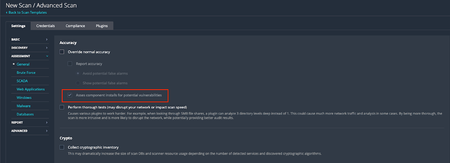
Background On Friday, February 6, 2026, Tenable Research published a plugin update that changed the way component installs are assessed for vulnerabilities. Those changes are outlined in a previous release highlight: Component Installs Require Paranoid Checks, This update essentially reverts this change, while adding new functionality to allow users to choose whether or not they want component installs assessed for vulnerabilities. Component installs are no longer influenced by scan paranoia settings. What are “Component Installs”? Software components, such as applications or language modules/libraries, are installed and managed by a primary "parent" package or application. The crucial point is that these components often cannot be updated individually. Instead, their vulnerability assessment and upgrade are entirely dependent on an update of the parent package. For instance, the SQLite database component is installed as part of the Trend Micro Deep Security Agent and is updated only when the Agent itself is updated. Nessus uses several factors to determine if a detected product is a component, or a standalone installation, including: Was the product installed by a package manager? These products are not considered components, as they are managed by the package manager and not a “parent” application Is the component a “language library”, i.e. a library or module used by the interpreter of a programming language like Python or Node.js? These enumerated libraries are marked as components by default. Does the product reside in a directory that is recognized for installations that are not component-based? Changes By default, component installs are once again assessed for vulnerabilities, as was the case prior to the release of the aforementioned update. If users wish to turn this setting off, so that component installs will not be assessed by generic vulnerability detection plugins, they can do so via the newly created scan preference. The end result of this change should be that fewer “false positives”, i.e. reported vulnerabilities for components that are “owned” by another application, are shown in scan results. Components with vulnerabilities that cannot be addressed independently of the “parent” application will not show in scan results. However, some customers have expressed a desire to see these vulnerabilities in their scan results anyway, to ensure full awareness of the risk profile of every application in their environment. This is still possible through the updated scan configuration settings. To modify this setting in your scan policy, go to Settings > Assessment > Accuracy > Override Normal Accuracy > Assess component installs for potential vulnerabilities. This setting is ON (checkbox is ticked) by default, so users must enable the Override Normal Accuracy checkbox (which is OFF / unchecked by default) if they wish to disable the setting and ensure that component installs are not assessed by generic vulnerability detection plugins in this scan. Please note that this update makes no other changes to the existing paranoia logic, outside of what is described above. For now, “Managed”, “Managed by OS” and “Backported” installs are still controlled by the Show/Avoid potential false alarms radio button. How can I tell if the detected install is a component or not? In addition to the above, we have also updated the relevant detection plugins so they will show if the component flag is set or not. At present, this includes detection plugins for OpenSSL, Curl, LibCurl, Apache HTTPD, Apache Tomcat, SQLite, Python Packages, Node.js modules and, soon to follow, Ruby and Nuget libraries. Using plugin ID 174788, SQLite Detection (Windows), here is a before and after example of the expected plugin output. Before: After: Expected Impact With the new default setting in place, users should anticipate an increase in vulnerability findings for the products in scope, returning to a level similar to what was observed before the first update. If users do not wish to surface these additional potential vulnerabilities, they should disable the "Assess component installs for potential vulnerabilities” setting. If the new scan preference is disabled, the volume of findings will remain consistent with current levels, when scanning with normal accuracy (paranoia) settings. Affected Plugins 12288, global_settings.nasl (updated to support the new scan policy preference) Any plugin that operates downstream of those in the list below: SQLite: 174788 - sqlite_nix_installed.nasl 171077 - sqlite_win_installed.nasl OpenSSL: 168007 - openssl_nix_installed.nasl 168149 - openssl_win_installed.nasl Curl: 182774 - curl_nix_installed.nasl 171860 - curl_win_installed.nasl LibCurl: 182848 - libcurl_nix_installed.nasl Apache HTTPD: 141394 - apache_http_server_nix_installed.nasl 141262 - apache_httpd_win_installed.nasl Apache Tomcat: 130175 - apache_tomcat_nix_installed.nasl 130590 - tomcat_win_installed.nasl Python Packages: 164122 - python_packages_installed_nix.nasl 139241 - python_win_installed.nasl Node.js Modules: 178772 - nodejs_modules_linux_installed.nasl 179440 - nodejs_modules_mac_installed.nasl 200172 - nodejs_modules_win_installed.nasl Targeted Release Date Tenable Nessus and Vulnerability Management: Monday, March 9, 2026 (ETA 22:30 Eastern Standard Time) Tenable Security Center: Monday, March 16, 20262.9KViews4likes11Comments
New Dell OS10 Compliance Plugin and Audit files
Summary Customers can now measure compliance against Dell OS10 devices with new plugin ID Dell OS10 Compliance Checks (275781) on Tenable Vulnerability Management and Nessus. This plugin is published as a part of the Policy Compliance template and will use the existing SSH credential type. The plugin will retrieve all target data using "show" commands and will evaluate actual values against a given audit policy. Three audits implementing the DISA STIG will be released along with the plugin: DISA Dell OS10 Switch Layer 2 Switch STIG v1r1 20 checks DISA Dell OS10 Switch NDM STIG v1r1 39 checks DISA Dell OS10 Switch Router STIG v1r1 42 checks These audits contain a total of 101 checks. Some examples include: OS10-NDM-000010 The Dell OS10 Switch must limit the number of concurrent sessions to an organization-defined number for each administrator account and/or administrator account type. OS10-NDM-000410 The Dell OS10 Switch must enforce password complexity by requiring that at least one uppercase character be used. OS10-L2S-000240 The Dell OS10 Switch must not use the default VLAN for management traffic. OS10-RTR-001040 The Dell OS10 Router must be configured to suppress Router Advertisements on all external IPv6-enabled interfaces. Additional Notes For those that are interested in creating custom audit content for their environment, please see the plugin documentation for all supported keywords and uses at https://docs.tenable.com/nessus/compliance-checks-reference/Content/dell-os10.htm. Target Release Date Nessus/Tenable.VM - Immediate Tenable.sc - To be determined