tenable nessus
60 Topics
Improvement To Plugin 142960 “HSTS Missing From HTTPS Server (RFC 6797)”
Summary Plugin 142960 now validates the identity of an HTTPS service in line with the current RFC 9525 as opposed to the obsolete RFC 6125. When a service's TLS certificate contains Subject Alternative Name (SAN) entries, the plugin compares the target hostname against those SANs only and no longer considers the certificate's Common Name (CN). If the certificate has no SANs, the plugin falls back to using the CN, so coverage for legacy certificates is unchanged. Background Plugin 142960 checks whether a detected web server supports HTTP Strict Transport Security (HSTS). Before it evaluates the service, the plugin must confirm that the service's TLS certificate covers the identity of the host. This confirms that the server is authorized to answer for that host, and that the finding describes the target host and not whichever service happened to respond on its behalf. If the identity check fails, the plugin cannot evaluate the service. Until now, the plugin performed this check by comparing the resolvable hostname against the CN of the certificate presented on the relevant port. If the CN covered the hostname, the service was evaluated for HSTS. RFC 9525, which supersedes the identity-matching guidance in RFC 6125 (which allowed for the checking of CNs) states that when a certificate carries one or more SAN entries, hostname identity must be validated against those SANs only. The CN must not be used for this purpose, even if it matches the hostname. The RFC gives several reasons: the CN is ambiguous, it cannot hold multiple identifiers, and its use leads to security and parsing inconsistencies. This change was prompted by a case in which a host's service could only be identified through the SAN of its certificate and not through the CN. Research into that case led to RFC 9525, and the update follows its guidance. Changes Service identity validation in plugin 142960 now works as follows: If SANs were enumerated from the service's TLS certificate, the hostname is compared against the SANs only. The CN is not used, even when it matches the hostname. If no SANs were enumerated from the certificate, the plugin uses the CN to validate the service identity, as it did before. Impact For services whose certificates include SANs, the outcome of the identity check depends only on the SAN values. A service whose SANs cover the hostname but whose CN does not will now be validated and evaluated for HSTS. A service whose CN matches the hostname but whose SANs do not will no longer pass validation, so the plugin will not evaluate it. Services with certificates that have no SANs are evaluated as before. Affected Plugins 142960 - HSTS Missing From HTTPS Server (RFC 6797) Targeted Release Date Monday, October 12, 2026
New Microsoft Azure Key Vault Integration
Summary We are pleased to announce that Tenable's credentialed scanning now supports Microsoft Azure Key Vault as a Privileged Access Management (PAM) integration. This will be available in Tenable One Vulnerability Management and Tenable Nessus Immediately. Change Tenable's credentialed scanning has been updated to include Microsoft Azure Key Vault as a new authentication method. Security teams can now store privileged credentials in Azure Key Vault and have Tenable retrieve them automatically at scan time using OAuth2 client-credentials authentication with a Microsoft Entra ID service principal. Credentials such as sensitive passwords and SSH private keys are maintained centrally inside the vault, they are never stored in Tenable scan policies and can be rotated seamlessly without requiring manual policy updates. The Azure Key Vault integration supports the following credential types: SSH Windows (SMB) Database (Oracle, SQL Server, MySQL, PostgreSQL, DB2, MongoDB) VMware ESXi SOAP API VMware vCenter API Nutanix Prism Central Each Key Vault secret is expected to hold a JSON object containing one or more of the fields username, password, ssh_key, ssh_keyphrase, and domain, so a single secret can drive both password and SSH private-key-based target authentication. For SSH targets, privilege escalation may optionally reference a separate Key Vault secret whose password field is used as the sudo/su password. For more information see our Microsoft Azure Key Vault Integration user documentation: https://docs.tenable.com/Integrations.htm Impact No impact to current scans are expected; If customers encounter issues with this integration, please open a ticket with Technical Support. Release Date September 3, 2026 for Tenable One Vulnerability Management and Nessus TBD for Tenable Security CenterVMware Integration vSphere 9.0 Compatibility
Summary We are pleased to announce that Tenable's VMware integration for vulnerability scanning now supports VMware vSphere 9.0 (ESXi 9.0 and vCenter Server 9.0). These updates will be available in Tenable Vulnerability Management, Nessus, and Tenable Security Center. Change Tenable has updated its VMware integration to support VMware ESXi 9.0 and VMware vCenter Server 9.0. Authenticated vulnerability scans can now be performed on these targets without the need for additional credential setup. VMware vSphere 9.0 compatibility covers the following scenarios: VMware ESX SOAP API authenticated scans against ESXi 9.0 hosts VMware vCenter API authenticated scans against vCenter Server 9.0 VMware vCenter auto-discovery flows for 9.0 hosts For more information see our user documentation: Welcome to Tenable for VMware Impact No impact to current scans are expected; existing ESXi 8.x and earlier vCenter scans continue to work as before. If customers encounter issues with this integration, please open a ticket with Technical Support. Tenable will engage with VMware as needed to identify and resolve any issues. Release Date Available Immediately (May 27, 2026) for Tenable Vulnerability Management, Nessus, and Tenable Security Center Note: TDB for updates to enable VMware ESXi 9.0 and VMware vCenter Server 9.0 compatibility with Compliance and Audit scanning.
Research Release Highlight – "Fully Scan Operational Technology" Default Setting Change
Summary The "Fully Scan Operational Technology" (OT) preference controls whether Nessus actively scans OT/ICS devices during a scan. This setting is intended to be disabled by default to avoid unintended disruption to sensitive operational technology environments. A long-standing setting in the Do not scan operational technology devices plugin caused this preference to default to enabled in a Basic Network Scan when the discovery type is not set to Custom. Change The default value for "Fully Scan Operational Technology" preference has been corrected from yes to no. Impact This fix will affect existing Basic Network scans automatically upon the next feed update — no scan recreation is required. Customers using Basic Network Scan policies with a non-custom discovery scan type will see the following behavioral change: Before change: "Fully Scan Operational Technology" was silently enabled, meaning OT devices may have been actively scanned. After change: "Fully Scan Operational Technology" will correctly default to disabled. Customers who intentionally want to scan OT devices should explicitly enable the "Fully Scan Operational Technology" preference by switching their scan policy's discovery type to Custom, which will expose the preference in the UI and allow it to be toggled on. Affected products: Tenable Security Center (SC), Tenable Vulnerability Management (TVM), and Nessus Target Release Date July 13, 2026Improvement to Printer OS Fingerprinting
Updated: April 3, 2026 Summary Scanned printers will now have an OS artefact surfaced in their scan host metadata if the target has been identified as a printer when the “Scan Network Printers” policy option is disabled. This change will not cause any additional asset licenses to be consumed within Tenable VM or Tenable Security Center. Background Printers are notoriously unstable scan targets. Oftentimes, they can behave erratically when scanned, so some users prefer to avoid scanning them altogether. At present, there is a switch in the scan policies to prevent further scanning of a host when it's identified as a printer. To enable this setting, go to Settings -> Host Discovery -> Fragile devices - Scan Network Printers (Currently, this is a checkbox setting, default value “off”). With that said, how can the scanner know the target is a printer if it cannot be scanned? In reality, the scanner still performs very basic fingerprinting (usually via SNMP) in order to gather enough information to make an educated guess at the device type. When the scan target is thought to be a printer, it essentially gets marked as “Host/dead" in the scan KB. When this happens, the scanner will not perform any further active scanning. Changes With this update, the fingerprint used to identify the printer as such, will now be stored in the scan Knowledge Base (KB) so it can be processed by os_fingerprint2.nasl ("Post-scan OS Identification", plugin ID 83349) and surfaced as metadata in the scan result. The relevant policy setting located at Settings -> Host Discovery -> Fragile devices -> Scan Network Printers. With this update, the printer's OS information will now be surfaced if it is available, regardless of the selected value for this setting. Impact Users can now see the OS information for their printer devices that would have otherwise gone unreported if the scan is not configured to “Scan Network Printers”. As plugin ID 83349 generates no plugin output, only an “operating-system” tag will be added to the scan result (and stored in an exported .nessus file). This information will be visible only the in “Host/Asset Details” section of the Tenable product UI, i.e: Tenable Nessus: Scans -> [Folder] -> [Individual Scan Result] - > Host Details -> OS (sidebar) Tenable Vulnerability Management: Explore -> Assets -> [Asset] -> Details -> Operating System Scans -> Vulnerability Management Scans -> [Individual Scan Result] -> Scan Details -> Asset Details -> Operating System Tenable Security Center: Analysis -> IP Summary -> [IP address] -> System Information -> OS Scans -> Scan Results -> [Individual Scan Result] -> IP Summary -> [IP address] -> System Information -> OS Note, we expect this information to surface mainly in individual scan results. It would only be present in cumulative asset details if a licensed asset already exists for the target in question. This update will not cause additional assets to be created or consume any additional licenses. Affected Plugins 83349 - os_fingerprint2.nasl 11933 - dont_scan_printers.nasl 22481 - dont_scan_settings.nasl Targeted Release Date Wednesday, March 4, 20261.3KViews2likes2Comments
NuGet Package Enumeration Updates
Summary Tenable has updated the NuGet package enumeration plugins to improve detection of installed NuGet packages on Linux/Unix scan targets. Change Before this update, the NuGet package enumeration plugins did not attempt to associate detected packages with an RPM or DEB package managed by the Linux distribution. This could cause packages to report vulnerabilities both based on a Linux distribution vendor's advisory and a CVE advisory from the NuGet package maintainer. After this update, these issues have been addressed. NuGet packages on Linux assets will be assessed to determine if they are managed by a Linux distribution's package manager, and if so, will be marked as “Managed” and will not report a vulnerability, unless the Show potential false alarms setting is enabled for the scan. Impact Most customers will notice improved accuracy in NuGet package vulnerability reporting. Scan results may show changes in detected vulnerabilities based on how packages were previously assessed. Affected plugins 190687 - NuGet Installed Packages (Linux / Unix) Target Release Date June 1, 2026Cisco Meraki API Host Guidance
Summary Tenable is announcing changes to our documentation for the Cisco Meraki API integration. Customers using a “unique” host in the “Cisco Meraki Host” field of the credential should use “api.meraki.com”, or a region-specific instead if applicable. Please refer to the documentation for full guidance. Tenable and Cisco Meraki Integration Guide Impact Customers using the Cisco Meraki API integration are encouraged to check their configurations and update them accordingly. This change in guidance addresses cases where some customers were experiencing HTTP 308 redirects, resulting in integration failures. This is also closely related to cases where customers were experiencing HTTP 403 errors, which has been addressed by changes in the Cisco Meraki API Web Application Firewall (WAF). Release Date Dec 15th, 2025Delinea Platform Authentication Support
Summary We are proud to announce that Tenable’s Delinea Secret Server Privileged Access Management (PAM) integration can now use Delinea Platform Authentication method. These updates are immediately available for scans in Tenable Vulnerability Management and Nessus Manager, with plans to release this feature at a later date in Tenable Security Center. Change With this addition, instead of just connecting to the standalone Secret Server, scans can now authenticate via the Delinea Platform, leveraging centralized identity and the security of the newer Delinea architecture. Delinea Platform Authentication method supports following credential types for Delinea Secret Server mode: Windows SSH Database Nutanix VMware ESX SOAP API VMware vCenter API Delinea Platform Authentication method also supports following the credential types for Delinea Secret Server Auto-Discovery mode: Windows SSH Database For more information see our user documentation: https://docs.tenable.com/integrations/Delinea/Content/Introduction.htm Impact No impact to current scans are expected; If customers encounter issues with this integration, please open a ticket with Technical Support. Tenable will engage with Delinea as needed to identify and resolve any issues. Release Date 11 May 2026 for Tenable Vulnerability Management and Nessus; TBD for Security CenterPlugin output for language library enumeration
Summary The plugins that enumerate Node.js, Python, and Ruby packages will now list the discovered packages in their output. Change Before this update, Tenable had updated some of the “language library” enumeration plugins - specifically for Node.js, Python, and Ruby - so that they would no longer list the discovered packages in the plugin output. This was a performance-related decision. When scanning assets with a substantial number of discovered packages, Tenable found that in many cases the size of the findings set would be so large that it would exhaust the memory allocated to the plugin and cause the plugin to crash without reporting. This would prevent downstream vulnerability plugins from detecting vulnerable packages and result in false negatives. Tenable found this to be a less desirable outcome, and began investigating solutions to make these findings sets available at the platform level. Customer feedback has led us to revert this change and develop an alternative solution for reporting from these plugins. After this update, the plugins below will now list the discovered packages, along with their path and version, in the plugin output, which can be used to locate specific installed packages on assets. Tenable will continue to investigate a platform-level feature to allow customers to locate specific language libraries across all managed assets in Tenable One. Impact Plugin output for updated plugins will include a list of detected packages. This may substantially increase the size of scan results in accordance with the number of detected packages. Plugins 200172 - Node.js Modules Installed (Windows) 179440 - Node.js Modules Installed (Linux) 178772 - Node.js Modules Installed (macOS) 181215 - Python Installed Packages (Windows) 164122 - Python Installed Packages (Linux/macOS) 240646 - Ruby Gem Modules Installed (macOS) 207585 - Ruby Gem Modules Installed (Windows) 207584 - Ruby Gem Modules Installed (Linux) Target Release Date April 27, 2026Tenable Post-Quantum Cryptography Inventory Support
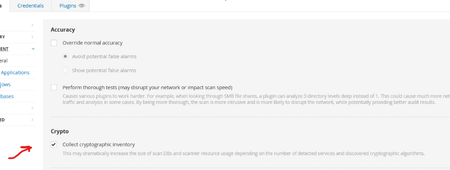
Summary The advent of quantum computing presents a significant threat to current cryptographic algorithms. Organizations worldwide are beginning the critical transition to post-quantum cryptography (PQC) resistant algorithms to ensure long-term data security. Government mandates, such as the U.S. National Security Memorandum 10 (NSM-10), outlines deadlines for PQC migration and specific actions agencies must take to migrate vulnerable systems. Our PQC support is designed to help customers inventory use of TLS and SSH quantum-resistant and vulnerable algorithms within their infrastructure using remote Nessus-based scans. Cipher Inventory and Reporting Post-Quantum Cipher Plugins Two remote-based scan informational reporting plugins for TLS and SSH protocols inform customers of their transition posture according to NIST Post-Quantum Encryption Standards. Services Using Post Quantum Cryptography: Reports on services equipped with at least one post-quantum cipher. It will specify which post-quantum ciphers were discovered, reporting by port and protocol. Services Not Using Post Quantum Cryptography: Reports on services that support no post-quantum ciphers. These plugins will be enabled by default and included in existing scans. Cryptographic Inventory Plugin Reporting To enable a JSON-based inventory of each target by service and cipher, enable through either a preference on your Advanced Network Scan or by running the Cryptographic Inventory scan template. These preferences will initially be supported in Nessus and Tenable Vulnerability Management. They are planned to be added to Tenable Security Center at a later date. Warning: Enabling this preference through the Advanced Network Scan is expected to increase the overall size of the plugin output per target and resulting Nessus database size. If you do not need to produce this inventory at all or on your regular scan cadence, it’s recommended to instead run the Cryptographic Inventory scan template to decrease the potential impact to your normal scan results. Options to Enable Inventory Reporting Advanced Scan Preference Post Quantum Cryptography Scan Template Cryptographic Inventory Plugin Details The plugin enabled with the preference or scan template is an information plugin called Target Cipher Inventory. Within the output of this plugin, you will find a JSON structure containing the TLS and SSH inventories for the scanned target. You can export this inventory based on plugin output using the Tenable API if needed. For TLS, the structure contains: Attribute Definition Encaps Protocol encapsulation employed such as TLSv1, TLSv2, TLSv3 Port Port used for TLS communication Curve Group Encryption method Ciphersuite Algorithm used to secure the TLS connection For SSH, the structure contains: Attribute Definition Proto Protocol of SSH Port Port used for SSH communication Name Algorithm used to secure the protocol Type Use of the named algorithm such as “message auth” Release Date Tenable Vulnerability Management and Tenable Nessus: December 8, 2025 Tenable Security Center: - December 8, 2025 for the informational plugins - Cryptographic Inventory scan template release to be determined