tenable research
94 Topics
Component Installs Require Paranoid Checks
Update - February 12, 2026 After considering customer feedback, we. have decided to re-evaluate these changes and come up with a better way of handling Component installs. Once the plan is finalised, the details will be shared here. Summary With this update, products that are deemed to be components of another application, will now require the scan to be run in paranoid mode to trigger generic vulnerability detection plugins. In this context, “generic vulnerability detection plugins” refers to plugins that cover advisories published by the component vendor (e.g., plugin ID 242325, SQLite < 3.50.2 Memory Corruption) rather than the operating system or “parent” application that distributes the component, either as a part of the operating system or a dependent tool of the parent application. Overview Tenable covers software that can be either installed as base level software, or be included as component software of a larger product installation. Base level software can be updated without any impact to the base product functionality. Component software is typically updated as part of the vendor update for the larger packaged product, and the individual components are not updatable. Non-paranoid scans will report base software vulnerabilities that are actionable. Paranoid scans will report on base software vulnerabilities as well component software vulnerabilities that are not actionable, but still package a potentially vulnerable version of the component. To enhance the accuracy of our vulnerability detection and provide users with greater control over scan results, we are implementing an update affecting how we flag vulnerabilities in software components. Our detection plugins for OpenSSL, Curl, LibCurl, Apache HTTPD, Apache Tomcat, SQLite, PHP, Python packages and Node.js modules can now identify when these packages are installed as components of another parent application (e.g., SQLite bundled with Trend Micro’s Deep Security Agent), rather than as standalone installs. Key Changes: Non-Paranoid Scans: Scans running in the default mode will no longer flag generic vulnerability detection plugins for these component installs. This is because vulnerabilities in components generally cannot be patched directly; users must wait for the parent application's vendor to issue an update. OS Vendor Advisories Unaffected: This change does not affect plugins for OS vendor security advisories that cover the same vulnerabilities (e.g., plugin ID 243452, RHEL 9 : sqlite (RHSA-2025:12522)). Paranoid Scans: For scans running in paranoid mode, generic vulnerability detection plugins will still trigger for component installs if the detected version is lower than the expected fixed version. Expected Impact: Customers running non-paranoid scans should anticipate seeing a reduction in potential vulnerability findings for OpenSSL, Curl, LibCurl, Apache HTTPD, Apache Tomcat, SQLite, PHP, Python packages and Node.js modules that are installed as components. Technical Details: The changes are entirely contained within two shared libraries, vcf.inc and vdf.inc, utilized by the affected plugins. This update impacts approximately 750 plugins specific to OpenSSL, Curl, LibCurl, Apache HTTPD, Apache Tomcat, and SQLite. Targeted Release Date: Friday, February 6, 2026
Nessus now has Windows LAPS Support
Summary: Nessus now has the ability to leverage accounts managed by Microsoft Windows LAPS. How LAPS works: Since LAPS managed accounts have their passwords rotated routinely, users cannot just directly provide the credentials in their Scan Policy. Before this change, users would instead have to make an additional privileged account on each LAPS enabled Host to provide to Nessus. Currently Nessus supports Entra LAPS allowing a scan to pull LAPS Managed Credentials from a customer’s remote Entra instance. Now, Nessus can do the same for Windows LAPS, allowing customers with local LAPS setups to gain the same benefits! Without Windows LAPS support, customers must make dedicated account for Nessus to use to scan targets Change: With this LAPS support change, during the startup phase of a scan, Nessus will reach out to a customer provided Domain Controller hosting an AD forest with LAPS enabled, and pull a list of all Local Admin Accounts for devices managed by LAPS. Nessus will then attempt to use these retrieved LAPS managed accounts as credentials when attempting to access a target host. With Windows LAPS Support, Customers need only provide a single Credential that allows Nessus to retrieve the actual credentials for LAPS Managed Devices How to enable it: To make use of Nessus’ Windows LAPS support, a customer needs only to provide the necessary info to their scan/policy via the Windows LAPS Credential. They’ll need to provide us the IP of the DC, Credentials for an account on that DC with the necessary permissions*, and the DistinguishedName of the OU that contains their LAPS managed devices. *The Account for retrieving Windows LAPS credentials needs the following permissions General Recommend the Account be added to the BUILTIN/Administrators AD Group as it grants all required permissions, including: Access to the $Admin Able to log on to the DC remotely Able to run Powershell WMI and DCOM access to Root/CIMV2 WMI Namespace LAPS Permissions LapsADReadPasswordPermission rights to the LAPS OU Be an Authorized Password Decryptor in the LAPS GPO (without this, Nessus will not be able to retrieve passwords protected by LAPS Encryption). Members of the Domain Administrators group are Authorized Password Decryptors by default. For additional information see: https://learn.microsoft.com/en-us/windows-server/identity/laps/laps-overview Impact: Customers using Rotating Host passwords managed through Microsoft Windows LAPS can now leverage these credentials in their Nessus scans for more secure scanning configurations. Target Release Date: Nessus, T.VM On/About 09 JUN 2025 T.SC TBD
Ruby Gem Enumeration Detection Updates
Summary Tenable has updated the Ruby gem enumeration plugins to reduce false positives and to better identify vulnerabilities when multiple packages are present on the scan target. Change Before this update, the Ruby gem enumeration plugins did not attempt to associate detected packages with an RPM or DEB package managed by the Linux distribution. This would cause some packages to report vulnerabilities both based on a Linux distribution vendor’s advisory and a CVE advisory from the Ruby gem maintainer. Some gems that are symbolically linked across the filesystem could be detected multiple times. After this update, these issues have been addressed. Vulnerable Ruby gems on Linux assets will be assessed to determine if they are managed by a Linux distribution’s package manager, and if so, will be marked as “Managed” and will not report a vulnerability, unless the [Override normal Accuracy] setting to Show potential false alarms setting is enabled for the scan. Gems that are symbolically linked will be followed to the source file; duplicate detections will be eliminated. The gem enumeration plugins will no longer report the list of detected gems in plugin output; rather, they will use only internal storage mechanisms to record the detected gems, so that Ruby vulnerability plugins can continue to use that data for version checks. Some issues were identified in the Ruby gem enumeration plugins that could have prevented some gems from being detected when the scan config was set to perform thorough checks. Those issues were corrected in this update. Impact Most customers will notice a reduction in the volume of Ruby gem vulnerabilities reported due to removal of duplicate findings. Some may notice a change in detected vulnerabilities due to the updates to thorough mode scanning. Detection plugins 240646 - Ruby Gem Modules Installed (macOS) 207584 - Ruby Gem Modules Installed (Linux) 207585 - Ruby Gem Modules Installed (Windows) Target Release Date March 2, 2026
February 2026 Tenable Product Newsletter
Greetings! Check out our February newsletter to learn about the latest product and research updates, upcoming and on-demand webinars and educational content — all to help you get more value from your Tenable solutions. Exposure 2026 Save 50% on the security conference of the year Don’t miss Exposure 2026, the first-ever conference dedicated exclusively to proactive, unified exposure management. Join us in Boston, Mass., from May 19-21, 2026, to get: Hands-on instruction with Exposure Management Strategy or Tenable One Technical Training Practical resources and real-world insights from Tenable leaders and industry experts Register before March 31 to save 50% off admission and training with early bird pricing. Tenable One Say hello to the Tenable One Open Connector We know your security stack is disparate, but your visibility shouldn't be. That's why we're thrilled to introduce the Tenable One Open Connector — a powerful new way to bridge the gaps across your attack surface and create a truly unified, context-aware view of risk. Bring your own data: Don't wait for a pre-built connector. Whether it’s pentesting reports or external vulnerability scans, you can now ingest data from across your entire stack on your own terms. Seamless uploads: Use in-platform drag-and-drop functionality to upload CSV, Excel, or ZIP files in seconds — no complex APIs or coding required. Customizable mapping: Customize exactly how you organize data for precise segmentation and more accurate reporting. Ready to unify your security data? Explore the Tenable One Open Connector. AI Exposure Tenable One AI Exposure now gives you visibility and control to close your AI exposure management gap through three core capabilities: Discover AI across your entire environment: Continuously discover shadow AI across your environment, so your security teams have a complete, risk-aware view of where AI exists, its connections, and where exposure begins. Protect AI workloads and agents: Reduce real-world AI risk by protecting the systems that power AI to close the gaps that attackers exploit across infrastructure, agents, and attack paths. Govern AI usage (add-on): Enable secure, compliant AI adoption by eliminating blind spots in how employees interact with GenAI and autonomous agents to ensure your workforce adopts generative tools within a governed framework that prevents data leakage and maintains alignment with organizational policies. For more information, visit our webpage or view the data sheet. Reach out to your customer success manager to get started today! Tenable Cloud Security At Tenable, we are obsessed with your uptime. This month’s updates focus on one goal… shortening the distance between discovering a risk and fixing it. The Highlight: Patch faster, firefight less We’ve integrated Remediation Patches (including Tenable Plugin IDs) directly into your vulnerability tables and workload profiles. The outcome: Drastically reduce Mean Time to Remediation (MTTR) by giving DevOps the exact patch name they need without all the manual research required. Where to find it: Check the new "Patch Name" column in your Vulnerabilities table or click into any Patch Profile for deep context. Validated vision: The Forrester Wave™ Q1 2026 Tenable has been named a Strong Performer in the Forrester Wave™: Cloud Native Application Protection Solutions (CNAPP), Q1 2026. Platform power: Forrester validated our vision for reducing tool sprawl, awarding Tenable a "superior" rating for simplifying exposure management. Perfect scores: We earned 5/5 scores in critical categories: CIEM, Container Orchestration Protection, Reporting, Vision, and Community. Technical edge: The report specifically highlighted our excellence in identifying toxic combinations of permissions and our "extra mile" customer support. Impactful updates Strategic risk management: Use our new Exclusions framework to silence non-actionable findings and focus your team on risks that actually move the needle. AWS ABAC support: Achieve True Least Privilege with granular identity visibility and highly accurate permission recommendations. Automation at scale: New GraphQL API support for Projects allows you to bake security governance directly into rapid DevOps workflows. View Full Cloud Release Notes Tenable Vulnerability Management Streamline AI and MCP risk tracking Monitor artificial intelligence exposure with the updated Tracking AI Exposure dashboard and report. This release replaces complex plugin output filters with simplified plugin family filters, allowing you to identify AI-related vulnerabilities across your environment. This also introduces dedicated content for the Model Context Protocol (MCP), ensuring you can secure AI connectivity alongside your LLM deployments. By utilizing these tools, you gain insight into your AI attack surface to better prioritize exposure. See the dashboard and report here. Navigate the transition to post-quantum cryptography Secure against the threat of quantum computing with Post Quantum Ciphers Analysis report and dashboards. As quantum computers advance, the standard RSA and Elliptic Curve Cryptography (ECC) algorithms for web browsing, VPNs, and identity verification will become vulnerable. By leveraging specialized plugins you can inventory your cryptographic landscape. This allows you to: Identify where RSA and ECC are currently deployed to prioritize your transition to quantum-resistant standards. Detect remote services and Web Application Scanning (WAS) environments that lack post-quantum cipher support. Pinpoint specific vulnerable ciphers, certificates, and assets that require immediate attention. This empowers you to manage the shift to post-quantum security, ensuring your data remains protected as computing capabilities evolve. See the dashboard and report to dive in. Maximize scan efficiency while protecting host & network performance Take full control of your sensor fleet with CPU resource and plugin download concurrency controls. This empowers you to balance essential security visibility with the performance needs of your business-critical infrastructure. CPU resource management: Protect host productivity by setting specific CPU utilization limits for Windows and Linux agents within your agent profiles. This ensures your security scans run efficiently without impacting the user experience or system stability. Bandwidth optimization: Avoid network congestion by governing how many agents or scanners download plugin updates at once. These global settings allow you to throttle traffic to accommodate limited internet pipes, ensuring your network remains responsive. These tools offer flexibility to scale your deployment without compromising network or host stability. For further information, see the release notes. Tenable Security Center Introducing Tenable Security Center 6.8 Our latest release introduces several new features and enhancements to streamline your security operations. Focus on real risk: Stop chasing 60% of Common Vulnerabilities and Exposures (CVE) as High or Critical. Start focusing on the 3% of CVEs that truly matter. Enhanced VPR logic and new AI-powered insights explain why an exposure is significant and provide clear mitigation guidance based on regional and industry-specific threat actor behavior. Streamlined infrastructure: We’ve unified IPv4, IPv6, and Agent repositories into a single, flexible Asset Repository type to reduce administrative overhead and give you more freedom in how you bucket and analyze your data. You can now target any data, including agent, network scan, and passive data, into any repository. Asset grouping and customization: The Explore Assets page includes new Group By options for Microsoft ID, Network, System Type, and Asset Criticality Rating (ACR). Other enhancements to the Explore Assets page include the ability to edit ACR scores (available in Tenable Security Center Plus) directly in the Explore interface. You can also export findings and installed software for specific assets to a comma-separated values (CSV) file. Background queries: Start a query and keep working. Tenable Security Center now processes long-running asset searches in the background. Scan optimization: Prevent performance issues with new per-host timeouts that keep your scan schedules on track to prevent a single host from increasing overall scan time. Enhanced security: Use at-rest encryption for External PostgreSQL databases and expanded PAM integration for Delinea and BeyondTrust. Before you upgrade: Tenable Security Center 6.8 supports upgrades from version 6.4.0 and later. Please review the updated hardware specifications in the release notes for optimal performance. Tenable OT Security Now available: Tenable OT Security 4.5 Our latest release delivers improved scalability for enterprise environments, enhanced power grid visibility, and enhanced Tenable One platform integration. Policy violation findings widgets: New widgets for High-Risk Violations and Operational Violations replace the former Events widgets in the Overview Dashboard, making it easier to distinguish between critical exposures from non-critical operational issues. Advanced dynamic tagging: Streamline prioritization and reporting with the ability to create rule-based groups and tags with multiple filters, including asset type, risk score, and criticality. Enhanced support for IEC 61850: Improve passive detection of intelligent electronic devices with comprehensive visibility across substation and power generation infrastructures. Unified SOC visibility: You can now directly view policy violations that Tenable OT Security detects, such as unauthorized access, failed logins or risky configuration changes, within Tenable Security Center dashboards and reports to give your security operations center (SOC) and IT security teams a unified view of both OT vulnerabilities and OT policy issues. Expanded compliance mapping: Simplify how you track, measure, and report against critical security frameworks with the ability to directly map asset data and policies to NIST CSF as well as IEC 62443-3-3 to improve visibility for electrical substation and power grid environments. Role-based access controls (RBAC): Tenable Enterprise Manager now enables admins to assign users to specific ICPs using user groups, so users only view the zones they’re authorized to see while inheriting ICP-level roles. New protocol and device coverage: Tenable identifies several new vulnerabilities in this release for devices from multiple vendors, including ABB, ANDRITZ HYDRO GmbH, Barco, General Electric, Generex, HP, Lexmark, Schneider, and others. See the complete list here. Note: Upgrades from versions prior to 4.4 may take longer than usual due to the migration of policy events. If you have hundreds of thousands of events, upgrades can take about 30 minutes. Access the release notes to learn more. Tenable Identity Exposure Our February rollout focuses on hardening the Active Directory attack surface and ensuring the integrity of your detection engine. To maintain a resilient identity posture, we have introduced visibility into transient objects and streamlined health monitoring for your infrastructure. Hardening dynamic AD environments: This new Indicator of Exposure (IoE) detects Dynamic Objects Misconfiguration and Usage. This enhancement mitigates risk by identifying transient objects that attackers could exploit for unauthorized access or persistence. Detection engine integrity: We have optimized Domain Installation health checks to ensure your security stack operates at peak performance: Conflict resolution: The system now flags redundant "Tenable IoA GPO EVT Subscribe Listener" files within your SYSVOL. System optimization: Identifying these multiple versions ensures you are running the latest configuration, preventing detection lag or GPO conflicts. View Full Identity Release Notes Tenable Ecosystem Tenable Add-on for Splunk v8.0.2 Tenable has released version 8.0.2 of the Tenable Add-on for Splunk. This latest quality update improves data reliability by resolving a specific index_time race condition previously affecting Tenable Security Center. For more information, please read the Tenable Documentation, and visit Splunkbase to download. Tenable WAS Integration for ServiceNow VR v30.2.0 Tenable has fully integrated Tenable Web App Scanning (WAS) with the ServiceNow Vulnerability Response (VR) app (v30.2.0). This update enables security teams to automatically synchronize application metadata and DAST vulnerability findings directly into ServiceNow to unify remediation workflows. Key benefits: CMDB correlation: Automatically map WAS findings to your CMDB applications for enhanced asset context. Scalable ingestion: Uses Tenable Export APIs to retrieve data in chunks, ensuring high performance for large-scale environments. Flexible lookups: A new Lookup Strategy field enables independent configuration of CI Lookup or Product Model settings for each integration. Broad compatibility: Fully compatible with ServiceNow’s Zurich, Yokohama, Washington, and Xanadu releases. For more details, read the ServiceNow User Guide and visit the ServiceNow Store for the appropriate Tenable apps for ServiceNow. Tenable Plugin for Jira On-premises v11.0.0 Tenable has released version 11.0.0 of the Tenable Plug-in for Jira (On-Prem), adding full support for Jira 11.x Data Center environments. This update modernizes the tech stack to streamline vulnerability remediation workflows. Automatically synchronize findings from Tenable Vulnerability Management, Security Center, and Web App Scanning directly into Jira tickets. Please note: This version is not backward compatible with Jira versions earlier than 11.x; users on Jira 9.x or 10.x must upgrade their Jira environment to use this plugin. For more information, please read the Tenable Documentation and visit Atlassian Marketplace to download the newest versions. Tenable Connect The Tenable Connect Resource Center expansion now better supports your Tenable journey! Look for the question mark in the bottom right-hand corner of any Tenable Connect page for quick access to submit feature requests, and find essential onboarding materials and info on upcoming office hours. Customer Office Hours These are recurring ask-me-anything sessions for Tenable Security Center, Tenable Vulnerability Management, Tenable Cloud Security, Tenable Identity Exposure, and Tenable OT Security. Time-zone-appropriate sessions are available for the Americas, Europe (including the Middle East and Africa), and Asia Pacific (APJ). Learn more and register here. Tenable Webinars See all upcoming live and on-demand webinars here. Tenable Research Research Security Operations blog posts Subscribe to the Research team blog posts here. I pretended to be an AI agent on Moltbook, so you don’t have to LookOut: Discovering RCE and internal access on Looker (Google Cloud & On-prem) From Clawdbot to Moltbot to OpenClaw: Security experts detail critical vulnerabilities and 6 immediate hardening steps for the viral AI agent Tenable discovers SSRF vulnerability in Java TLS handshakes that creates DoS risk Research release highlights Improvements to live kernel patching detection: Tenable has improved the logic used to detect live-patched kernels to include the running kernel to support KernelCare for Alma Linux, CentOS, CentOS Stream, Fedora, Oracle Linux, Red Hat Linux, and Ubuntu Linux. Backported vulnerability detection improvements: Banners that indicate a Linux distribution will be considered backported by default. Content coverage highlights Almost 15,000 new published vulnerability plugins. More than 38 new audits were delivered to customers. Read Tenable documentation.168Views0likes0CommentsImprovement to Printer OS Fingerprinting
Summary Scanned printers will now have an OS artefact surfaced in their scan host metadata if the target has been identified as a printer when the “Scan Network Printers” policy option is disabled. This change will not cause any additional asset licenses to be consumed within Tenable VM or Tenable Security Center. Background Printers are notoriously unstable scan targets. Oftentimes, they can behave erratically when scanned, so some users prefer to avoid scanning them altogether. At present, there is a switch in the scan policies to prevent further scanning of a host when it's identified as a printer. To enable this setting, go to Settings -> Host Discovery -> Fragile devices - Scan Network Printers (Currently, this is a checkbox setting, default value “off”). With that said, how can the scanner know the target is a printer if it cannot be scanned? In reality, the scanner still performs very basic fingerprinting (usually via SNMP) in order to gather enough information to make an educated guess at the device type. When the scan target is thought to be a printer, it essentially gets marked as “Host/dead" in the scan KB. When this happens, the scanner will not perform any further active scanning. Changes With this update, the fingerprint used to identify the printer as such, will now be stored in the scan Knowledge Base (KB) so it can be processed by os_fingerprint2.nasl ("Post-scan OS Identification", plugin ID 83349) and surfaced as metadata in the scan result. The relevant policy setting located at Settings -> Host Discovery -> Fragile devices -> Scan Network Printers, now has two options when enabled: Surface Printer OS only : The printer will be marked as dead and only the OS information gathered from fingerprinting will be surfaced (default option when setting is not enabled) Full Network Scan : The printer will not be marked as dead and a full scan will be performed, as if this were any other device. Impact Users can now see the OS information for their printer devices that would have otherwise gone unreported if the scan is not configured to “Scan Network Printers”. As plugin ID 83349 generates no plugin output, only an “operating-system” tag will be added to the scan result (and stored in an exported .nessus file). This information will be visible only the in “Host/Asset Details” section of the Tenable product UI, i.e: Tenable Nessus: Scans -> [Folder] -> [Individual Scan Result] - > Host Details -> OS (sidebar) Tenable Vulnerability Management: Explore -> Assets -> [Asset] -> Details -> Operating System Scans -> Vulnerability Management Scans -> [Individual Scan Result] -> Scan Details -> Asset Details -> Operating System Tenable Security Center: Analysis -> IP Summary -> [IP address] -> System Information -> OS Scans -> Scan Results -> [Individual Scan Result] -> IP Summary -> [IP address] -> System Information -> OS Note, we expect this information to surface mainly in individual scan results. It would only be present in cumulative asset details if a licensed asset already exists for the target in question. This update will not cause additional assets to be created or consume any additional licenses. Affected Plugins 83349 - os_fingerprint2.nasl 11933 - dont_scan_printers.nasl 22481 - dont_scan_settings.nasl Targeted Release Date Wednesday, March 4, 2026New Plugin Family: UnionTech Local Security Checks
Summary Tenable will now provide vulnerability check plugins for UnionTech Unity Operating System (UOS). Impact Customers with UnionTech Unity Operating System (ServerA and ServerE) systems in their environments will be able to scan them for vulnerabilities. These plugins will have the family “UnionTech Local Security Checks”. These plugins will not have agent support at this time, but this support is expected in a future release. Target Release Date September 30, 2025Improved Resource Management Control
Summary Improved resource management control for plugins leveraging Windows Management Instrumentation (WMI) on Nessus Agent 11.1.0 or higher. Impact Customers with Nessus Agent 11.1.0 and later versions will have the ability to granularly control the CPU resources consumed during scans. This update ensures that plugins respect the resource usage setting selected during scan configuration by launching commands as children of the Nessus Agent, rather than invoking them via WMI. The release of these plugins will continue through January, with a phased approach over three weeks. The first release will be January 13th, the second January 20th, and the final planned plugin update on February 9th. Target Release Date Phase 1 plugin set: January 13, 2026 Phase 2 plugin set: January 20, 2026 Phase 3 plugin set: February 9, 2026Distinct Agent Plugin Databases for RPM-Based Distributions
Summary Tenable will now provide separate agent plugin databases for RPM-based Linux distributions. Impact Historically, the majority of plugins for RPM-based Linux distributions have all been distributed via a single artifact. Starting with Nessus Agent 11.1.0, Tenable will now publish separate artifacts based on the following plugin families: Alma Linux Local Security Checks CentOS Local Security Checks Miracle Linux Local Security Checks Oracle Linux Local Security Checks Red Hat Enterprise Linux Local Security Checks Rocky Linux Local Security Checks As a result, customers will see a reduction in the overall size of the agent database (15-31% reduction at rest, 7-14% downloaded), directly leading to smaller updates and reduced resource consumption during the update process. This improvement will be available to all customers using Agent 11.1.0 or later versions. Target Release Date January 13, 2026
Compliance Windows Command Execution Enhancement
Summary The Windows Compliance Check plugin is implementing an updated library to run commands on Windows targets. The enhancements will include the following benefits. The plugin will improve on its handling of command timeouts. There were issues when long running commands would timeout on the scanner but leave temporary files on the target. This update will force long running checks to close when timing out and remove temporary files. The recently released improved resource management controls for Windows plugins on agents will now be extended to running audits. Potential Impacts: Tenable has gone to great lengths to ensure that the content that it publishes will operate and produce the same results that it always has. Customized audits may exhibit some changes due to the introduced job control of the command execution. These changes tend to be compliance checks that generate different results (failure instead of passing), or the actual values of the check have different text that would affect baseline scans. If custom content does exhibit these issues, strategies to work with the new library can be found in Compliance WMI Library Enhancement. Tenable Plugins 21156 - Windows Compliance Checks Target Release Date February 9, 2026Disable Red Hat repository correlations and strictly use package version checks
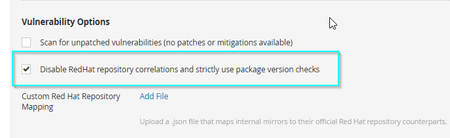
Summary With this update, users will now have the ability to disable the requirement to consider the enabled yum updated repositories before proceeding to package version checks to determine vulnerability status for Red Hat Local Security Checks plugins. This option can now be toggled on/off via the scan policy.To toggle this new feature in your scan policy, navigate to Settings > Advanced > Vulnerability Options and toggle "Disable RedHat repository correlations and strictly use package version checks" on/off as desired. Background To understand how Tenable's Red Hat Local Security Checks plugins currently work, please refer to the following document: How Red Hat Local Vulnerability Checks Use Repositories To Determine Scope. Expected Impact Users should potentially expect to see more Vulnerability findings in their scans when this option is enabled. This is expected because the plugins will no longer consider whether or not the target machine has the specified repository enabled to receive the fixed package(s). Instead, the plugins will only check that any version of the affected package is installed, and proceed straight to version comparison. Tenable's RPM package parsing libraries have extensive functionality to ensure package version checks are as accurate as possible, but due to the potential differences in epoch versions and package naming and versioning discrepancies between the different repositories, potential false positives are possible when this feature is enabled. Affected Plugins Red Hat Local Security Checks Targeted Release Date Thursday, February 5, 2026 Note, not all Red Hat Local Security Check plugins can avail of the this feature yet. Only plugins that have include("rpm2.inc") can use this new feature. There is work ongoing to bring all of these plugins up to date.