tenable research
113 Topics
Tenable Post-Quantum Cryptography Inventory Support
Summary The advent of quantum computing presents a significant threat to current cryptographic algorithms. Organizations worldwide are beginning the critical transition to post-quantum cryptography (PQC) resistant algorithms to ensure long-term data security. Government mandates, such as the U.S. National Security Memorandum 10 (NSM-10), outlines deadlines for PQC migration and specific actions agencies must take to migrate vulnerable systems. Our PQC support is designed to help customers inventory use of TLS and SSH quantum-resistant and vulnerable algorithms within their infrastructure using remote Nessus-based scans. Cipher Inventory and Reporting Post-Quantum Cipher Plugins Two remote-based scan informational reporting plugins for TLS and SSH protocols inform customers of their transition posture according to NIST Post-Quantum Encryption Standards. Services Using Post Quantum Cryptography: Reports on services equipped with at least one post-quantum cipher. It will specify which post-quantum ciphers were discovered, reporting by port and protocol. Services Not Using Post Quantum Cryptography: Reports on services that support no post-quantum ciphers. These plugins will be enabled by default and included in existing scans. Cryptographic Inventory Plugin Reporting To enable a JSON-based inventory of each target by service and cipher, enable through either a preference on your Advanced Network Scan or by running the Cryptographic Inventory scan template. These preferences will initially be supported in Nessus and Tenable Vulnerability Management. They are planned to be added to Tenable Security Center at a later date. Warning: Enabling this preference through the Advanced Network Scan is expected to increase the overall size of the plugin output per target and resulting Nessus database size. If you do not need to produce this inventory at all or on your regular scan cadence, it’s recommended to instead run the Cryptographic Inventory scan template to decrease the potential impact to your normal scan results. Options to Enable Inventory Reporting Advanced Scan Preference Post Quantum Cryptography Scan Template Cryptographic Inventory Plugin Details The plugin enabled with the preference or scan template is an information plugin called Target Cipher Inventory. Within the output of this plugin, you will find a JSON structure containing the TLS and SSH inventories for the scanned target. You can export this inventory based on plugin output using the Tenable API if needed. For TLS, the structure contains: Attribute Definition Encaps Protocol encapsulation employed such as TLSv1, TLSv2, TLSv3 Port Port used for TLS communication Curve Group Encryption method Ciphersuite Algorithm used to secure the TLS connection For SSH, the structure contains: Attribute Definition Proto Protocol of SSH Port Port used for SSH communication Name Algorithm used to secure the protocol Type Use of the named algorithm such as “message auth” Release Date Tenable Vulnerability Management and Tenable Nessus: December 8, 2025 Tenable Security Center: - December 8, 2025 for the informational plugins - Cryptographic Inventory scan template release to be determined
Improvement: Handling Component Installs for Vulnerability Assessment
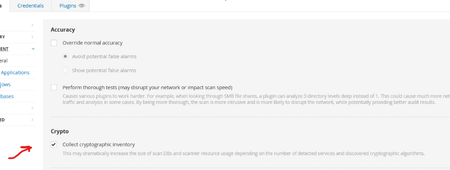
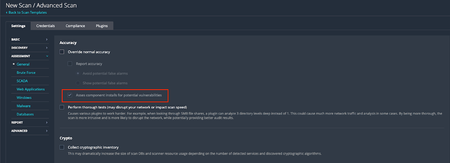
Background On Friday, February 6, 2026, Tenable Research published a plugin update that changed the way component installs are assessed for vulnerabilities. Those changes are outlined in a previous release highlight: Component Installs Require Paranoid Checks, This update essentially reverts this change, while adding new functionality to allow users to choose whether or not they want component installs assessed for vulnerabilities. Component installs are no longer influenced by scan paranoia settings. What are “Component Installs”? Software components, such as applications or language modules/libraries, are installed and managed by a primary "parent" package or application. The crucial point is that these components often cannot be updated individually. Instead, their vulnerability assessment and upgrade are entirely dependent on an update of the parent package. For instance, the SQLite database component is installed as part of the Trend Micro Deep Security Agent and is updated only when the Agent itself is updated. Nessus uses several factors to determine if a detected product is a component, or a standalone installation, including: Was the product installed by a package manager? These products are not considered components, as they are managed by the package manager and not a “parent” application Is the component a “language library”, i.e. a library or module used by the interpreter of a programming language like Python or Node.js? These enumerated libraries are marked as components by default. Does the product reside in a directory that is recognized for installations that are not component-based? Changes By default, component installs are once again assessed for vulnerabilities, as was the case prior to the release of the aforementioned update. If users wish to turn this setting off, so that component installs will not be assessed by generic vulnerability detection plugins, they can do so via the newly created scan preference. The end result of this change should be that fewer “false positives”, i.e. reported vulnerabilities for components that are “owned” by another application, are shown in scan results. Components with vulnerabilities that cannot be addressed independently of the “parent” application will not show in scan results. However, some customers have expressed a desire to see these vulnerabilities in their scan results anyway, to ensure full awareness of the risk profile of every application in their environment. This is still possible through the updated scan configuration settings. To modify this setting in your scan policy, go to Settings > Assessment > Accuracy > Override Normal Accuracy > Assess component installs for potential vulnerabilities. This setting is ON (checkbox is ticked) by default, so users must enable the Override Normal Accuracy checkbox (which is OFF / unchecked by default) if they wish to disable the setting and ensure that component installs are not assessed by generic vulnerability detection plugins in this scan. Please note that this update makes no other changes to the existing paranoia logic, outside of what is described above. For now, “Managed”, “Managed by OS” and “Backported” installs are still controlled by the Show/Avoid potential false alarms radio button. How can I tell if the detected install is a component or not? In addition to the above, we have also updated the relevant detection plugins so they will show if the component flag is set or not. At present, this includes detection plugins for OpenSSL, Curl, LibCurl, Apache HTTPD, Apache Tomcat, SQLite, Python Packages, Node.js modules and, soon to follow, Ruby and Nuget libraries. Using plugin ID 174788, SQLite Detection (Windows), here is a before and after example of the expected plugin output. Before: After: Expected Impact With the new default setting in place, users should anticipate an increase in vulnerability findings for the products in scope, returning to a level similar to what was observed before the first update. If users do not wish to surface these additional potential vulnerabilities, they should disable the "Assess component installs for potential vulnerabilities” setting. If the new scan preference is disabled, the volume of findings will remain consistent with current levels, when scanning with normal accuracy (paranoia) settings. Affected Plugins 12288, global_settings.nasl (updated to support the new scan policy preference) Any plugin that operates downstream of those in the list below: SQLite: 174788 - sqlite_nix_installed.nasl 171077 - sqlite_win_installed.nasl OpenSSL: 168007 - openssl_nix_installed.nasl 168149 - openssl_win_installed.nasl Curl: 182774 - curl_nix_installed.nasl 171860 - curl_win_installed.nasl LibCurl: 182848 - libcurl_nix_installed.nasl Apache HTTPD: 141394 - apache_http_server_nix_installed.nasl 141262 - apache_httpd_win_installed.nasl Apache Tomcat: 130175 - apache_tomcat_nix_installed.nasl 130590 - tomcat_win_installed.nasl Python Packages: 164122 - python_packages_installed_nix.nasl 139241 - python_win_installed.nasl Node.js Modules: 178772 - nodejs_modules_linux_installed.nasl 179440 - nodejs_modules_mac_installed.nasl 200172 - nodejs_modules_win_installed.nasl Targeted Release Date Tenable Nessus and Vulnerability Management: Monday, March 9, 2026 (ETA 22:30 Eastern Standard Time) Tenable Security Center: Monday, March 16, 2026Component Installs Require Paranoid Checks (DEPRECATED)
Update - March 4, 2026 After considering customer feedback, we. have decided to re-evaluate these changes and come up with a better way of handling Component installs. For the latest information, please refer to the new release highlight: Improvement: Handling Component Installs for Vulnerability Assessment Summary With this update, products that are deemed to be components of another application, will now require the scan to be run in paranoid mode to trigger generic vulnerability detection plugins. In this context, “generic vulnerability detection plugins” refers to plugins that cover advisories published by the component vendor (e.g., plugin ID 242325, SQLite < 3.50.2 Memory Corruption) rather than the operating system or “parent” application that distributes the component, either as a part of the operating system or a dependent tool of the parent application. Overview Tenable covers software that can be either installed as base level software, or be included as component software of a larger product installation. Base level software can be updated without any impact to the base product functionality. Component software is typically updated as part of the vendor update for the larger packaged product, and the individual components are not updatable. Non-paranoid scans will report base software vulnerabilities that are actionable. Paranoid scans will report on base software vulnerabilities as well component software vulnerabilities that are not actionable, but still package a potentially vulnerable version of the component. To enhance the accuracy of our vulnerability detection and provide users with greater control over scan results, we are implementing an update affecting how we flag vulnerabilities in software components. Our detection plugins for OpenSSL, Curl, LibCurl, Apache HTTPD, Apache Tomcat, SQLite, PHP, Python packages and Node.js modules can now identify when these packages are installed as components of another parent application (e.g., SQLite bundled with Trend Micro’s Deep Security Agent), rather than as standalone installs. Key Changes: Non-Paranoid Scans: Scans running in the default mode will no longer flag generic vulnerability detection plugins for these component installs. This is because vulnerabilities in components generally cannot be patched directly; users must wait for the parent application's vendor to issue an update. OS Vendor Advisories Unaffected: This change does not affect plugins for OS vendor security advisories that cover the same vulnerabilities (e.g., plugin ID 243452, RHEL 9 : sqlite (RHSA-2025:12522)). Paranoid Scans: For scans running in paranoid mode, generic vulnerability detection plugins will still trigger for component installs if the detected version is lower than the expected fixed version. Expected Impact: Customers running non-paranoid scans should anticipate seeing a reduction in potential vulnerability findings for OpenSSL, Curl, LibCurl, Apache HTTPD, Apache Tomcat, SQLite, PHP, Python packages and Node.js modules that are installed as components. Technical Details: The changes are entirely contained within two shared libraries, vcf.inc and vdf.inc, utilized by the affected plugins. This update impacts approximately 750 plugins specific to OpenSSL, Curl, LibCurl, Apache HTTPD, Apache Tomcat, and SQLite. Targeted Release Date: Friday, February 6, 2026
Nessus now has Windows LAPS Support
Summary: Nessus now has the ability to leverage accounts managed by Microsoft Windows LAPS. How LAPS works: Since LAPS managed accounts have their passwords rotated routinely, users cannot just directly provide the credentials in their Scan Policy. Before this change, users would instead have to make an additional privileged account on each LAPS enabled Host to provide to Nessus. Currently Nessus supports Entra LAPS allowing a scan to pull LAPS Managed Credentials from a customer’s remote Entra instance. Now, Nessus can do the same for Windows LAPS, allowing customers with local LAPS setups to gain the same benefits! Without Windows LAPS support, customers must make dedicated account for Nessus to use to scan targets Change: With this LAPS support change, during the startup phase of a scan, Nessus will reach out to a customer provided Domain Controller hosting an AD forest with LAPS enabled, and pull a list of all Local Admin Accounts for devices managed by LAPS. Nessus will then attempt to use these retrieved LAPS managed accounts as credentials when attempting to access a target host. With Windows LAPS Support, Customers need only provide a single Credential that allows Nessus to retrieve the actual credentials for LAPS Managed Devices How to enable it: To make use of Nessus’ Windows LAPS support, a customer needs only to provide the necessary info to their scan/policy via the Windows LAPS Credential. They’ll need to provide us the IP of the DC, Credentials for an account on that DC with the necessary permissions*, and the DistinguishedName of the OU that contains their LAPS managed devices. *The Account for retrieving Windows LAPS credentials needs the following permissions General Recommend the Account be added to the BUILTIN/Administrators AD Group as it grants all required permissions, including: Access to the $Admin Able to log on to the DC remotely Able to run Powershell WMI and DCOM access to Root/CIMV2 WMI Namespace LAPS Permissions LapsADReadPasswordPermission rights to the LAPS OU Be an Authorized Password Decryptor in the LAPS GPO (without this, Nessus will not be able to retrieve passwords protected by LAPS Encryption). Members of the Domain Administrators group are Authorized Password Decryptors by default. For additional information see: https://learn.microsoft.com/en-us/windows-server/identity/laps/laps-overview Impact: Customers using Rotating Host passwords managed through Microsoft Windows LAPS can now leverage these credentials in their Nessus scans for more secure scanning configurations. Target Release Date: Nessus, T.VM On/About 09 JUN 2025 T.SC TBD2.3KViews11likes5CommentsResearch Release Highlight - SSH Session Reuse
Summary Nessus scan will support an opt-in feature to reuse SSH sessions during a scan where possible when running Nessus versions 10.9.0 and greater. This update was made in response to numerous customer requests for reducing the number of new SSH connections established during remote network scans and the associated increase in network traffic. Change A new scan configuration template option will be available for customers to actively enable the [Reuse SSH connections] configuration in their scan policies in Advanced Settings under Advanced Performance Options. Customers can return to the classic SSH connection functionality by changing [Reuse SSH connections] to the default “off” setting in their scan policies. Customers must be running a version of Nessus 10.9.0 or greater that supports this feature and have a Plugin Feed that displays the scan configuration policy user interface and NASL plugin set with the SSH session reuse functionality. Impact Customers should see a significant decrease in the total number of SSH sessions established during a Nessus scan as well as a reduction in load on Enterprise authorization, access, and accounting (AAA) tooling such as RADIUS servers and other connection management services. There should be no difference in scan results between scans that leverage SSH Session Reuse and scans that do not. If customers experience any such issues, the feature can easily be toggled off to return SSH connections during scans to the classic connection functionality. Target Release Date January 15, 2026Improvement to Printer OS Fingerprinting
Updated: April 3, 2026 Summary Scanned printers will now have an OS artefact surfaced in their scan host metadata if the target has been identified as a printer when the “Scan Network Printers” policy option is disabled. This change will not cause any additional asset licenses to be consumed within Tenable VM or Tenable Security Center. Background Printers are notoriously unstable scan targets. Oftentimes, they can behave erratically when scanned, so some users prefer to avoid scanning them altogether. At present, there is a switch in the scan policies to prevent further scanning of a host when it's identified as a printer. To enable this setting, go to Settings -> Host Discovery -> Fragile devices - Scan Network Printers (Currently, this is a checkbox setting, default value “off”). With that said, how can the scanner know the target is a printer if it cannot be scanned? In reality, the scanner still performs very basic fingerprinting (usually via SNMP) in order to gather enough information to make an educated guess at the device type. When the scan target is thought to be a printer, it essentially gets marked as “Host/dead" in the scan KB. When this happens, the scanner will not perform any further active scanning. Changes With this update, the fingerprint used to identify the printer as such, will now be stored in the scan Knowledge Base (KB) so it can be processed by os_fingerprint2.nasl ("Post-scan OS Identification", plugin ID 83349) and surfaced as metadata in the scan result. The relevant policy setting located at Settings -> Host Discovery -> Fragile devices -> Scan Network Printers. With this update, the printer's OS information will now be surfaced if it is available, regardless of the selected value for this setting. Impact Users can now see the OS information for their printer devices that would have otherwise gone unreported if the scan is not configured to “Scan Network Printers”. As plugin ID 83349 generates no plugin output, only an “operating-system” tag will be added to the scan result (and stored in an exported .nessus file). This information will be visible only the in “Host/Asset Details” section of the Tenable product UI, i.e: Tenable Nessus: Scans -> [Folder] -> [Individual Scan Result] - > Host Details -> OS (sidebar) Tenable Vulnerability Management: Explore -> Assets -> [Asset] -> Details -> Operating System Scans -> Vulnerability Management Scans -> [Individual Scan Result] -> Scan Details -> Asset Details -> Operating System Tenable Security Center: Analysis -> IP Summary -> [IP address] -> System Information -> OS Scans -> Scan Results -> [Individual Scan Result] -> IP Summary -> [IP address] -> System Information -> OS Note, we expect this information to surface mainly in individual scan results. It would only be present in cumulative asset details if a licensed asset already exists for the target in question. This update will not cause additional assets to be created or consume any additional licenses. Affected Plugins 83349 - os_fingerprint2.nasl 11933 - dont_scan_printers.nasl 22481 - dont_scan_settings.nasl Targeted Release Date Wednesday, March 4, 20261.3KViews2likes2CommentsImproved Resource Management Control
Summary Improved resource management control for plugins leveraging Windows Management Instrumentation (WMI) on Nessus Agent 11.1.0 or higher. Impact Customers with Nessus Agent 11.1.0 and later versions will have the ability to granularly control the CPU resources consumed during scans. This update ensures that plugins respect the resource usage setting selected during scan configuration by launching commands as children of the Nessus Agent, rather than invoking them via WMI. The release of these plugins will continue through January, with a phased approach over three weeks. The first release will be January 13th, the second January 20th, and the final planned plugin update on February 9th. Target Release Date Phase 1 plugin set: January 13, 2026 Phase 2 plugin set: January 20, 2026 Phase 3 plugin set: February 9, 2026Tenable Research is providing the following supporting...
Tenable Research is providing the following supporting information about the 31 NASL detection plugins and two WAS plugin recently released in response to a critical vulnerability reported in Log4j (Log4Shell). As a reminder, it is recommended that thorough_tests are enabled for all scans using these CVE-2021-44228, CVE-2021-45046, CVE-2021-4104, and CVE-2021-45105 plugins. NASL plugins 156183 Apache Log4j 2.x < 2.17.0 DoS Version check for known vuln Log4j versions related to CVE-2021-45105 in Windows, Unix and Linux systems 156057 Apache Log4j 2.x < 2.16.0 Version check for known vuln Log4j versions related to CVE-2021-45046 in Windows, Unix and Linux systems 156165 Apache Log4j 2.x < 2.16.0 RCE Version check for known vuln Log4j versions related to CVE-2021-45046 in MacOS systems 156164 Apache Log4Shell CVE-2021-45046 Bypass Remote Code Execution - (Direct Check HTTP) Direct Check compatible with Tenable.io Cloud Scanners and restrictive networks Delivers jndi:ldap crafted payloads including Session, JSession and PHPSession into the HTTP headers and then tracks the injection via DNS when the callback is made. Callback is needed given the nature of the vulnerability wherein the target / victim connects back to the host sending the original request and the host is vulnerable if the callback happens This plugin uses DNS (default port 53) for network communication. The following Apache Log4Shell CVE-2021-44228 Direct Checks share common techniques applied on different ports and protocols. They all share the following attributes: Direct Checks compatible with Tenable.io Cloud Scanners and restrictive networks Callback is needed given the nature of the vulnerability wherein the target / victim connects back to the host sending the original request and the host is vulnerable if the callback happens These plugins DNS (default port 53) for network communication. Delivers jndi:ldap crafted header script to select ports on a scan target and then tracks the injection via DNS when the callback is made CVE-2021-44228 direct check not requiring authentication 156669 Apache Log4Shell RCE detection via callback correlation (Direct Check - MSRPC) 156559 Apache Log4Shell RCE detection via callback correlation (Direct Check - RPCBIND) 156445 Apache Log4Shell RCE detection via callback correlation (Direct Check - PPTP) 156375 Apache Log4Shell RCE detection via callback correlation (Direct Check - UPnP) 156258 Apache Log4Shell RCE detection via callback correlation (Direct Check - NTP) 156257 Apache Log4Shell RCE detection via callback correlation (Direct Check - DNS) 156256 Apache Log4Shell RCE detection via callback correlation (Direct Check - SNMP) 156232 Apache Log4Shell RCE detection via callback correlation (Direct Check - SMB) 156197 Apache Log4Shell RCE detection via callback correlation (Direct Check - NetBIOS) 156166 Apache Log4Shell RCE detection via callback correlation (Direct Check - SSH) 156162 Apache Log4Shell RCE detection via callback correlation (Direct Check - Telnet) 156158 Apache Log4Shell RCE detection via callback correlation (Direct Check - IMAP) 156157 Apache Log4Shell RCE detection via callback correlation (Direct Check - POP3) 156132 Apache Log4Shell RCE detection via callback correlation (Direct Check - SMTP) 156115 Apache Log4Shell RCE detection via callback correlation (Direct Check - FTP) 156056 Apache Log4Shell RCE detection via callback correlation (Direct Check - any open port) 156035 VMware vCenter Log4Shell (Direct Check HTTP) Delivers jndi:ldap crafted payloads into the HTTP header of VMWare vCenter applications installed on the remote host on a scan target and then tracks the injection via DNS when the callback is made 156017 Apache Log4Shell RCE detection via callback correlation (Direct Check - SIP) 156016 Apache Log4Shell RCE detection via Path Enumeration (Direct Check HTTP) 156014 Apache Log4Shell RCE detection via callback correlation (Direct Check HTTP) CVE-2021-44228 direct check not requiring authentication Direct Check compatible with Tenable.io Cloud Scanners and restrictive networks Injects payload into the HTTP headers and then tracks the injection via DNS when the callback is made Callback is needed given the nature of the vulnerability wherein the target / victim connects back to the host sending the original request and the host is vulnerable if the callback happens This plugin uses DNS (default port 53) for network communication. 155998 Apache Log4j Message Lookup Substitution RCE (Log4Shell) (Direct Check) CVE-2021-44228 direct check not requiring authentication Scanner sends jndi:ldap string to target and listens for LDAP BIND request from target It is not compatible with Tenable.io cloud scanners and may fail to return results in certain networks due to firewall rules or interference from other security devices. Callback is needed given the nature of the vulnerability wherein the target / victim connects back to the host sending the original request and the host is vulnerable if the callback happens This plugin uses ephemeral ports 50,000-60,000 for network communication 156001 Apache Log4j JAR Detection (Windows) Local Windows detection **recommend Thorough Tests** Checks running processes for Java instances running with Log4j in classpath and records the file paths Searches the file system for .jar files with known vuln Log4j filename matches (if thorough tests is enabled) 156000 Apache Log4j Installed (Unix) Local Linux detection Checks rpm packages for vulnerable Log4j matches (RedHat, Gentoo, SuSE, etc.) Search the file system paths for known vulnerable Log4j matches (if thorough tests is enabled) 155999 Apache Log4j < 2.15.0 Remote Code Execution Local Linux Detection (uses 156000) Version check for known vuln Log4j versions in Unix and Linux systems 156002 Apache Log4j < 2.15.0 Remote Code Execution Local Windows detection (uses 156001) Version check for known vuln Log4j versions in Windows systems 156032 EOL plugin for Log4j 1.x Apache Log4j version < 1.x End of Life / Unsupported Version Detection 156103 Apache Log4j 1.2 JMSAppender Remote Code Execution (CVE-2021-4104) The version of Apache Log4j on the remote host is 1.2. It is, therefore, affected by a remote code execution vulnerability when specifically configured to use JMSAppender. WAS plugins 113075- Apache Log4j Remote Code Execution (Log4Shell) CVE-2021-44228 direct check not requiring authentication Inject payload into the HTTP headers, POST/GET values, XML, JSON, cookies, etc. and then track the injection via DNS when the callback is made Callback is needed given the nature of the vulnerability wherein the target / victim connects back to the host sending the original request and the host is vulnerable if the callback happens 113076- Apache Log4j Remote Code Execution (Log4Shell) CVE-2021-44228 WAS Log4Shell file detection plugin Scan the web application directories for known vulnerable version of the Log4j installation file and flag the host if found899Views0likes19Comments
Research Release Highlight - Backported Vulnerability Detection Improvements
Summary Backporting is the practice of using parts of a newer version of software to patch previous versions of the same software, most commonly to resolve security issues that also affect previous versions. For example, if a vulnerability is patched in version 2.0 of a piece of software, but version 1.0 is also affected by the same security hole, the changes are also provided as a patch to version 1.0 to ensure it remains secure. Tenable Research identifies backported software installs based on the server banners that the service returns. Previously, when a backported install was detected during a non-paranoid scan, downstream vulnerability plugins would not report the install as vulnerable. During a paranoid scan, vulnerability plugins would act upon the version returned in the banner and would flag if a vulnerable version was installed. Exact details of this process were outlined in this article. This approach was false positive prone and was difficult to maintain accurately due to inconsistent & untimely information from vendors detailing their backported fixes. Change As discussed in the above article, Tenable Research previously maintained a list of known backported banners. If a delta existed between the release of a backported fix & an update made by Tenable Research, a false positive result may have occurred in scans during this time. Following this change, any banners which indicate the software is packaged by a Linux distribution will be deemed to be backported by default. These types of banners typically follow the format of <product>/<version> (<Operating System>) ( E.g., Apache/1.2.3 (Ubuntu) ). Impact During non-paranoid scans, customers can expect improved coverage for products which contain backport fixes that are detected remotely. As a result of this, a reduction in false positives being reported is also expected. Enabling paranoia in a scan configuration will continue to cause backported installs to be treated as regular installs by vulnerability checks. For more accurate vulnerability checks which don’t rely upon the content in a server banner, customers can leverage credentialed or agent-based local checks. Target Release Date January 22, 2026
Tenable Product Update Newsletter - September 2026
Welcome to your monthly round-up of the latest Tenable product updates, platform enhancements, and community news. This month, we’re bringing frontier AI reasoning into exposure management, deepening cloud and vulnerability visibility, and expanding how the community vets AI agents before deployment. Tenable One - Platform updates Claude Mythos 5 is coming to Tenable One with Adversary View Attackers don’t exploit systems in isolation. They chain together scattered, low-signal evidence like netstat entries, cached accounts, and active connections that traditional rules engines can’t connect, and that your team doesn’t have time to piece together manually. This is where frontier AI models shine. Tenable One Adversary View, launching this September, brings the power of Anthropic’s Claude Mythos 5 directly into the Tenable One Exposure Management Platform. Built on the Project Glasswing collaboration between Tenable and Anthropic, Adversary View applies advanced cyber reasoning to your existing exposure data, uncovering hidden vulnerability chains, visualizing how an attacker would actually move through your environment, and surfacing evidence-backed fixes to break those chains before attackers exploit them — all within an agentic harness that keeps the AI’s reasoning controlled and auditable. Take advantage of Claude Mythos 5 to tackle complex exposure management challenges. Cut through the noise with a ranked, prioritized list of the vulnerability chains that matter most, backed by evidence and specific remediation guidance. Move at the speed of adversaries by pairing Claude Mythos 5’s advanced reasoning with the exposure intelligence you already have in Tenable One — no new tools required. Read the blog post Explore the guided demo 3 new connectors bring GitHub and GitLab findings into Tenable One Tenable One connectors combine your third-party security tools with Tenable’s native sensor data for one view of risk across your attack surface. Three new connectors extend that coverage, pulling static application security testing (SAST), software composition analysis (SCA), and secret scanning findings straight into Tenable One. GitHub Code Scanning: Consolidates SAST and secret scanning findings, covering both vulnerable code and exposed credentials, into the same risk view as every other exposure you track. GitHub Dependabot: Brings SCA alerts on vulnerable dependencies, so a flawed package deep in your supply chain gets prioritized against everything else exposing you. GitLab Connector: Covers SAST, SCA, and Secret Detection findings in one connector, consolidating what’s otherwise split across multiple tools into a single risk view. Requires GitLab Ultimate to ingest findings. All three are native connectors; add the connector, and findings start showing up in Tenable One. Set up GitHub Code Scanning Set up GitHub Dependabot Set up GitLab Connector CyberAgents Exchange Exchange Inspector vets AI agents before they reach your environment Tenable and OpenAI unveiled the CyberAgents Exchange AI Inspector, which pairs OpenAI’s GPT cyber models with Tenable One AI Exposure and expert researcher review to screen AI agents, skills, MCP servers, and multi-agent playbooks for prompt injection, PII exposure, and supply-chain risks before they’re deployed. Combines OpenAI GPT cyber models, Tenable One AI Exposure, and expert researcher review to vet AI agents before deployment. Screens AI agents, skills, MCP servers, and multi-agent playbooks for prompt injection, PII exposure, and supply-chain risks. Gives practitioners insight into production-ready AI agents and CISOs the confidence to approve their use. The Exchange Inspector builds on the CyberAgents Exchange registry, which has already drawn more than 100 AI listings. Exchange Inspector is expected to be available in September. Read the technical blog Read the press release Tenable One Vulnerability Management Visualize your security trends over time You can finally see exactly where your security metrics are heading, not just where they stand today. With newly added Trending Widgets, you can track your asset data and findings as daily line charts, giving you the historical context you need to accurately monitor your progress. Data collection begins the moment you set up a widget. To get started, you can: Build custom views: Add up to five unique trend lines per widget, tailoring the dataset, entity type, and filters for each. Deploy pre-built charts: Search trending in the widget library to drop ready-to-use visualizations right onto your dashboard. Check out the Trending Widget documentation Release notes for the full details Tenable One Cloud Exposure Expanded Kubernetes and container topology in Tenable One Cloud Exposure A comprehensive overview of Kubernetes and container topology is essential for risk-based prioritization because you have to see the whole picture of the resources, workloads, and clusters a vulnerability touches to know what’s actually risky. Now, the “graph” tab in Tenable One Cloud Exposure gives you the full structural layout of a Kubernetes cluster, all the way down to a vulnerable container image, in one interactive view. What’s new: Guided relationship picker: By expanding any node in the graph, it now surfaces a categorized menu (Compute, IAM, Kubernetes, Containers, Management, Network, Risk) so you can choose which connection to explore next. Full Kubernetes depth: Namespaces, roles, role bindings, service accounts, configuration maps, and workloads all surface as first-class nodes, whether the cluster is EKS, AKS, GKE, or self-managed. The Kubernetes graph provides a holistic view of cluster contents, namespaces, and resource relationships, while allowing you to effortlessly navigate from clusters to underlying virtual machines and specific workloads, such as business-critical services. It also enables you to explore vulnerability instances linked to container images, ensuring they have complete context for risk prioritization and informed decision-making. View the demo Check out the product documentation Tenable Nessus Nessus reliability and performance updates We have released several Tenable Nessus updates recently, with a mix of new capabilities as well as improvements related to performance and security. Scanner reliability fixes: Resolved SSL connection issues that could cause scanners to appear offline and stop receiving plugin updates. Kerberos authentication fix: Corrected an issue blocking plugins from retrieving host FQDNs, causing authentication failures. Tenable Security Center performance: Fixed timeout errors when processing large volumes of Tenable Nessus agent reports. Certificate handling: Resolved an issue in PostgreSQL client authentication. Review Nessus documentation Read the Plugin Release Notes Take Tenable University training Training and product education Tenable Patch Management training Upgrade your skills with the refreshed, free on-demand Introduction to Tenable Patch Management course in Tenable University. Modernized with interactive elements, real-time knowledge checks, and step-by-step video demonstrations, this self-paced web training gives you hands-on practice to efficiently secure both your SaaS and on-premises environments. Through this updated course, you will learn to: Understand core architecture: Master essential server and client components, operating system coverage, and fundamental patching logic. Optimize configuration and strategy: Configure locations and business units while implementing proven patching strategies across your enterprise. Execute global operations: Swiftly respond to critical threats using the Emergency Kit. Eliminate blind spots: Monitor real-time compliance health and identify hidden vulnerabilities using dynamic performance widgets and interactive dashboards. Access this free course today in Tenable University to strengthen your remediation workflows and keep your organization secure. Learn more Tenable events and webinars Customer office hours Customer office hours are recurring ask-me-anything sessions for Tenable Security Center, Tenable One Vulnerability Management, Tenable One Cloud Exposure, Tenable One Identity Exposure, and Tenable One OT Exposure. Time-zone-appropriate sessions are available for the Americas, Europe (including the Middle East and Africa), and Asia-Pacific. Learn more and register Virtual events Tenable customer update - October 2026: Join the next quarterly customer update session at 11 a.m. ET / 4 p.m. BST / 5 p.m. CEST Oct. 20. This informative, fast-paced overview will explore how to better secure your expanding attack surface and consolidate critical security data. Products covered include Tenable One, Tenable One Vulnerability Management, Tenable Security Center, and Tenable Patch Management. Register here See all upcoming live and on-demand webinars TenableTalk Live: How Mythos will change cyber defenses forever: Join us at 11 a.m. ET, Thursday, Sept. 24, on LinkedIn as we dive into what happens when frontier AI reasoning gets built directly into the tools defenders use, and how teams can prepare for these new capabilities. Attend on LinkedIn Tenable Professional Services Tenable Hexa AI enablement workshop Confidently adopt Tenable Hexa AI and the Tenable Hexa AI Model Context Protocol (MCP) Server with expert, hands-on guidance tailored to your environment. Delivered by Tenable Professional Services as a custom Statement of Work (SOW) engagement, this new workshop equips your team with practical skills to maximize your AI-driven exposure management capabilities. Through this custom engagement, you will: Explore enterprise AI capabilities: Analyze your internal AI tool usage and complete a technical overview of Tenable Hexa AI. Build practical expertise: Receive hands-on instruction to effectively operate Tenable Hexa AI and integrate the Tenable MCP Server into your tech stack. Design custom workflows: Develop tailored operational workflows and implement proven best practices to accelerate risk reduction. To scope a custom workshop for your organization, contact your Tenable representative or email [email protected]. Read Tenable documentation.800Views0likes0Comments