tenable security center
8 Topics
Improvement to Printer OS Fingerprinting
Updated: April 3, 2026 Summary Scanned printers will now have an OS artefact surfaced in their scan host metadata if the target has been identified as a printer when the “Scan Network Printers” policy option is disabled. This change will not cause any additional asset licenses to be consumed within Tenable VM or Tenable Security Center. Background Printers are notoriously unstable scan targets. Oftentimes, they can behave erratically when scanned, so some users prefer to avoid scanning them altogether. At present, there is a switch in the scan policies to prevent further scanning of a host when it's identified as a printer. To enable this setting, go to Settings -> Host Discovery -> Fragile devices - Scan Network Printers (Currently, this is a checkbox setting, default value “off”). With that said, how can the scanner know the target is a printer if it cannot be scanned? In reality, the scanner still performs very basic fingerprinting (usually via SNMP) in order to gather enough information to make an educated guess at the device type. When the scan target is thought to be a printer, it essentially gets marked as “Host/dead" in the scan KB. When this happens, the scanner will not perform any further active scanning. Changes With this update, the fingerprint used to identify the printer as such, will now be stored in the scan Knowledge Base (KB) so it can be processed by os_fingerprint2.nasl ("Post-scan OS Identification", plugin ID 83349) and surfaced as metadata in the scan result. The relevant policy setting located at Settings -> Host Discovery -> Fragile devices -> Scan Network Printers. With this update, the printer's OS information will now be surfaced if it is available, regardless of the selected value for this setting. Impact Users can now see the OS information for their printer devices that would have otherwise gone unreported if the scan is not configured to “Scan Network Printers”. As plugin ID 83349 generates no plugin output, only an “operating-system” tag will be added to the scan result (and stored in an exported .nessus file). This information will be visible only the in “Host/Asset Details” section of the Tenable product UI, i.e: Tenable Nessus: Scans -> [Folder] -> [Individual Scan Result] - > Host Details -> OS (sidebar) Tenable Vulnerability Management: Explore -> Assets -> [Asset] -> Details -> Operating System Scans -> Vulnerability Management Scans -> [Individual Scan Result] -> Scan Details -> Asset Details -> Operating System Tenable Security Center: Analysis -> IP Summary -> [IP address] -> System Information -> OS Scans -> Scan Results -> [Individual Scan Result] -> IP Summary -> [IP address] -> System Information -> OS Note, we expect this information to surface mainly in individual scan results. It would only be present in cumulative asset details if a licensed asset already exists for the target in question. This update will not cause additional assets to be created or consume any additional licenses. Affected Plugins 83349 - os_fingerprint2.nasl 11933 - dont_scan_printers.nasl 22481 - dont_scan_settings.nasl Targeted Release Date Wednesday, March 4, 2026
Tenable Post-Quantum Cryptography Inventory Support
Summary The advent of quantum computing presents a significant threat to current cryptographic algorithms. Organizations worldwide are beginning the critical transition to post-quantum cryptography (PQC) resistant algorithms to ensure long-term data security. Government mandates, such as the U.S. National Security Memorandum 10 (NSM-10), outlines deadlines for PQC migration and specific actions agencies must take to migrate vulnerable systems. Our PQC support is designed to help customers inventory use of TLS and SSH quantum-resistant and vulnerable algorithms within their infrastructure using remote Nessus-based scans. Cipher Inventory and Reporting Post-Quantum Cipher Plugins Two remote-based scan informational reporting plugins for TLS and SSH protocols inform customers of their transition posture according to NIST Post-Quantum Encryption Standards. Services Using Post Quantum Cryptography: Reports on services equipped with at least one post-quantum cipher. It will specify which post-quantum ciphers were discovered, reporting by port and protocol. Services Not Using Post Quantum Cryptography: Reports on services that support no post-quantum ciphers. These plugins will be enabled by default and included in existing scans. Cryptographic Inventory Plugin Reporting To enable a JSON-based inventory of each target by service and cipher, enable through either a preference on your Advanced Network Scan or by running the Cryptographic Inventory scan template. These preferences will initially be supported in Nessus and Tenable Vulnerability Management. They are planned to be added to Tenable Security Center at a later date. Warning: Enabling this preference through the Advanced Network Scan is expected to increase the overall size of the plugin output per target and resulting Nessus database size. If you do not need to produce this inventory at all or on your regular scan cadence, it’s recommended to instead run the Cryptographic Inventory scan template to decrease the potential impact to your normal scan results. Options to Enable Inventory Reporting Advanced Scan Preference Post Quantum Cryptography Scan Template Cryptographic Inventory Plugin Details The plugin enabled with the preference or scan template is an information plugin called Target Cipher Inventory. Within the output of this plugin, you will find a JSON structure containing the TLS and SSH inventories for the scanned target. You can export this inventory based on plugin output using the Tenable API if needed. For TLS, the structure contains: Attribute Definition Encaps Protocol encapsulation employed such as TLSv1, TLSv2, TLSv3 Port Port used for TLS communication Curve Group Encryption method Ciphersuite Algorithm used to secure the TLS connection For SSH, the structure contains: Attribute Definition Proto Protocol of SSH Port Port used for SSH communication Name Algorithm used to secure the protocol Type Use of the named algorithm such as “message auth” Release Date Tenable Vulnerability Management and Tenable Nessus: December 8, 2025 Tenable Security Center: - December 8, 2025 for the informational plugins - Cryptographic Inventory scan template release to be determined3.2KViews3likes4CommentsImprovement: Handling Component Installs for Vulnerability Assessment
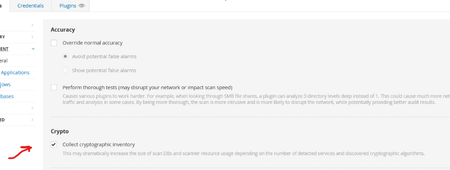
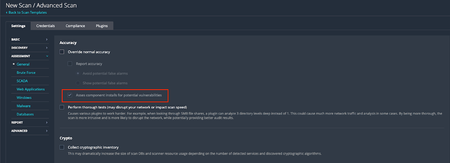
Background On Friday, February 6, 2026, Tenable Research published a plugin update that changed the way component installs are assessed for vulnerabilities. Those changes are outlined in a previous release highlight: Component Installs Require Paranoid Checks, This update essentially reverts this change, while adding new functionality to allow users to choose whether or not they want component installs assessed for vulnerabilities. Component installs are no longer influenced by scan paranoia settings. What are “Component Installs”? Software components, such as applications or language modules/libraries, are installed and managed by a primary "parent" package or application. The crucial point is that these components often cannot be updated individually. Instead, their vulnerability assessment and upgrade are entirely dependent on an update of the parent package. For instance, the SQLite database component is installed as part of the Trend Micro Deep Security Agent and is updated only when the Agent itself is updated. Nessus uses several factors to determine if a detected product is a component, or a standalone installation, including: Was the product installed by a package manager? These products are not considered components, as they are managed by the package manager and not a “parent” application Is the component a “language library”, i.e. a library or module used by the interpreter of a programming language like Python or Node.js? These enumerated libraries are marked as components by default. Does the product reside in a directory that is recognized for installations that are not component-based? Changes By default, component installs are once again assessed for vulnerabilities, as was the case prior to the release of the aforementioned update. If users wish to turn this setting off, so that component installs will not be assessed by generic vulnerability detection plugins, they can do so via the newly created scan preference. The end result of this change should be that fewer “false positives”, i.e. reported vulnerabilities for components that are “owned” by another application, are shown in scan results. Components with vulnerabilities that cannot be addressed independently of the “parent” application will not show in scan results. However, some customers have expressed a desire to see these vulnerabilities in their scan results anyway, to ensure full awareness of the risk profile of every application in their environment. This is still possible through the updated scan configuration settings. To modify this setting in your scan policy, go to Settings > Assessment > Accuracy > Override Normal Accuracy > Assess component installs for potential vulnerabilities. This setting is ON (checkbox is ticked) by default, so users must enable the Override Normal Accuracy checkbox (which is OFF / unchecked by default) if they wish to disable the setting and ensure that component installs are not assessed by generic vulnerability detection plugins in this scan. Please note that this update makes no other changes to the existing paranoia logic, outside of what is described above. For now, “Managed”, “Managed by OS” and “Backported” installs are still controlled by the Show/Avoid potential false alarms radio button. How can I tell if the detected install is a component or not? In addition to the above, we have also updated the relevant detection plugins so they will show if the component flag is set or not. At present, this includes detection plugins for OpenSSL, Curl, LibCurl, Apache HTTPD, Apache Tomcat, SQLite, Python Packages, Node.js modules and, soon to follow, Ruby and Nuget libraries. Using plugin ID 174788, SQLite Detection (Windows), here is a before and after example of the expected plugin output. Before: After: Expected Impact With the new default setting in place, users should anticipate an increase in vulnerability findings for the products in scope, returning to a level similar to what was observed before the first update. If users do not wish to surface these additional potential vulnerabilities, they should disable the "Assess component installs for potential vulnerabilities” setting. If the new scan preference is disabled, the volume of findings will remain consistent with current levels, when scanning with normal accuracy (paranoia) settings. Affected Plugins 12288, global_settings.nasl (updated to support the new scan policy preference) Any plugin that operates downstream of those in the list below: SQLite: 174788 - sqlite_nix_installed.nasl 171077 - sqlite_win_installed.nasl OpenSSL: 168007 - openssl_nix_installed.nasl 168149 - openssl_win_installed.nasl Curl: 182774 - curl_nix_installed.nasl 171860 - curl_win_installed.nasl LibCurl: 182848 - libcurl_nix_installed.nasl Apache HTTPD: 141394 - apache_http_server_nix_installed.nasl 141262 - apache_httpd_win_installed.nasl Apache Tomcat: 130175 - apache_tomcat_nix_installed.nasl 130590 - tomcat_win_installed.nasl Python Packages: 164122 - python_packages_installed_nix.nasl 139241 - python_win_installed.nasl Node.js Modules: 178772 - nodejs_modules_linux_installed.nasl 179440 - nodejs_modules_mac_installed.nasl 200172 - nodejs_modules_win_installed.nasl Targeted Release Date Tenable Nessus and Vulnerability Management: Monday, March 9, 2026 (ETA 22:30 Eastern Standard Time) Tenable Security Center: Monday, March 16, 20261.3KViews4likes11Comments
Ruby Gem Enumeration Detection Updates
Summary Tenable has updated the Ruby gem enumeration plugins to reduce false positives and to better identify vulnerabilities when multiple packages are present on the scan target. Change Before this update, the Ruby gem enumeration plugins did not attempt to associate detected packages with an RPM or DEB package managed by the Linux distribution. This would cause some packages to report vulnerabilities both based on a Linux distribution vendor’s advisory and a CVE advisory from the Ruby gem maintainer. Some gems that are symbolically linked across the filesystem could be detected multiple times. After this update, these issues have been addressed. Vulnerable Ruby gems on Linux assets will be assessed to determine if they are managed by a Linux distribution’s package manager, and if so, will be marked as “Managed” and will not report a vulnerability, unless the [Override normal Accuracy] setting to Show potential false alarms setting is enabled for the scan. Gems that are symbolically linked will be followed to the source file; duplicate detections will be eliminated. The gem enumeration plugins will no longer report the list of detected gems in plugin output; rather, they will use only internal storage mechanisms to record the detected gems, so that Ruby vulnerability plugins can continue to use that data for version checks. Some issues were identified in the Ruby gem enumeration plugins that could have prevented some gems from being detected when the scan config was set to perform thorough checks. Those issues were corrected in this update. Impact Most customers will notice a reduction in the volume of Ruby gem vulnerabilities reported due to removal of duplicate findings. Some may notice a change in detected vulnerabilities due to the updates to thorough mode scanning. Detection plugins 240646 - Ruby Gem Modules Installed (macOS) 207584 - Ruby Gem Modules Installed (Linux) 207585 - Ruby Gem Modules Installed (Windows) Target Release Date March 23, 2026Release Highlight - Large Differential Feed Update Notification
Summary Due to integration of new binaries into the plugin feed, there will be a larger than normal differential plugin feed update. Potential Impacts: The addition of the binaries is expected to add approximately 37MB of new content to the plugin feed. The impact is expected to be minimal for Nessus customers. SC customers will see the biggest impact of approximately 230MB due to how the differential feed updates are built. The differential update does not apply to Nessus agents as the binaries were not added there. For Tenable Security Center customers, you can configure the plugins to update on a schedule or switch to manual updates for an optimal time window. Target Release Date March 4, 2026
Windows Patch Management Remediation Guidance
SUMMARY Tenable Research is making changes to Windows-based patch management integrations that affect vulnerability remediation. This announcement only applies to customers who are using the WSUS and SCCM patch management credentials. Vulnerabilities identified by WSUS and SCCM integrations will now be identified as “local checks”, which will cause them to now affect vulnerability remediation, also known as vulnerability mitigation. CHANGE Prior to this change, vulnerabilities identified by these scans could not be remediated except by a Host credentialed scan - in other words, a Windows (SMB) credential. After this change, vulnerabilities identified by these Windows patch management scans may be remediated with a subsequent Windows patch management scan. Windows patch management credentials will identify only a subset of the vulnerabilities that a Host credentialed scan will. Therefore, a scenario could arise in which a patch management scan incorrectly remediates vulnerabilities previously identified by a Host credentialed scan. To prevent incorrectly remediating vulnerabilities, Tenable advises customers using a combination of patch management and Host credentials to combine them in a single scan, rather than running them in separate scans. IMPACT Customers who are not using patch management credentials are not affected by this change. Customers using patch management credentials but not Host credentials do not need to take any action, but will now see vulnerabilities identified by Windows and SCCM integrations being remediated. The guidance to combine credentials in a single scan applies to customers who are using Windows-based patch management credentials in combination with Windows Host (SMB) credentials. TARGET RELEASE DATE February 23, 2026Include/Exclude Path and Tenable Utils Unzip added to Log4j Detection
Summary Tenable has updated the Apache Log4j detection plugins. The Windows plugin will now honor the Include/Exclude Filepath configuration option. The Linux/UNIX plugin will now use the version of ‘unzip’ supplied with the Nessus Agent, when enabled in the Agent’s configuration, and correctly inspect the MANIFEST.MF and pom.properties files. Change Before this update, plugin 156000, Apache Log4j Installed (Linux / Unix), would fail to detect Log4j in specific scan scenarios. The plugin uses several inspection methods to determine if a JAR file is a copy of Log4j. During Nessus Agent scans, as well as scans with ‘localhost’ as a target, the plugin was not properly executing the unzip command to inspect META-INF/MANIFEST.MF and pom.properties files in the JAR archive. If this method was the only option that would result in a successful detection, the copy of Log4j would not be detected properly. In addition, the plugin had failed to launch the unzip binary supplied with the Agent when inspecting files in JAR archives. Note: The Nessus Agent can be configured to use find and unzip binaries that it provides, instead of those supplied by the asset’s operating system. See https://docs.tenable.com/vulnerability-management/Content/Scans/AdvancedSettings.htm#Agent_Performance_Options for more information. Also before this update, plugin 156001, Apache Log4j JAR Detection (Windows), would fail to honor the directories included or excluded for full-disk searches configured in the Windows Include Filepath and Windows Exclude Filepath directives in the Advanced Settings of a scan config. Note: Configuration of these options is described in https://docs.tenable.com/vulnerability-management/Content/Scans/AdvancedSettings.htm#Windows_filesearchOptions. After this update, plugin 156000 will use the Agent-supplied copy of unzip when configured to do so. If this option is not enabled in the scan config, the plugin will use the existing method to find and execute an archive utility supplied by the asset’s operating system. In either case, the plugin will properly inspect Log4j’s MANIFEST.MF and pom.properties files as a version source. Plugin 156001 already properly inspects these files. Also after this update, plugin 156001’s Powershell code will now honor directories included or excluded by the Filepath directives. Plugin 156000 already supported this feature. Impact When scanning Linux / UNIX assets via 'localhost' (i.e. scanning the scanner itself) or with the Nessus Agent, additional Log4j instances from MANIFEST.MF or pom.properties sources may be reported. For Linux Nessus Agents with "Use Tenable supplied binaries for find and unzip" enabled and "Agent CPU Resource Control - Scan Performance Mode" set to Low, plugin 156000 will now properly limit CPU usage during scans. As noted in the product documentation, “Note: Setting your process_priority preference value to low could cause longer running scans. You may need to increase your scan-window timeframe to account for this value.” Customers should be aware of this configuration setting and potential changes to the results provided in the Log4J detection results. When scanning Windows targets, Log4j JAR files stored in paths specified in the Windows Exclude Filepath configuration will no longer be detected. Log4j JAR files stored in paths or drives specified in the Windows Include Filepath configuration that had not been previously scanned will now be detected, assuming they can be assessed before the plugin’s configured timeout has been reached. Plugins 156000 - Apache Log4j Installed (Linux / Unix) 156001 - Apache Log4j JAR Detection (Windows) Target Release Date September 1, 2025KACE Unified Endpoint Management End-of-Support
Summary Effective immediately, Tenable has discontinued support for KACE Unified Endpoint Management Software by Quest. This applies to all previous and current versions of the software. Change Discontinued support of the Tenable integrations for KACE Unified Endpoint Management Software. Impact Customers may continue to use this integration. However, there will be no support or future updates made to these integrations. Release Date Effective Immediately