plugins and research
30 Topics
Nessus now has Windows LAPS Support
Summary: Nessus now has the ability to leverage accounts managed by Microsoft Windows LAPS. How LAPS works: Since LAPS managed accounts have their passwords rotated routinely, users cannot just directly provide the credentials in their Scan Policy. Before this change, users would instead have to make an additional privileged account on each LAPS enabled Host to provide to Nessus. Currently Nessus supports Entra LAPS allowing a scan to pull LAPS Managed Credentials from a customer’s remote Entra instance. Now, Nessus can do the same for Windows LAPS, allowing customers with local LAPS setups to gain the same benefits! Without Windows LAPS support, customers must make dedicated account for Nessus to use to scan targets Change: With this LAPS support change, during the startup phase of a scan, Nessus will reach out to a customer provided Domain Controller hosting an AD forest with LAPS enabled, and pull a list of all Local Admin Accounts for devices managed by LAPS. Nessus will then attempt to use these retrieved LAPS managed accounts as credentials when attempting to access a target host. With Windows LAPS Support, Customers need only provide a single Credential that allows Nessus to retrieve the actual credentials for LAPS Managed Devices How to enable it: To make use of Nessus’ Windows LAPS support, a customer needs only to provide the necessary info to their scan/policy via the Windows LAPS Credential. They’ll need to provide us the IP of the DC, Credentials for an account on that DC with the necessary permissions*, and the DistinguishedName of the OU that contains their LAPS managed devices. *The Account for retrieving Windows LAPS credentials needs the following permissions General Recommend the Account be added to the BUILTIN/Administrators AD Group as it grants all required permissions, including: Access to the $Admin Able to log on to the DC remotely Able to run Powershell WMI and DCOM access to Root/CIMV2 WMI Namespace LAPS Permissions LapsADReadPasswordPermission rights to the LAPS OU Be an Authorized Password Decryptor in the LAPS GPO (without this, Nessus will not be able to retrieve passwords protected by LAPS Encryption). Members of the Domain Administrators group are Authorized Password Decryptors by default. For additional information see: https://learn.microsoft.com/en-us/windows-server/identity/laps/laps-overview Impact: Customers using Rotating Host passwords managed through Microsoft Windows LAPS can now leverage these credentials in their Nessus scans for more secure scanning configurations. Target Release Date: Nessus, T.VM On/About 09 JUN 2025 T.SC TBD2.4KViews11likes5CommentsResearch Release Highlight - SSH Session Reuse
Summary Nessus scan will support an opt-in feature to reuse SSH sessions during a scan where possible when running Nessus versions 10.9.0 and greater. This update was made in response to numerous customer requests for reducing the number of new SSH connections established during remote network scans and the associated increase in network traffic. Change A new scan configuration template option will be available for customers to actively enable the [Reuse SSH connections] configuration in their scan policies in Advanced Settings under Advanced Performance Options. Customers can return to the classic SSH connection functionality by changing [Reuse SSH connections] to the default “off” setting in their scan policies. Customers must be running a version of Nessus 10.9.0 or greater that supports this feature and have a Plugin Feed that displays the scan configuration policy user interface and NASL plugin set with the SSH session reuse functionality. Impact Customers should see a significant decrease in the total number of SSH sessions established during a Nessus scan as well as a reduction in load on Enterprise authorization, access, and accounting (AAA) tooling such as RADIUS servers and other connection management services. There should be no difference in scan results between scans that leverage SSH Session Reuse and scans that do not. If customers experience any such issues, the feature can easily be toggled off to return SSH connections during scans to the classic connection functionality. Target Release Date January 15, 2026
Improvement: Handling Component Installs for Vulnerability Assessment
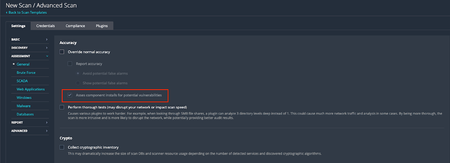
Background On Friday, February 6, 2026, Tenable Research published a plugin update that changed the way component installs are assessed for vulnerabilities. Those changes are outlined in a previous release highlight: Component Installs Require Paranoid Checks, This update essentially reverts this change, while adding new functionality to allow users to choose whether or not they want component installs assessed for vulnerabilities. Component installs are no longer influenced by scan paranoia settings. What are “Component Installs”? Software components, such as applications or language modules/libraries, are installed and managed by a primary "parent" package or application. The crucial point is that these components often cannot be updated individually. Instead, their vulnerability assessment and upgrade are entirely dependent on an update of the parent package. For instance, the SQLite database component is installed as part of the Trend Micro Deep Security Agent and is updated only when the Agent itself is updated. Nessus uses several factors to determine if a detected product is a component, or a standalone installation, including: Was the product installed by a package manager? These products are not considered components, as they are managed by the package manager and not a “parent” application Is the component a “language library”, i.e. a library or module used by the interpreter of a programming language like Python or Node.js? These enumerated libraries are marked as components by default. Does the product reside in a directory that is recognized for installations that are not component-based? Changes By default, component installs are once again assessed for vulnerabilities, as was the case prior to the release of the aforementioned update. If users wish to turn this setting off, so that component installs will not be assessed by generic vulnerability detection plugins, they can do so via the newly created scan preference. The end result of this change should be that fewer “false positives”, i.e. reported vulnerabilities for components that are “owned” by another application, are shown in scan results. Components with vulnerabilities that cannot be addressed independently of the “parent” application will not show in scan results. However, some customers have expressed a desire to see these vulnerabilities in their scan results anyway, to ensure full awareness of the risk profile of every application in their environment. This is still possible through the updated scan configuration settings. To modify this setting in your scan policy, go to Settings > Assessment > Accuracy > Override Normal Accuracy > Assess component installs for potential vulnerabilities. This setting is ON (checkbox is ticked) by default, so users must enable the Override Normal Accuracy checkbox (which is OFF / unchecked by default) if they wish to disable the setting and ensure that component installs are not assessed by generic vulnerability detection plugins in this scan. Please note that this update makes no other changes to the existing paranoia logic, outside of what is described above. For now, “Managed”, “Managed by OS” and “Backported” installs are still controlled by the Show/Avoid potential false alarms radio button. How can I tell if the detected install is a component or not? In addition to the above, we have also updated the relevant detection plugins so they will show if the component flag is set or not. At present, this includes detection plugins for OpenSSL, Curl, LibCurl, Apache HTTPD, Apache Tomcat, SQLite, Python Packages, Node.js modules and, soon to follow, Ruby and Nuget libraries. Using plugin ID 174788, SQLite Detection (Windows), here is a before and after example of the expected plugin output. Before: After: Expected Impact With the new default setting in place, users should anticipate an increase in vulnerability findings for the products in scope, returning to a level similar to what was observed before the first update. If users do not wish to surface these additional potential vulnerabilities, they should disable the "Assess component installs for potential vulnerabilities” setting. If the new scan preference is disabled, the volume of findings will remain consistent with current levels, when scanning with normal accuracy (paranoia) settings. Affected Plugins 12288, global_settings.nasl (updated to support the new scan policy preference) Any plugin that operates downstream of those in the list below: SQLite: 174788 - sqlite_nix_installed.nasl 171077 - sqlite_win_installed.nasl OpenSSL: 168007 - openssl_nix_installed.nasl 168149 - openssl_win_installed.nasl Curl: 182774 - curl_nix_installed.nasl 171860 - curl_win_installed.nasl LibCurl: 182848 - libcurl_nix_installed.nasl Apache HTTPD: 141394 - apache_http_server_nix_installed.nasl 141262 - apache_httpd_win_installed.nasl Apache Tomcat: 130175 - apache_tomcat_nix_installed.nasl 130590 - tomcat_win_installed.nasl Python Packages: 164122 - python_packages_installed_nix.nasl 139241 - python_win_installed.nasl Node.js Modules: 178772 - nodejs_modules_linux_installed.nasl 179440 - nodejs_modules_mac_installed.nasl 200172 - nodejs_modules_win_installed.nasl Targeted Release Date Tenable Nessus and Vulnerability Management: Monday, March 9, 2026 (ETA 22:30 Eastern Standard Time) Tenable Security Center: Monday, March 16, 2026Improved Resource Management Control
Summary Improved resource management control for plugins leveraging Windows Management Instrumentation (WMI) on Nessus Agent 11.1.0 or higher. Impact Customers with Nessus Agent 11.1.0 and later versions will have the ability to granularly control the CPU resources consumed during scans. This update ensures that plugins respect the resource usage setting selected during scan configuration by launching commands as children of the Nessus Agent, rather than invoking them via WMI. The release of these plugins will continue through January, with a phased approach over three weeks. The first release will be January 13th, the second January 20th, and the final planned plugin update on February 9th. Target Release Date Phase 1 plugin set: January 13, 2026 Phase 2 plugin set: January 20, 2026 Phase 3 plugin set: February 9, 2026Improvement to Printer OS Fingerprinting
Updated: April 3, 2026 Summary Scanned printers will now have an OS artefact surfaced in their scan host metadata if the target has been identified as a printer when the “Scan Network Printers” policy option is disabled. This change will not cause any additional asset licenses to be consumed within Tenable VM or Tenable Security Center. Background Printers are notoriously unstable scan targets. Oftentimes, they can behave erratically when scanned, so some users prefer to avoid scanning them altogether. At present, there is a switch in the scan policies to prevent further scanning of a host when it's identified as a printer. To enable this setting, go to Settings -> Host Discovery -> Fragile devices - Scan Network Printers (Currently, this is a checkbox setting, default value “off”). With that said, how can the scanner know the target is a printer if it cannot be scanned? In reality, the scanner still performs very basic fingerprinting (usually via SNMP) in order to gather enough information to make an educated guess at the device type. When the scan target is thought to be a printer, it essentially gets marked as “Host/dead" in the scan KB. When this happens, the scanner will not perform any further active scanning. Changes With this update, the fingerprint used to identify the printer as such, will now be stored in the scan Knowledge Base (KB) so it can be processed by os_fingerprint2.nasl ("Post-scan OS Identification", plugin ID 83349) and surfaced as metadata in the scan result. The relevant policy setting located at Settings -> Host Discovery -> Fragile devices -> Scan Network Printers. With this update, the printer's OS information will now be surfaced if it is available, regardless of the selected value for this setting. Impact Users can now see the OS information for their printer devices that would have otherwise gone unreported if the scan is not configured to “Scan Network Printers”. As plugin ID 83349 generates no plugin output, only an “operating-system” tag will be added to the scan result (and stored in an exported .nessus file). This information will be visible only the in “Host/Asset Details” section of the Tenable product UI, i.e: Tenable Nessus: Scans -> [Folder] -> [Individual Scan Result] - > Host Details -> OS (sidebar) Tenable Vulnerability Management: Explore -> Assets -> [Asset] -> Details -> Operating System Scans -> Vulnerability Management Scans -> [Individual Scan Result] -> Scan Details -> Asset Details -> Operating System Tenable Security Center: Analysis -> IP Summary -> [IP address] -> System Information -> OS Scans -> Scan Results -> [Individual Scan Result] -> IP Summary -> [IP address] -> System Information -> OS Note, we expect this information to surface mainly in individual scan results. It would only be present in cumulative asset details if a licensed asset already exists for the target in question. This update will not cause additional assets to be created or consume any additional licenses. Affected Plugins 83349 - os_fingerprint2.nasl 11933 - dont_scan_printers.nasl 22481 - dont_scan_settings.nasl Targeted Release Date Wednesday, March 4, 20261.3KViews2likes2CommentsImprovement To Plugin 142960 “HSTS Missing From HTTPS Server (RFC 6797)”
Summary Plugin 142960 now validates the identity of an HTTPS service in line with the current RFC 9525 as opposed to the obsolete RFC 6125. When a service's TLS certificate contains Subject Alternative Name (SAN) entries, the plugin compares the target hostname against those SANs only and no longer considers the certificate's Common Name (CN). If the certificate has no SANs, the plugin falls back to using the CN, so coverage for legacy certificates is unchanged. Background Plugin 142960 checks whether a detected web server supports HTTP Strict Transport Security (HSTS). Before it evaluates the service, the plugin must confirm that the service's TLS certificate covers the identity of the host. This confirms that the server is authorized to answer for that host, and that the finding describes the target host and not whichever service happened to respond on its behalf. If the identity check fails, the plugin cannot evaluate the service. Until now, the plugin performed this check by comparing the resolvable hostname against the CN of the certificate presented on the relevant port. If the CN covered the hostname, the service was evaluated for HSTS. RFC 9525, which supersedes the identity-matching guidance in RFC 6125 (which allowed for the checking of CNs) states that when a certificate carries one or more SAN entries, hostname identity must be validated against those SANs only. The CN must not be used for this purpose, even if it matches the hostname. The RFC gives several reasons: the CN is ambiguous, it cannot hold multiple identifiers, and its use leads to security and parsing inconsistencies. This change was prompted by a case in which a host's service could only be identified through the SAN of its certificate and not through the CN. Research into that case led to RFC 9525, and the update follows its guidance. Changes Service identity validation in plugin 142960 now works as follows: If SANs were enumerated from the service's TLS certificate, the hostname is compared against the SANs only. The CN is not used, even when it matches the hostname. If no SANs were enumerated from the certificate, the plugin uses the CN to validate the service identity, as it did before. Impact For services whose certificates include SANs, the outcome of the identity check depends only on the SAN values. A service whose SANs cover the hostname but whose CN does not will now be validated and evaluated for HSTS. A service whose CN matches the hostname but whose SANs do not will no longer pass validation, so the plugin will not evaluate it. Services with certificates that have no SANs are evaluated as before. Affected Plugins 142960 - HSTS Missing From HTTPS Server (RFC 6797) Targeted Release Date Monday, October 12, 2026
Compliance Windows Command Execution Enhancement
Summary The Windows Compliance Check plugin is implementing an updated library to run commands on Windows targets. The enhancements will include the following benefits. The plugin will improve on its handling of command timeouts. There were issues when long running commands would timeout on the scanner but leave temporary files on the target. This update will force long running checks to close when timing out and remove temporary files. The recently released improved resource management controls for Windows plugins on agents will now be extended to running audits. Potential Impacts: Tenable has gone to great lengths to ensure that the content that it publishes will operate and produce the same results that it always has. Customized audits may exhibit some changes due to the introduced job control of the command execution. These changes tend to be compliance checks that generate different results (failure instead of passing), or the actual values of the check have different text that would affect baseline scans. If custom content does exhibit these issues, strategies to work with the new library can be found in Compliance WMI Library Enhancement. Tenable Plugins 21156 - Windows Compliance Checks Target Release Date February 9, 2026Distinct Agent Plugin Databases for RPM-Based Distributions
Summary Tenable will now provide separate agent plugin databases for RPM-based Linux distributions. Impact Historically, the majority of plugins for RPM-based Linux distributions have all been distributed via a single artifact. Starting with Nessus Agent 11.1.0, Tenable will now publish separate artifacts based on the following plugin families: Alma Linux Local Security Checks CentOS Local Security Checks Miracle Linux Local Security Checks Oracle Linux Local Security Checks Red Hat Enterprise Linux Local Security Checks Rocky Linux Local Security Checks As a result, customers will see a reduction in the overall size of the agent database (15-31% reduction at rest, 7-14% downloaded), directly leading to smaller updates and reduced resource consumption during the update process. This improvement will be available to all customers using Agent 11.1.0 or later versions. Target Release Date January 13, 2026New Plugin Family: UnionTech Local Security Checks
Summary Tenable will now provide vulnerability check plugins for UnionTech Unity Operating System (UOS). Impact Customers with UnionTech Unity Operating System (ServerA and ServerE) systems in their environments will be able to scan them for vulnerabilities. These plugins will have the family “UnionTech Local Security Checks”. These plugins will not have agent support at this time, but this support is expected in a future release. Target Release Date September 30, 2025