target
101 Topics
Overview of Callbacks in Log4j Remote Detection Plugins The...
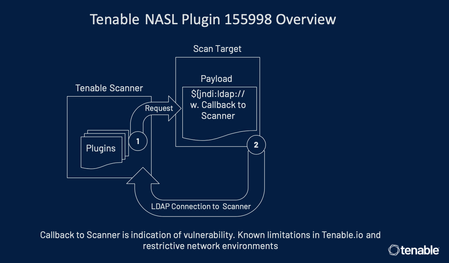
Overview of Callbacks in Log4j Remote Detection Plugins The following is an overview of callbacks in Tenable plugins for Log4Shell that perform remote detection 155998, 156014, 156016, 156017, 156035, 156056, 156115, 156132, 156157, 156158, 156162, 156166, 156197, 156232, 156256, 156257, 156258, 156375, 156445, 156559, and 156669. A HTTP request is sent by the scanner to the target being scanned with a benign payload containing a unique token. The target, if vulnerable, will act on the payload. Tenable tracks the target’s action on the payload via a callback to our hosted environment (plugins 156014, 156016, 156017, 156035, 156056, 156115, 156132, 156157, 156158, 156162, 156166,156197, 156232, 156256, 156257, 156258, 156375, 156445, 156559, and 156669) based on the unique token that was embedded in the initial request or via the LDAP connection callback to the scanner for plugin 155998. The callback is needed given the nature of the vulnerability as execution of the payload happens on the target being scanned. In plugin 155998, the callback happens to the scanner. This is the reason the plugin is not supported on Tenable.io cloud scanners In plugins 156014, 156016, 156017, 156035, 156056, 156115, 156132, 156157, 156158, 156162, 156166, 156197, 156232, 156256, 156257, 156258, 156375, 156445, 156559, and 156669 as part of execution of the payload, the target tries to resolve a domain owned by Tenable. While resolving the domain, Tenable is able to see the unique token that was sent in the initial request and thereby can track the callback. These plugins come with the major benefit that credentials are not required for scanning. However, the callbacks need to be successful for the plugin to be able to identify the exposure. Hence, communication between the target being scanned and the callback server must not be interrupted by intermediary devices. For more details: https://community.tenable.com/s/feed/0D53a00008E3hKzCAJ https://www.tenable.com/blog/cve-2021-44228-proof-of-concept-for-critical-apache-log4j-remote-code-execution-vulnerability1.1KViews0likes13CommentsTenable Research Release Highlight Nessus Agent Reset...
Tenable Research Release Highlight Nessus Agent Reset Plugin and Scan Template Summary Tenable Research has released a Credentialed Scan plugin and Scan Template “Nessus 10.8.0 / 10.8.1 Agent Reset” in support of addressing the issues in the Nessus Agent 10.8.0 and 10.8.1. Change New Scan Template: “Nessus 10.8.0 / 10.8.1 Agent Reset” Pre-requisite: Ensure that the agent version is set to 10.8.2 or 10.7.x in Agent Profile (for TVM) and Nessus Manager (for TSC). This Scan Template and Credentialed Scan plugin will run OS specific scripts to remotely reset the agent plugins on Windows, Mac OS or ‘Nix based Nessus Agent host machines on 10.8.0 or 10.8.1. These scripts and the permissions level each script requires are detailed in the Nessus Agent 10.8.2 Release Notes (https://docs.tenable.com/release-notes/Content/nessus-agent/2025.htm#10.8.2) under the [Perform a plugin reset] section. Notes: The Nessus Agent Reset plugin will only run from the provided Scan Template and will not reset Nessus Agents when run from any other Scan Template. For Ubuntu/Debian Unix credentials, please ensure that only one set of privilege escalation credentials are provided with the required permissions level for the OS script to execute. 13 JAN 2025 UPDATE: Please note that triggering a plugin reset will result in a large spike in network traffic. Impact Without this script, customers would have to logon to each Nessus Agent host and run the appropriate Nessus Agent Reset script for that host OS. Using this Scan Template and Credentialed Scan plugin, customers can run the Nessus Agent Reset scripts on each updated Nessus Agent from a Remote Credentialed Scan, with the necessary credentials and permissions, using Nessus, Nessus Manager, T.VM, and T.SC (released 08 JAN). Target Release Date 07 JAN 2025800Views0likes17CommentsOracle JavaVM (OJVM) Detection Update Summary Authenticated...
Oracle JavaVM (OJVM) Detection Update Summary Authenticated scans launched against Oracle database hosts will no longer report Oracle JavaVM (OJVM) patches as missing if the OJVM component is not installed. Change A series of plugins are used to detect Oracle Database patch levels. With local checks enabled plugin 71644 gathers the patch information of the Oracle Databases detected. With remote checks enabled (i.e. authenticating into the Database without authenticating in the OS) it is plugin 45624 that will gather the patch information from the Database. While plugin 71644 alone cannot detect the presence of OJVM, users can leverage plugin 45624 to detect the installation status of that component.This limitation of 71644 results in Oracle CPU plugins reporting missing OJVM patches, despite OJVM not being installed. Although reporting these missing patches follows Oracle’s best-practice guidelines, numerous customers have requested the ability to silence these reports when enabling Oracle Database remote checks in the same scan. Following this update, scans will no longer report OJVM patches as missing if the component is not found as installed by plugin 45624. To achieve this result, scans need to be provided with both OS credentials and Oracle Database credentials, and successful authentication must occur with both sets of credentials. Impact In remote scans, Oracle JavaVM vulnerabilities will only be reported if Oracle JavaVM is installed when scanned with both OS and Oracle Database credentials. This change has no impact on Nessus Agent scans, as remote database connections are no possible. Impacted Plugins 45624 (Oracle RDBMS Host Name and Patch Info) All Oracle CPU plugins pertaining to Oracle Databases. Target Release Date Tuesday, September 19, 2023
Apache Log4j Detection for Windows - Manifest / Properties...
Apache Log4j Detection for Windows - Manifest / Properties Detection Update Summary: In the light of resource requirements to scan entire file systems along with inspecting each Java archive file in-depth while checking the manifest and properties files, we have decided to require that the following settings be enabled to leverage the detection using manifest and properties files in Apache Log4j JAR Detection (Windows) (156001): ‘Perform thorough tests’ setting must be enabled ‘Override normal accuracy’ setting must be set to ‘Show potential false alarms’ This feature was first released in Nessus plugin feed 202201080412. We are looking at ways to further optimize this feature to enable faster scans while lowering its impact on system resources. Impact: Customers may observe fewer resources being consumed on Windows scan targets during a local or Agent scan but may also observe slightly fewer Apache Log4j detections that were detected via the manifest or properties file over the past several days. Once ‘Perform thorough tests’ and ‘Override normal accuracy’ settings are configured as mentioned above, the detections should re-appear. A consequence of this change is that some Apache Log4j vulnerabilities may appear as remediated if they were previously detected via this method and subsequent scans did not have the aforementioned settings enabled. Plugin: Apache Log4j JAR Detection (Windows) (156001) References: Assessment Scan Settings - Perform thorough tests and Override normal Accuracy settings Target Release Date: January 12, 2022 (released in Nessus plugin feed 202201130817)599Views0likes15CommentsHost Credential Validation Scan Template Summary In an...
Host Credential Validation Scan Template Summary In an effort to simplify the process of diagnosing issues with scan credentials, Tenable Research is releasing a lightweight scan template which enables several informational plugins that report on the success of provided host (Windows / Unix) credential pairs. Change The complete list of plugins enabled by the scan template is available here. Impact Customers running Nessus & Tenable Vulnerability Management will be able to diagnose credential pair issues quickly by leveraging this new scan template. Target Release Date Nessus & Tenable Vulnerability Management: Immediate Tenable Security Center: TBD
AuditLang VSCode Extension Summary Tenable has created a...
AuditLang VSCode Extension Summary Tenable has created a Visual Studio Code extension to assist with custom audit writing and validation. Features include: Syntax highlighting Check snippets Command shortcuts for Compliance Checks reference documentation, download links, etc. Parse/Syntax checking For up-to-date features and installation information you can search for 'Tenable AuditLang' in VS Code -> Extensions: Marketplace, or visit https://marketplace.visualstudio.com/items?itemName=Tenable.vscode-auditlang If you have any use cases you’d like to see added to the extension, please either contact your CSM or add a suggestion through the Tenable Products Suggestion Portal. Please use your Community credentials to access the suggestions portal and choose the product “Plugins, Audits, and Compliance” on submittal. Target Release Date Immediate
Security End of Life (SEoL) Plugin Conversions 2024 Q4...
Security End of Life (SEoL) Plugin Conversions 2024 Q4 Change In accordance with the SEoL framework published in April 2023, we are updating and/or deprecating the legacy “Unsupported <x>” plugins to conform to the new plugin specification. Only the Unsupported plugins listed in the “Deprecated Plugin” table below have been deprecated and replaced with SEoL plugins - all other plugins that detect Unsupported software remain in service. Impact Customers should anticipate the legacy “Unsupported” plugins to be deprecated and/or converted to their corresponding SEoL plugins. This may result in new findings and a more detailed picture of the exposure landscape associated with products in the SEoL state. Customer-created dashboards or reports that use the now-deprecated “Unsupported” plugins should be migrated to use the new SEoL plugins listed below. For additional details please see the SEoL FAQ knowledge base article from June 2023. This FAQ covers questions about SEoL plugin severity ratings, considerations for extended vendor support agreements, and future product coverage. Converted Plugins Deprecated Plugin: 55690; IBM DB2 Unsupported Version Detection New Plugin(s): IBM DB2 SEoL Deprecated Plugins: 40362; Mozilla Foundation Unsupported Application Detection, 56584; Mozilla Foundation Unsupported Application Detection (macOS) New Plugin(s): Firefox and Thunderbird SEoL Deprecated Plugin: 78675; WinZip Unsupported Version Detection New Plugin(s): Winzip SEoL Deprecated Plugins: 95258; Fortinet FortiClient Unsupported Version Detection (macOS), 93098; Fortinet FortiClient Unsupported Version Detection New Plugin(s): Fortinet Forticlient SEoL Deprecated Plugin: 56710; Wireshark / Ethereal Unsupported Version Detection New Plugin(s): Wireshark SEoL Consolidated List of Deprecated Plugins 55690, 40362, 56584, 78675, 95258, 93098, 56710 Target Release Date January 6, 2025 Additional Notes For a complete list of current SEoL plugin coverage, please visit https://www.tenable.com/plugins/search?q=%22SEoL%22. Additional coverage requests can be made via Tenable’s Suggestions Portal at https://suggestions.tenable.com.New RedHat OpenShift Container Platform Plugin and Audit...
New RedHat OpenShift Container Platform Plugin and Audit files Summary Customers can now measure compliance against RedHat OpenShift Container Platform with new plugin ID 161406 on Tenable.io and Nessus. This plugin will be published with a new credential type: OpenShift Container Platform. This plugin retrieves target data using the RedHat OpenShift Container Platform API and will evaluate actual values against a given audit policy. All data retrieval and communication is via the RedHat OpenShift Container Platform API. Additional Notes Two CIS audits will be released along with the plugin: CIS RedHat OpenShift Container Platform 4 v1.2.0 Level 1 CIS RedHat OpenShift Container Platform 4 v1.2.0 Level 2 Example audit structure <check_type: "OpenShift"> <custom_item> type : REST_API description : "Minimize the admission of containers with allowPrivilegeEscalation" request : "getSecurityContextConstraints" json_transform : ".items[] | .spec.clusterID as $clusterID | .items[] | \"Cluster ID: \($clusterID), Name: \(.metadata.name), UID: \(.metadata.uid), Allow Privilege Escalation: \(.allowPrivilegeEscalation)\"" expect : "Allow Privilege Escalation: false" </custom_item> </check_type> The 'request' tag references specific API endpoints for data retrieval. The 'json_transform' tag selects specific parts of returned data. Regex and expect tags will further filter and evaluate the data for a passing or failing result. Target Release Date January 27, 2023Support for Custom CA in SSL Libraries for upload to Tenable.
Support for Custom CA in SSL Libraries for upload to Tenable.io Summary Customer self-signed certificates can now be applied at the scan policy level in Tenable.io through the Advanced Scan Template. This support for assigning custom certificates to scan policies in T.io will allow customers to use self-signed certificates for SSL authentication without triggering plugin 51192 as a vulnerability in their environments. There is no change to the existing self-signed certificates functionality in Security Center, Nessus Manager or Nessus scanners by adding the certificates to the trusted list at the scanner level. This new functionality supports securely applying the certificate to an individual user’s scan policy, as opposed to the entire scanner. Individual customer certificates are encrypted in transit and live in memory while the scan runs, then purged when the task is complete for security. T.io users can configure custom certificates for a scan policy in the Settings >> Advanced >> General Settings >> Trusted CAs field by copying the custom CA text into the configuration setting. Please note, multiple certificates can be listed in this Trusted CAs field. Also, once the trusted CA gui element template update has been applied, it is available for the Scanner if accessed via API. Impact This will affect any customer who uses internally-signed certificates for SSL/TLS enabled services applied to scan target hosts inside their internal network and allow them to avoid triggering plugin 51192 on their T.io scans when using self-signed certificates on a scan policy. Changes T.io customers will have an additional Trusted CAs configuration setting to implement this feature. No changes to Security Center, Nessus Manager or Nessus scanners. Target Release Date Immediate
Automatically accept SSH disclaimers Summary A new UI...
Automatically accept SSH disclaimers Summary A new UI setting is being made available, allowing customers to indicate that Tenable products are permitted to accept disclaimers on their behalf when SSH connections require user input for disclaimer agreement. Change A new Advanced policy setting for scans in Nessus, T.io, and T.sc named "Automatically accept detected SSH disclaimer prompts" is being added. This allows customers connecting to devices which require text input to agree to a disclaimer, such as FortiOS, to authorize Tenable products to supply the necessary responses to those disclaimers. By default this setting is not enabled. Without the setting enabled, credentialed scans on products with a disclaimer will produce an error. If Nessus identifies the presence of a FortiOS post-login disclaimer blocking the scan this error will be reported in the output of 97993: “Local security checks have been disabled because a FortiOS disclaimer prompt has been detected in the response to an SSH connection, but the setting for permitting this Tenable product to accept the disclaimer has not been enabled or did not function correctly. You must manually enable this setting in your scan policy, which indicates your permission and consent for this Tenable product to connect to this system and accept the disclaimer.” With the setting enabled, the Nessus scanner will provide the necessary output to accept the disclaimer and continue the scan. Impact Customers running FortiOS with a post-login banner can complete scans of those devices using the new setting. Plugins 97993 - OS Identification and Installed Software Enumeration over SSH v2 (Using New SSH Library) Target Release Date 31 August 2020200Views0likes0Comments