tenable vulnerability management
81 Topics
Tenable product update: Standardizing Tenable risk scoring
At Tenable, we are committed to providing the most accurate, defensible, and actionable view of organizational risk. To achieve this, we must continually refine the intelligence that powers your prioritization. On July 1, 2026, we are implementing a series of foundational updates to our risk scoring engines. As part of this update, you may see changes to your risk scores, depending on the Tenable product(s) you own. These changes simplify your workflow by standardizing scoring on a single, high-fidelity model for vulnerability and asset risk. The new standard for VPR For the past several months, many of you have utilized VPR (Beta) to gain deeper insights into exploitability. We are excited to announce that on July 1, this model will be promoted to the primary Vulnerability Priority Rating (VPR) across the Tenable platform. By standardizing on this advanced model, we are retiring legacy VPR scoring to ensure every customer benefits from our most sophisticated threat intelligence. The new version of VPR incorporates more threat intelligence and vulnerability metadata so that you can focus on the 1.6% of vulnerabilities that actually matter. Better context through enhanced asset classification Alongside the VPR update, we are enhancing our asset classification engine. This update improves how we identify the function and importance of assets across your entire attack surface, including Cloud, OT, and third-party devices. As a result, customers with access to Asset Criticality Ratings (ACR) for VM assets will see these scores more accurately reflect real-world business risk. What this means for you These are backend enhancements designed to provide immediate value with zero manual configuration. On July 1, your dashboards, reports, and APIs will automatically reflect these updated metrics. Because both VPR and ACR serve as inputs to Cyber Exposure Score (CES) and Asset Exposure Score (AES), customers using these scores may see changes that reflect a more accurate understanding of exposure. Customer FAQ What happens to the VPR (Beta) score in the Tenable UI? The Beta label will be removed. The high-fidelity model you’ve been previewing will become the standard VPR. The legacy version of VPR will be retired to ensure a single, unified source or truth. Do I need to rewrite my custom API scripts using VPR? No. For customers using APIs, updated values will be mapped into legacy VPR fields on the back end to ensure compatibility and a smooth transition for your scripts and third-party tools. How does this affect my SLAs? Because many organizations use VPR as their operational prioritization layer, your SLA statistics and remediation tracking will now reflect the more precise scoring model. This helps ensure your team is meeting response goals for the vulnerabilities that pose the highest actual risk. How does Enhanced Asset Classification affect my scores? The system now automatically identifies the function and criticality of assets across Cloud, OT, and third-party sources. This improved context leads to more accurate Asset Criticality Rating (ACR) adjustments. For customers with access to ACR, this ensures your most critical business assets are effectively prioritized. What actions does my team need to take, and when will the changes be reflected in my container? These updates will occur automatically within your Tenable console. Depending on the size of your environment, it may take time for score recalculations to be fully reflected across your console. For a detailed guide on our enhanced VPR, check out this FAQ. Want to see the why behind our scoring? View our scoring explained.7KViews9likes13Comments
Tenable Post-Quantum Cryptography Inventory Support
Summary The advent of quantum computing presents a significant threat to current cryptographic algorithms. Organizations worldwide are beginning the critical transition to post-quantum cryptography (PQC) resistant algorithms to ensure long-term data security. Government mandates, such as the U.S. National Security Memorandum 10 (NSM-10), outlines deadlines for PQC migration and specific actions agencies must take to migrate vulnerable systems. Our PQC support is designed to help customers inventory use of TLS and SSH quantum-resistant and vulnerable algorithms within their infrastructure using remote Nessus-based scans. Cipher Inventory and Reporting Post-Quantum Cipher Plugins Two remote-based scan informational reporting plugins for TLS and SSH protocols inform customers of their transition posture according to NIST Post-Quantum Encryption Standards. Services Using Post Quantum Cryptography: Reports on services equipped with at least one post-quantum cipher. It will specify which post-quantum ciphers were discovered, reporting by port and protocol. Services Not Using Post Quantum Cryptography: Reports on services that support no post-quantum ciphers. These plugins will be enabled by default and included in existing scans. Cryptographic Inventory Plugin Reporting To enable a JSON-based inventory of each target by service and cipher, enable through either a preference on your Advanced Network Scan or by running the Cryptographic Inventory scan template. These preferences will initially be supported in Nessus and Tenable Vulnerability Management. They are planned to be added to Tenable Security Center at a later date. Warning: Enabling this preference through the Advanced Network Scan is expected to increase the overall size of the plugin output per target and resulting Nessus database size. If you do not need to produce this inventory at all or on your regular scan cadence, it’s recommended to instead run the Cryptographic Inventory scan template to decrease the potential impact to your normal scan results. Options to Enable Inventory Reporting Advanced Scan Preference Post Quantum Cryptography Scan Template Cryptographic Inventory Plugin Details The plugin enabled with the preference or scan template is an information plugin called Target Cipher Inventory. Within the output of this plugin, you will find a JSON structure containing the TLS and SSH inventories for the scanned target. You can export this inventory based on plugin output using the Tenable API if needed. For TLS, the structure contains: Attribute Definition Encaps Protocol encapsulation employed such as TLSv1, TLSv2, TLSv3 Port Port used for TLS communication Curve Group Encryption method Ciphersuite Algorithm used to secure the TLS connection For SSH, the structure contains: Attribute Definition Proto Protocol of SSH Port Port used for SSH communication Name Algorithm used to secure the protocol Type Use of the named algorithm such as “message auth” Release Date Tenable Vulnerability Management and Tenable Nessus: December 8, 2025 Tenable Security Center: - December 8, 2025 for the informational plugins - Cryptographic Inventory scan template release to be determined
Improvement: Handling Component Installs for Vulnerability Assessment
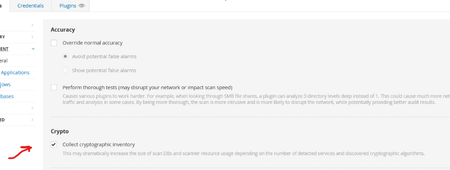
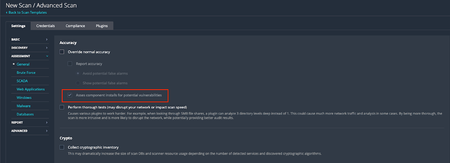
Background On Friday, February 6, 2026, Tenable Research published a plugin update that changed the way component installs are assessed for vulnerabilities. Those changes are outlined in a previous release highlight: Component Installs Require Paranoid Checks, This update essentially reverts this change, while adding new functionality to allow users to choose whether or not they want component installs assessed for vulnerabilities. Component installs are no longer influenced by scan paranoia settings. What are “Component Installs”? Software components, such as applications or language modules/libraries, are installed and managed by a primary "parent" package or application. The crucial point is that these components often cannot be updated individually. Instead, their vulnerability assessment and upgrade are entirely dependent on an update of the parent package. For instance, the SQLite database component is installed as part of the Trend Micro Deep Security Agent and is updated only when the Agent itself is updated. Nessus uses several factors to determine if a detected product is a component, or a standalone installation, including: Was the product installed by a package manager? These products are not considered components, as they are managed by the package manager and not a “parent” application Is the component a “language library”, i.e. a library or module used by the interpreter of a programming language like Python or Node.js? These enumerated libraries are marked as components by default. Does the product reside in a directory that is recognized for installations that are not component-based? Changes By default, component installs are once again assessed for vulnerabilities, as was the case prior to the release of the aforementioned update. If users wish to turn this setting off, so that component installs will not be assessed by generic vulnerability detection plugins, they can do so via the newly created scan preference. The end result of this change should be that fewer “false positives”, i.e. reported vulnerabilities for components that are “owned” by another application, are shown in scan results. Components with vulnerabilities that cannot be addressed independently of the “parent” application will not show in scan results. However, some customers have expressed a desire to see these vulnerabilities in their scan results anyway, to ensure full awareness of the risk profile of every application in their environment. This is still possible through the updated scan configuration settings. To modify this setting in your scan policy, go to Settings > Assessment > Accuracy > Override Normal Accuracy > Assess component installs for potential vulnerabilities. This setting is ON (checkbox is ticked) by default, so users must enable the Override Normal Accuracy checkbox (which is OFF / unchecked by default) if they wish to disable the setting and ensure that component installs are not assessed by generic vulnerability detection plugins in this scan. Please note that this update makes no other changes to the existing paranoia logic, outside of what is described above. For now, “Managed”, “Managed by OS” and “Backported” installs are still controlled by the Show/Avoid potential false alarms radio button. How can I tell if the detected install is a component or not? In addition to the above, we have also updated the relevant detection plugins so they will show if the component flag is set or not. At present, this includes detection plugins for OpenSSL, Curl, LibCurl, Apache HTTPD, Apache Tomcat, SQLite, Python Packages, Node.js modules and, soon to follow, Ruby and Nuget libraries. Using plugin ID 174788, SQLite Detection (Windows), here is a before and after example of the expected plugin output. Before: After: Expected Impact With the new default setting in place, users should anticipate an increase in vulnerability findings for the products in scope, returning to a level similar to what was observed before the first update. If users do not wish to surface these additional potential vulnerabilities, they should disable the "Assess component installs for potential vulnerabilities” setting. If the new scan preference is disabled, the volume of findings will remain consistent with current levels, when scanning with normal accuracy (paranoia) settings. Affected Plugins 12288, global_settings.nasl (updated to support the new scan policy preference) Any plugin that operates downstream of those in the list below: SQLite: 174788 - sqlite_nix_installed.nasl 171077 - sqlite_win_installed.nasl OpenSSL: 168007 - openssl_nix_installed.nasl 168149 - openssl_win_installed.nasl Curl: 182774 - curl_nix_installed.nasl 171860 - curl_win_installed.nasl LibCurl: 182848 - libcurl_nix_installed.nasl Apache HTTPD: 141394 - apache_http_server_nix_installed.nasl 141262 - apache_httpd_win_installed.nasl Apache Tomcat: 130175 - apache_tomcat_nix_installed.nasl 130590 - tomcat_win_installed.nasl Python Packages: 164122 - python_packages_installed_nix.nasl 139241 - python_win_installed.nasl Node.js Modules: 178772 - nodejs_modules_linux_installed.nasl 179440 - nodejs_modules_mac_installed.nasl 200172 - nodejs_modules_win_installed.nasl Targeted Release Date Tenable Nessus and Vulnerability Management: Monday, March 9, 2026 (ETA 22:30 Eastern Standard Time) Tenable Security Center: Monday, March 16, 2026Now available: VM-Native OT Discovery
VM-Native OT Discovery introduces a powerful new asset discovery engine directly inside Tenable Vulnerability Management and Tenable Security Center. This allows you to identify and profile OT assets—including PLCs, HMIs, and IoT devices—using the VM tools you already own. Use a new "OT Recon" scan template to perform safe, protocol-aware active queries. No additional hardware or sensors are needed. Get started in minutes. Discovered assets count toward your existing license at a 1:1 ratio. Watch this 2-minute guided demo to see VM-Native Discovery in action. For more information, please refer to the user guides for Tenable Vulnerability Management (Discovery Settings, Scan Templates) and Tenable Security Center (Scan Policy Options). For continuous monitoring and access to a wide range of other advanced OT/CPS security capabilities, consider upgrading to Tenable OT Security to maximize the value of your Tenable One deployment.1.3KViews1like0CommentsImprovement to Printer OS Fingerprinting
Updated: April 3, 2026 Summary Scanned printers will now have an OS artefact surfaced in their scan host metadata if the target has been identified as a printer when the “Scan Network Printers” policy option is disabled. This change will not cause any additional asset licenses to be consumed within Tenable VM or Tenable Security Center. Background Printers are notoriously unstable scan targets. Oftentimes, they can behave erratically when scanned, so some users prefer to avoid scanning them altogether. At present, there is a switch in the scan policies to prevent further scanning of a host when it's identified as a printer. To enable this setting, go to Settings -> Host Discovery -> Fragile devices - Scan Network Printers (Currently, this is a checkbox setting, default value “off”). With that said, how can the scanner know the target is a printer if it cannot be scanned? In reality, the scanner still performs very basic fingerprinting (usually via SNMP) in order to gather enough information to make an educated guess at the device type. When the scan target is thought to be a printer, it essentially gets marked as “Host/dead" in the scan KB. When this happens, the scanner will not perform any further active scanning. Changes With this update, the fingerprint used to identify the printer as such, will now be stored in the scan Knowledge Base (KB) so it can be processed by os_fingerprint2.nasl ("Post-scan OS Identification", plugin ID 83349) and surfaced as metadata in the scan result. The relevant policy setting located at Settings -> Host Discovery -> Fragile devices -> Scan Network Printers. With this update, the printer's OS information will now be surfaced if it is available, regardless of the selected value for this setting. Impact Users can now see the OS information for their printer devices that would have otherwise gone unreported if the scan is not configured to “Scan Network Printers”. As plugin ID 83349 generates no plugin output, only an “operating-system” tag will be added to the scan result (and stored in an exported .nessus file). This information will be visible only the in “Host/Asset Details” section of the Tenable product UI, i.e: Tenable Nessus: Scans -> [Folder] -> [Individual Scan Result] - > Host Details -> OS (sidebar) Tenable Vulnerability Management: Explore -> Assets -> [Asset] -> Details -> Operating System Scans -> Vulnerability Management Scans -> [Individual Scan Result] -> Scan Details -> Asset Details -> Operating System Tenable Security Center: Analysis -> IP Summary -> [IP address] -> System Information -> OS Scans -> Scan Results -> [Individual Scan Result] -> IP Summary -> [IP address] -> System Information -> OS Note, we expect this information to surface mainly in individual scan results. It would only be present in cumulative asset details if a licensed asset already exists for the target in question. This update will not cause additional assets to be created or consume any additional licenses. Affected Plugins 83349 - os_fingerprint2.nasl 11933 - dont_scan_printers.nasl 22481 - dont_scan_settings.nasl Targeted Release Date Wednesday, March 4, 20261.3KViews2likes2Comments
Tenable Product Update Newsletter - September 2026
Welcome to your monthly round-up of the latest Tenable product updates, platform enhancements, and community news. This month, we’re bringing frontier AI reasoning into exposure management, deepening cloud and vulnerability visibility, and expanding how the community vets AI agents before deployment. Tenable One - Platform updates Claude Mythos 5 is coming to Tenable One with Adversary View Attackers don’t exploit systems in isolation. They chain together scattered, low-signal evidence like netstat entries, cached accounts, and active connections that traditional rules engines can’t connect, and that your team doesn’t have time to piece together manually. This is where frontier AI models shine. Tenable One Adversary View, launching this September, brings the power of Anthropic’s Claude Mythos 5 directly into the Tenable One Exposure Management Platform. Built on the Project Glasswing collaboration between Tenable and Anthropic, Adversary View applies advanced cyber reasoning to your existing exposure data, uncovering hidden vulnerability chains, visualizing how an attacker would actually move through your environment, and surfacing evidence-backed fixes to break those chains before attackers exploit them — all within an agentic harness that keeps the AI’s reasoning controlled and auditable. Take advantage of Claude Mythos 5 to tackle complex exposure management challenges. Cut through the noise with a ranked, prioritized list of the vulnerability chains that matter most, backed by evidence and specific remediation guidance. Move at the speed of adversaries by pairing Claude Mythos 5’s advanced reasoning with the exposure intelligence you already have in Tenable One — no new tools required. Read the blog post Explore the guided demo 3 new connectors bring GitHub and GitLab findings into Tenable One Tenable One connectors combine your third-party security tools with Tenable’s native sensor data for one view of risk across your attack surface. Three new connectors extend that coverage, pulling static application security testing (SAST), software composition analysis (SCA), and secret scanning findings straight into Tenable One. GitHub Code Scanning: Consolidates SAST and secret scanning findings, covering both vulnerable code and exposed credentials, into the same risk view as every other exposure you track. GitHub Dependabot: Brings SCA alerts on vulnerable dependencies, so a flawed package deep in your supply chain gets prioritized against everything else exposing you. GitLab Connector: Covers SAST, SCA, and Secret Detection findings in one connector, consolidating what’s otherwise split across multiple tools into a single risk view. Requires GitLab Ultimate to ingest findings. All three are native connectors; add the connector, and findings start showing up in Tenable One. Set up GitHub Code Scanning Set up GitHub Dependabot Set up GitLab Connector CyberAgents Exchange Exchange Inspector vets AI agents before they reach your environment Tenable and OpenAI unveiled the CyberAgents Exchange AI Inspector, which pairs OpenAI’s GPT cyber models with Tenable One AI Exposure and expert researcher review to screen AI agents, skills, MCP servers, and multi-agent playbooks for prompt injection, PII exposure, and supply-chain risks before they’re deployed. Combines OpenAI GPT cyber models, Tenable One AI Exposure, and expert researcher review to vet AI agents before deployment. Screens AI agents, skills, MCP servers, and multi-agent playbooks for prompt injection, PII exposure, and supply-chain risks. Gives practitioners insight into production-ready AI agents and CISOs the confidence to approve their use. The Exchange Inspector builds on the CyberAgents Exchange registry, which has already drawn more than 100 AI listings. Exchange Inspector is expected to be available in September. Read the technical blog Read the press release Tenable One Vulnerability Management Visualize your security trends over time You can finally see exactly where your security metrics are heading, not just where they stand today. With newly added Trending Widgets, you can track your asset data and findings as daily line charts, giving you the historical context you need to accurately monitor your progress. Data collection begins the moment you set up a widget. To get started, you can: Build custom views: Add up to five unique trend lines per widget, tailoring the dataset, entity type, and filters for each. Deploy pre-built charts: Search trending in the widget library to drop ready-to-use visualizations right onto your dashboard. Check out the Trending Widget documentation Release notes for the full details Tenable One Cloud Exposure Expanded Kubernetes and container topology in Tenable One Cloud Exposure A comprehensive overview of Kubernetes and container topology is essential for risk-based prioritization because you have to see the whole picture of the resources, workloads, and clusters a vulnerability touches to know what’s actually risky. Now, the “graph” tab in Tenable One Cloud Exposure gives you the full structural layout of a Kubernetes cluster, all the way down to a vulnerable container image, in one interactive view. What’s new: Guided relationship picker: By expanding any node in the graph, it now surfaces a categorized menu (Compute, IAM, Kubernetes, Containers, Management, Network, Risk) so you can choose which connection to explore next. Full Kubernetes depth: Namespaces, roles, role bindings, service accounts, configuration maps, and workloads all surface as first-class nodes, whether the cluster is EKS, AKS, GKE, or self-managed. The Kubernetes graph provides a holistic view of cluster contents, namespaces, and resource relationships, while allowing you to effortlessly navigate from clusters to underlying virtual machines and specific workloads, such as business-critical services. It also enables you to explore vulnerability instances linked to container images, ensuring they have complete context for risk prioritization and informed decision-making. View the demo Check out the product documentation Tenable Nessus Nessus reliability and performance updates We have released several Tenable Nessus updates recently, with a mix of new capabilities as well as improvements related to performance and security. Scanner reliability fixes: Resolved SSL connection issues that could cause scanners to appear offline and stop receiving plugin updates. Kerberos authentication fix: Corrected an issue blocking plugins from retrieving host FQDNs, causing authentication failures. Tenable Security Center performance: Fixed timeout errors when processing large volumes of Tenable Nessus agent reports. Certificate handling: Resolved an issue in PostgreSQL client authentication. Review Nessus documentation Read the Plugin Release Notes Take Tenable University training Training and product education Tenable Patch Management training Upgrade your skills with the refreshed, free on-demand Introduction to Tenable Patch Management course in Tenable University. Modernized with interactive elements, real-time knowledge checks, and step-by-step video demonstrations, this self-paced web training gives you hands-on practice to efficiently secure both your SaaS and on-premises environments. Through this updated course, you will learn to: Understand core architecture: Master essential server and client components, operating system coverage, and fundamental patching logic. Optimize configuration and strategy: Configure locations and business units while implementing proven patching strategies across your enterprise. Execute global operations: Swiftly respond to critical threats using the Emergency Kit. Eliminate blind spots: Monitor real-time compliance health and identify hidden vulnerabilities using dynamic performance widgets and interactive dashboards. Access this free course today in Tenable University to strengthen your remediation workflows and keep your organization secure. Learn more Tenable events and webinars Customer office hours Customer office hours are recurring ask-me-anything sessions for Tenable Security Center, Tenable One Vulnerability Management, Tenable One Cloud Exposure, Tenable One Identity Exposure, and Tenable One OT Exposure. Time-zone-appropriate sessions are available for the Americas, Europe (including the Middle East and Africa), and Asia-Pacific. Learn more and register Virtual events Tenable customer update - October 2026: Join the next quarterly customer update session at 11 a.m. ET / 4 p.m. BST / 5 p.m. CEST Oct. 20. This informative, fast-paced overview will explore how to better secure your expanding attack surface and consolidate critical security data. Products covered include Tenable One, Tenable One Vulnerability Management, Tenable Security Center, and Tenable Patch Management. Register here See all upcoming live and on-demand webinars TenableTalk Live: How Mythos will change cyber defenses forever: Join us at 11 a.m. ET, Thursday, Sept. 24, on LinkedIn as we dive into what happens when frontier AI reasoning gets built directly into the tools defenders use, and how teams can prepare for these new capabilities. Attend on LinkedIn Tenable Professional Services Tenable Hexa AI enablement workshop Confidently adopt Tenable Hexa AI and the Tenable Hexa AI Model Context Protocol (MCP) Server with expert, hands-on guidance tailored to your environment. Delivered by Tenable Professional Services as a custom Statement of Work (SOW) engagement, this new workshop equips your team with practical skills to maximize your AI-driven exposure management capabilities. Through this custom engagement, you will: Explore enterprise AI capabilities: Analyze your internal AI tool usage and complete a technical overview of Tenable Hexa AI. Build practical expertise: Receive hands-on instruction to effectively operate Tenable Hexa AI and integrate the Tenable MCP Server into your tech stack. Design custom workflows: Develop tailored operational workflows and implement proven best practices to accelerate risk reduction. To scope a custom workshop for your organization, contact your Tenable representative or email [email protected]. Read Tenable documentation.800Views0likes0CommentsTenable Product Update Newsletter — August 2026
Welcome to your monthly round-up of the latest Tenable product updates, platform enhancements, and community news. This month, we’re focused on agentic automation, quantum-readiness, and sharper visibility across your attack surface. Tenable One Platform Updates Tenable Hexa AI now supports Routines and Agent Center in Tenable One Introducing the next major evolution in agentic security: an always-on workforce powered by Tenable Hexa AI Routines, Agent Center, and a new Jamf integration directly within the Tenable One platform. Moving past conversational search and one-off actions, mobilize an autonomous fleet that runs in the background to seamlessly coordinate multi-step security tasks across your entire exposure landscape. Routines: Define an exposure workflow once and set a schedule. Hexa reasons through fresh context on every run and automatically delivers actionable results. Agent Center: A central workspace to track all routines to get clear visibility into what’s running, completed, queued, or awaiting user input. Jamf integration: Fetch Jamf-managed Mac context on demand and push patch policies directly back to Jamf without ever leaving Tenable One. Available now. Get started by navigating to Agent Center > Create a Routine or the Routines tab in Hexa AI. Get more details in the release notes CyberAgents Exchange CyberAgents Exchange and SWARM event recap The CyberAgents Exchange, powered by Tenable, is an open-source, vendor-agnostic hub where security practitioners and CISOs can discover, share, and collaborate on AI agents, skills, MCP servers, and playbooks built for cybersecurity. This free-to-use community infrastructure allows defenders to scale their capabilities, eliminate development silos, and outpace AI-generated threats without vendor lock-in. In conjunction with the CyberAgents Exchange launch, Tenable hosted SWARM, a hands-on cybersecurity agentic AI build event at Black Hat USA 2026 in Las Vegas. Real-world solutions: Sponsored by AWS and presented with support from Anthropic, the event challenged security practitioners to build open-source components that automate real-world security workflows. Winners: Congratulations to our first-, second-, and third-place winning teams! Your incredible builds are now on the CyberAgents Exchange for the global security community to adopt and build upon. Explore the CyberAgents Exchange today, and check out our official press release and SWARM recap blog post for complete details. Explore the CyberAgents Exchange Read the SWARM recap blog Read the press release Tenable One Vulnerability Management Accelerate software discovery and compliance reporting in Explore Seamlessly track software inventory and isolate compliance checks directly within Tenable One Vulnerability Management. The new Software and Host Audit tabs in Explore deliver dedicated views to eliminate UI clutter, track deployed application footprints, and speed up audit reporting. Use these views to: Pinpoint software exposure: Search installed software, versions, and vendors alongside risk metrics like ACR and AES to maximize SBOM value. Isolate compliance findings: Separate CIS benchmark and hardening checks from general vulnerability noise without building complex filters. Export audit evidence: Instantly group and export targeted software inventories or configuration results for internal teams and external auditors. Read the full post on Tenable Connect Tenable One AI Exposure Now covering all major AI platforms and developer tools AI adoption is outpacing most teams’ ability to govern it, and every new LLM, agent, or IDE plugin adds another blind spot to the attack surface. Tenable One AI Exposure closes that gap further, adding support for Google Gemini and extending coverage across the tools where AI actually gets used inside your environment. Expanded coverage and capabilities include: Full LLM coverage: Monitor prompts, responses, and usage patterns across Google Gemini, Anthropic Claude, OpenAI ChatGPT Enterprise, and Microsoft Copilot, with policy enforcement and detection of risky or unauthorized activity. Broader shadow AI visibility: Discover sanctioned and unsanctioned AI use across Model Context Protocol (MCP) deployments, AI-native IDEs like Cursor, Windsurf, and Trae, and AI-enabled browser extensions. Faster remediation workflows: Route policy violations straight into Jira or ServiceNow, or trigger automated alerts over email, Slack, or Teams, so issues get worked instead of just logged. Read the Tenable One AI Exposure press release Tenable One Cloud Exposure Identify non-compliant post-quantum cryptography cloud resources Encrypted traffic captured today can be stored and decrypted later, once quantum computing matures, a threat known as harvest-now-decrypt-later (HNDL). Organizations relying on outdated Transport Layer Security (TLS) configurations or non-quantum-safe encryption are exposed to this risk without even knowing it. Tenable One Cloud Exposure now helps customers identify non-compliant post-quantum cryptography (PQC) cloud resources to support future compliance regulations. We’ve added four new properties to the Network Endpoint profile for HTTPS-supported endpoints. The enhancement allows teams to: Get visibility into quantum readiness: See which endpoints already support post-quantum cryptography and which don’t, so you can prioritize upgrades ahead of emerging compliance mandates. Get all non-PQC-compliant resources listed in one query. Identify weak encryption faster: Surface outdated TLS versions and vulnerable cipher suites across your environment without manual audits or separate scanning tools. Reduce HNDL exposure: Proactively harden key exchange methods and ciphers before intercepted traffic becomes a future liability. Gain compliance evidence: Customers in regulated industries, such as healthcare and financial services, can easily prove compliance as quantum computing matures. To find these resources in your cloud environment, go to Tenable One Cloud Exposure and filter or query “non-ready PQC resources” using the Network Endpoint page or Explorer. Check out other recent releases in the product documentation Tenable One OT Exposure Deeper IT/OT visibility for every corner of your environment Our latest release of Tenable One OT Exposure 4.7 expands visibility for grid operators and disconnected environments, and introduces a variety of productivity enhancements. OT agents for isolated networks: Get asset visibility and vulnerability coverage in air-gapped and disconnected environments (no sensors or live connectivity required) with offline scan profiles and a local agent UI for field technicians. Power substation anomaly detection: Passively monitors GOOSE streams and flags anomalous activity, such as configuration revision changes, giving utilities and grid operators critical visibility. Yokogawa DCS activity detection: Surfaces critical operational changes on Yokogawa Centum VP systems, so you can spot engineering activity that may signal unauthorized access. Centralized subnet management: Define CIDR boundaries and toggle monitoring across all ICPs from a single interface in Enterprise Manager, eliminating per-site configuration. Saved Views: Save, name, and reuse custom filter combinations across asset and findings views, cutting down repetitive setup during investigations. Asset side panel: Review asset details without leaving the findings or asset grid, for faster pivoting during investigations. Upgrade today to put these new capabilities to work in your environment. Explore the release notes Tenable Security Center Sharper visibility, streamlined operations The latest release of Tenable Security Center 6.9 brings several upgrades to help you accelerate your self-hosted vulnerability management program. Updated vulnerability findings interface: Rich filtering options (severity, asset, plugin, IP-based) and surfaced Vulnerability Priority Rating (VPR) insights help you zero in on what matters most, faster. Tenable Nessus scanner support via Sensor Proxy: Link Tenable Nessus scanners through the Sensor Proxy service for more flexible deployments and horizontal scaling across large enterprise and Tenable Enclave Security environments. Windows LAPS credential support: Dynamic credential retrieval from Active Directory (AD) strengthens scan security and reduces the admin burden of credential management. Expanded PAM Kerberos authentication: Support across BeyondTrust, Delinea, and CyberArk integrations gives you tighter credential control. One-click diagnostic bundle upload: Submit diagnostic files directly to Tenable Support from within your console, so we can resolve your cases faster. (Requires a valid Tenable Nessus feed license. Not supported in air-gapped environments.) Trending data moves to PostgreSQL: A lighter disk footprint and better performance for your trend reporting. Explore the release notes Tenable Nessus Stability fixes and continued security hardening with the latest Tenable Nessus releases Tenable Nessus 10.12.2 and 10.12.3 are now available, resolving a scanner connectivity issue and rounding out a batch of stability fixes: Your scanners stay online and up to date: We’ve addressed a bug where scanners could drop offline and stop receiving plugin updates after an upgrade, so you get consistent scan coverage without needing to manually check scanner status. Fewer stuck or incomplete agent scans: Cluster-based agent scans will finish reliably, so you will not need to re-run them. More accurate reporting on linked agents: You can always trust what you see in the console (requires Tenable Agent 11.2.0 or later). Want to see Tenable Nessus in action or level up your team’s skills? View a Tenable Nessus demo or purchase our on-demand training course. What these updates mean for you: If you were experiencing scanners going offline or missing plugin updates, updating to 10.12.3 will solve it. Tenable Agent customers should update to v11.2.0 or later to get the linked-agent plugin reporting fix. Review the release notes Tenable Nessus Professional data sheet Tenable Nessus Expert data sheet Tenable Patch Management Instant patch verification and expanded Linux support This latest update focuses on saving you time and verifying your fixes faster. Instantly verify patches: Automatically trigger a Nessus Agent scan the moment a patch finishes installing. You get immediate proof of CVE remediation without waiting for your next scheduled scan window. Natively patch EPEL packages: Update community-maintained add-on software across your Enterprise Linux distributions on the exact same schedule as your core OS, eliminating the need for custom scripts. Stronger security and faster performance: Benefit from upgraded AES-GCM encryption, easier TLS certificate management directly from your console, faster dashboard load times, and fixes that keep your maintenance windows accurate to prevent unwanted reboots. Read the full details on Tenable Connect Training and Product Education Tenable One Cloud Exposure Specialist Training refreshed in Tenable University The instructor-led Tenable One Cloud Exposure Specialist product training in Tenable University is rebuilt with modernized content and hands-on lab exercises. All labs and course content now reflect the latest user interface and recent feature releases. Learn more Buy instructor-led training Tenable Events and Webinars Virtual events Tenable customer update, July 2026: Watch the most recent quarterly customer update session. This informative, fast-paced overview explores how to better secure your expanding attack surface and consolidate critical security data. Products covered include Tenable One, Tenable One AI Exposure, Tenable One Vulnerability Management, and Tenable Security Center. Watch the July customer update Live from SWARM: An announcement to shift the future of agentic AI security. Watch the replay of a special 15-minute session streaming directly from SWARM, our exclusive agentic AI build event at Black Hat USA 2026. The session dives into the realities of AI-augmented exposure management and a special announcement that will change how the infosec community collaborates on AI security. Watch on LinkedIn --- Read Tenable documentation.800Views1like0Comments
VMware Integration vSphere 9.0 Compatibility
Summary We are pleased to announce that Tenable's VMware integration for vulnerability scanning now supports VMware vSphere 9.0 (ESXi 9.0 and vCenter Server 9.0). These updates will be available in Tenable Vulnerability Management, Nessus, and Tenable Security Center. Change Tenable has updated its VMware integration to support VMware ESXi 9.0 and VMware vCenter Server 9.0. Authenticated vulnerability scans can now be performed on these targets without the need for additional credential setup. VMware vSphere 9.0 compatibility covers the following scenarios: VMware ESX SOAP API authenticated scans against ESXi 9.0 hosts VMware vCenter API authenticated scans against vCenter Server 9.0 VMware vCenter auto-discovery flows for 9.0 hosts For more information see our user documentation: Welcome to Tenable for VMware Impact No impact to current scans are expected; existing ESXi 8.x and earlier vCenter scans continue to work as before. If customers encounter issues with this integration, please open a ticket with Technical Support. Tenable will engage with VMware as needed to identify and resolve any issues. Release Date Available Immediately (May 27, 2026) for Tenable Vulnerability Management, Nessus, and Tenable Security Center Note: TDB for updates to enable VMware ESXi 9.0 and VMware vCenter Server 9.0 compatibility with Compliance and Audit scanning.May 2026 Tenable Product Newsletter
Check out our May newsletter to learn about the latest product and research updates, events, and educational content — all to help you get more value from your Tenable solutions. Tenable One Tenable Hexa AI: Intelligence into action at machine speed. We are thrilled to announce that Tenable Hexa AI, the agentic engine of the Tenable One Exposure Management Platform, is now generally available. Tenable Hexa AI orchestrates and automates security workflows to accelerate risk reduction. Built-in or custom agents: Start immediately with our pre-built agents for common security tasks like asset management and dashboard creation, or build custom agents via the MCP server for your unique environment. Execute the fix: Tenable Hexa AI handles complex multi-step tasks like identifying the root cause of a threat and automatically creating the necessary remediation tickets. Automate with confidence: You define the guardrails. Every action is fully auditable and requires the level of human oversight you choose, so you can scale automation without risking your production environment. Get more details on Tenable Connect or read the documentation. To learn more about how to leverage Tenable Hexa AI, reach out to your account team or contact us. The Tenable One Open Connector Connect more. See more. Act faster. We built Tenable One to be the open, connected hub that turns your scattered tools into a one-stop shop for risk reduction. While our standard Connectors already keep your favorite tools in sync, we’re taking integration to the next level with the new Tenable One Open Connector. We're no longer just talking about official integrations; we're talking about bringing in your data from across unsupported or custom tools, spreadsheets, and even homegrown internal systems. What this means for you: Get a more complete view of risk by bringing your security data together in a single, contextual view. Unlock an open, flexible platform for your security stack by staying independent of pre-built integrations. Act faster with automated data syncs that keep your information always current. Tailor your data mapping to enable precise segmentation that fits your organization’s needs. Ready to achieve a truly unified view of your entire attack surface? Read the blog and view the demo. To get started, see the setup guide. Lifecycle management in attack path analysis Take control of your security workflows with our new lifecycle management features in attack path analysis. You can now manually transition attack techniques through specific stages — To Do, In Review, In Progress, Resolved, and Excluded — to ensure seamless collaboration across your team. What’s new: Manual technique control: Track progress accurately by assigning specific statuses to each technique. Smart attack path sync: When you update a technique’s status, the system automatically updates the status of all related attack paths to reflect that change. Unified workflow: Align your team around a shared lifecycle, providing a clear and consistent view of every identified threat. Learn more. Tenable One + Recorded Future integration Our new Recorded Future connector bridges the gap between your internal exposure data and the external threat landscape, giving you a single source of truth to accelerate remediation where it matters most. By layering Recorded Future’s threat intelligence over Tenable’s deep attack surface visibility, you can now achieve: Truly unified visibility: View high-fidelity threat intelligence alongside your full exposure data in one pane of glass. Holistic context: Instantly see how internal asset criticality aligns with real-world exploit trends. Targeted remediation: Ignore the noise and focus exclusively on the vulnerabilities threat actors are actively weaponizing in the wild. Learn more. Tenable integrates with the Claude Compliance API for AI governance Tenable has announced an integration between the Tenable One Exposure Management Platform and the Claude Compliance API. This new capability provides security and compliance teams with unprecedented visibility and governance over enterprise AI usage directly within their existing workflows. Key highlights of this release include: Granular visibility: Monitor enterprise Claude AI interactions, including chats and file uploads, natively within Tenable One. Risk detection: Identify malicious or suspicious activity across your AI ecosystem. Regulatory alignment: Ensure AI usage complies with corporate acceptable-use policies and global mandates like the EU AI Act. This integration is available immediately for all Tenable One customers, allowing organizations to safely adopt Claude Enterprise at scale while proactively managing AI-related risks. Tenable One Cloud Exposure This month, we are focusing on automated orchestration and shifting security further left into native developer workflows. What's New: Retroactive cloud automations: Apply new or re-enabled automation rules retrospectively to your entire backlog of cloud findings to wipe out historical cloud risks in a single click. 280 cloud-native secret types: Our original generic categories are now split into 280 specific data types (like GitHub App Tokens), allowing you to customize sensitivity criteria to fit your exact cloud compliance requirements. Native PR scanning (IaC): Catch security risks natively inside GitHub and Azure DevOps pull requests so developers can fix configuration errors directly on the relevant lines of code before merging. Windows container scans: Maintain robust protection across your entire application footprint with shift-left vulnerability scanning that now supports Windows-based container images within cloud CI/CD pipelines. On-demand registry scans: Manually push critical cloud container images or full repositories to the top of the scan queue to instantly verify your security fixes. For more information on these updates, please view “documentation” inside the Tenable One Cloud Exposure interface. Tenable One Vulnerability Management Automate remediation with direct ticketing Stop bouncing between disconnected tools. You can now create Jira or ServiceNow tickets directly within your Explore Findings view and launch Exposure Response Initiatives straight from Vulnerability Intelligence. Even better, Tenable automatically closes these tickets the moment a vulnerability is fixed, eliminating tedious manual cleanup for your team. To keep your security and IT teams aligned, we've also added live ticket log tracking inside the finding details page, new ticket filters for your findings table, and easy exports for Exposure Response logs. To get started, check out our documentation or interactive tour. Clear your blind spots and validate your security coverage To protect your network, you need to know your security tools are working correctly. New dashboards and reports help you eliminate hidden gaps and prioritize fixes faster. The program health dashboard monitors your deployment health and scanning coverage. It gives you a central view to ensure your security agents are active and fully patched, preventing silent operational failures. The program health report unifies fragmented asset data and scan authentication indicators into a single document. It resolves conflicting inventories and credential issues, giving you a clean, trusted report to plan and execute remediation. The endpoint application visibility dashboard cuts out the hours your team spends hunting down software inventories. It automatically consolidates application data across endpoints so you can prioritize fixes based on real-world exploit likelihood and deployment scale. Nessus Whether you are a seasoned pro with Nessus or just starting out as a first-time user, don’t forget to check out our on-demand training courses and learn from the team that built Nessus. Nessus Fundamentals: Maximize your Nessus Professional or Expert deployments. You’ll master the essential building blocks of vulnerability assessment, conquering everything from initial installation and asset discovery to compliance checks and in-depth analysis. No prerequisites necessary. Nessus Advanced: Elevate your Nessus Expert skills. You’ll build upon your foundational knowledge to take command of external attack surface discovery, web app scans, and results analysis. Accelerate your time-to-value with a full year of unlimited access to expert-led video instruction. You will master critical workflows, maximize your security ROI, and earn a digital badge and Certificate of Completion to validate your hard-earned expertise. Learn more and enroll today at www.tenable.com/buy/training Tenable Security Center Tenable Security Center 6.8 Focus on the vulnerabilities that matter with AI-powered VPR insights and mitigation guidance. This release streamlines your operations with unified asset repositories for IPv4, IPv6, and Agents, and improves efficiency with new background query processing and scan optimization capabilities. View the full release notes to learn more. Tenable Patch Management Scale patching and simplify upgrades Broader environment coverage, faster endpoint updates, and a much smoother platform upgrade are available with the latest releases. Version 10.1.971.12 (SaaS & on-premise) expands your coverage across new Linux distributions and architectures. On your endpoints, you can now run lightweight, native driver and BIOS updates without the heavy files that cause CPU bloat, and deploy Windows upgrades via bandwidth-saving peer-to-peer rollouts. This release also cuts console memory usage, hardens library security, and fixes interface bugs affecting patch previews. Version 10.1.972.14 (server) delivers a targeted hotfix that corrects server upgrade task-sequencing and strategy validation issues, ensuring you a seamless, error-free migration from older versions. Broader environment coverage, faster endpoint updates, and a much smoother platform upgrade are available with the latest releases. Version 10.1.971.12 (SaaS and on-premises): Expands your coverage across new Linux distributions and architectures. On your endpoints, you can now run lightweight, native driver and BIOS updates without the heavy files that cause CPU bloat, and deploy Windows upgrades via bandwidth-saving peer-to-peer rollouts. This release also cuts console memory usage, hardens library security, and fixes interface bugs affecting patch previews. Version 10.1.972.14 (server): Delivers a targeted hotfix that corrects server upgrade task-sequencing and strategy validation issues, ensuring a seamless, error-free migration from older versions. How to update: SaaS tenants have been updated automatically. For on-prem deployments, download the latest installers via the Tenable Downloads Portal. For the further details, check out the release notes. Tenable One OT Exposure Tenable OT Security 4.6 Our latest release introduces a variety of new features and performance enhancements, including refined scan controls and streamlined workflows for large-scale enterprise environments. Massive subnet scaling: Now supports up to 5,000 subnets per ICP, significantly increasing visibility for distributed large enterprise deployments. Centralized network management: A new Monitored Networks page includes bulk-add capabilities and the ability to stage inactive networks before monitoring. Precision scanning: New scan customization options allow you to define specific credential usage per scan for safe discovery of sensitive assets. Streamlined platform navigation: Updated workflow for SSO/SAML users allows you to instantly pivot back to Tenable One with a single click. Remote agent updates and query restrictions: Update OT agents directly from the ICP, remove local site visits or manual CLI intervention, and restrict specific protocol queries with OT agents. Enhanced diagnostics: Deeper metadata in asset log exports for faster troubleshooting. IoT connector updates: Major stability and performance upgrades for Milestone, AvigilonES, and Exacq Edge integrations for IoT asset discovery. Update required: Tenable OT Security 4.5 Service Pack (version 4.5.61) All customers running version 4.5 should apply this upgrade immediately for optimal system stability and performance when processing high volumes of network conversations. This update also addresses communication gaps with Rockwell Stratix devices and Nessus scans. View the full release notes. Tenable Ecosystem Tenable App for Microsoft Sentinel v3.1.2 Version 3.1.2 of the Tenable App for Microsoft Sentinel is now available, bringing connector enhancements and schema updates to optimize your integration. What’s new: TIE data connector: The UI now supports multiple rsyslog configurations. Schema updates: Updated table schemas for Tenable One Vulnerability Management and Tenable One Web App Scanning vulnerabilities within the ARM Template. Improved data handling: The Tenable Vulnerability SDK now utilizes indexed_at instead of last_found. We highly recommend upgrading to v3.1.2 to ensure full support for these latest changes. For more details, please read Tenable Documentation or visit the Azure Marketplace to download. Please note, this application is also available via the Microsoft Azure Gov Cloud marketplace. Tenable events and webinars Tune in for product updates, demos, how-to advice and Q&A. See all upcoming live and on-demand webinars at https://www.tenable.com/webinars. Customer Office Hours These are recurring ask-me-anything sessions for Tenable Security Center, Tenable One Vulnerability Management, Tenable One Cloud Exposure, Tenable One Identity Exposure and Tenable One OT Exposure. Time-zone-appropriate sessions are available for the Americas, Europe (including the Middle East and Africa and Asia Pacific (APJ). Learn more and register here. On-demand TenableTalk Live: Responding to Mythos and Frontier AI vulnerability discovery: Catch the replay of this conversation about the impact of frontier AI models on the threat landscape and how security teams can evolve vulnerability discovery into a machine-speed agentic defense. Watch on LinkedIn or in Tenable Connect. Tenable customer update: April 2026: Watch this quarterly Tenable customer update to learn how to use AI to augment your security team, secure your expanding AI attack surface, uncover hidden risk across your connected IT/OT environments, and more. Products covered: Tenable One, Tenable One AI Exposure, Tenable One Vulnerability Management, OT functionality, third-party data connections, and Tenable Security Center. Tenable Research Research Security Operations Subscribe to the Research team blog posts here. Why the approaching flood of vulnerabilities changes everything — and what to do about it New content Almost 7,000 new published vulnerability plugins. More than 60 new audits delivered to customers. Read Tenable documentation.800Views2likes0CommentsTenable Product Update Newsletter — July 2026
Check out our July newsletter to learn about the latest product and research updates, events, and educational content. Plus, this month we’re featuring the launch of the CyberAgents Exchange, powered by Tenable. Keep reading to read more about the new open-source AI exchange! Tenable One - Platform updates Integrate application security data into Tenable One for code-to-runtime security Your codebase is growing faster than your security program, and in the age of AI, developers are introducing security findings at 10 times the rate of their peers. It is critical to see code as part of your entire attack surface. Application security data now integrates directly into Tenable One to further close visibility gaps and ensure secure code development in the AI era. Whether code is human- or machine-written, you can now integrate application security risks, like those from Snyk, Claude Security, or any other application security tool via Tenable One Connectors — directly alongside your existing exposure data. What this means for you: Achieve full code-to-runtime visibility by bringing application security risks together with the rest of your exposure data in one place. Fix code flaws before they become incidents by identifying your most business-critical code flaws and fixing them early in the development lifecycle. Measure organizational exposure and transform technical static code vulnerabilities into clear risk metrics on business resilience. Read the blog post Explore the guided demo Check out Open Connector documentation and Snyk Connector documentation Improved workflow orchestration capabilities in Tenable One Vulnerability Management and Tenable One New enhancements to Tenable's workflow orchestration capabilities are now generally available. This release streamlines remediation workflows and improves operational efficiency with the following key updates: Plugin output in tickets: You can now attach Plugin Output directly to tickets, providing immediate context and critical information while eliminating the need for further navigation. Tenable Hexa AI for ServiceNow: You can now leverage Tenable Hexa AI for ServiceNow incident and initiative creation to match already available Jira functionality. Review the exposure management release notes Review the Tenable Vulnerability Management release notes Tenable unified scoring is now live Tenable has unified its risk prioritization standard, moving the high-fidelity Vulnerability Priority Rating (VPR) model out of beta to become the sole standard. To sharpen your prioritization, an updated asset classification engine also delivers more accurate Asset Criticality Ratings (ACR) for your assets. Because VPR and ACR feed directly into your Cyber Exposure Score (CES) and Asset Exposure Score (AES), your console will automatically update to reflect a precise understanding of your exposure. These recalculations occur automatically, though completion times depend on the size of your environment. To prevent errors in your saved views, you must manually update any filters or combinations that still use VPR v1. No data migration is required. Visit Tenable Connect for more details Learn more about Tenable One scoring The CyberAgents Exchange, powered by Tenable Tenable launches the industry’s first open-source AI exchange (and we want your agents on it) Security teams are building AI agents in isolation, reinventing the wheel with no neutral place to share what actually works. The CyberAgents Exchange, powered by Tenable, is the only purpose-built, cybersecurity-native registry for AI agents, skills, MCP servers, and multi-agent playbooks in the current market. Built by defenders. For defenders: Purpose-built for security teams to solve the exposure problems practitioners actually face. Collective defense for the agentic era: Anyone can contribute; everyone benefits. Agents and skills are shared under open licenses with no fees or gates. Trust through transparency: Every agent links directly to its source repository, so there are no bundled binaries or black boxes. Build your reputation. Elevate your craft: Contributing is career capital. We give practitioners a platform to earn validation and build an undeniable resume. Join the community, build your reputation, and start automating risk reduction. Explore the directory and submit your builds Tenable One Cloud Exposure Tenable One Cloud Exposure achieves FedRAMP High authorization Tenable is committed to being the trusted partner of choice for the public sector, providing the advanced protection required for the U.S. government’s most sensitive environments. We are proud to announce that Tenable One Cloud Exposure has achieved FedRAMP High and Impact Level 5 (IL5) authorization. Purpose-built for sensitive government cloud environments, this high-level authorization delivers: Unified visibility: Gain a single view across infrastructure, identities, and workloads — even in air-gapped environments. Zero-trust enforcement: Leverage advanced identity analytics to enforce least privilege principles and align with DoW CIO mandates. Blast radius reduction: Map the Web of Risk to see how vulnerabilities connect to identities and sensitive data, stopping problems before they snowball. Cost reduction: Support fiscal modernization by eliminating tool sprawl and reducing costs without compromising security. Read the press release Learn more about our FedRAMP High solutions Take control of your sensitive data When data classification engines scan the cloud, they often flag false positives, like internal test data, mock databases, or benign corporate email domains, as critical risks. With Tenable’s new data classification exclusions, customers can fine-tune their data scans to get to the bottom of what’s actually sensitive. Exclude by resource scope: Narrow exclusions to specific data types or resources using user-friendly Explorer-based queries. Exclude specific values: Filter out known text patterns or regex strings (like internal email domains). Target precise locations: Use OR logic to pinpoint exact databases, schemas, tables, file extensions, or object paths. Learn how to create a data classification exclusion Read about the recent releases here Tenable One Web App Scanning Authenticate web app scans with OAuth 2.0 You can now scan protected applications and APIs using OAuth 2.0 authentication within Tenable One Web App Scanning. Configure these options under your scan credential settings using three supported flows: Authorization code: For user-driven logins, with optional PKCE and Selenium scripting for complex identity providers. Client credentials: For machine-to-machine API scans without user interaction. Device code: For headless and device-style authentication. To prevent scans from silently losing access, authorization verification continuously validates your session via response patterns, headers, or HTTP status codes across all credential types. Integrate these capabilities immediately through your existing credentials API without changing endpoints. You can call the List Credential Types endpoint to programmatically discover the new fields. Review the documentation Review the release notes Tenable One OT Exposure Extended OT visibility for grid operators and disconnected environments Our latest Tenable One OT Exposure release expands visibility for grid operators and disconnected environments, and introduces productivity and performance enhancements to accelerate analyst workflows. OT agent for disconnected environments: Secure air-gapped and isolated networks without deploying sensors or requiring live connectivity, featuring offline scan profiles, a local agent interface tailored for field technicians, and centralized Network Areas to resolve duplicate IP conflicts across distributed sites. Power substation anomaly detection: Passively monitor GOOSE streams and alert on anomalous activity (e.g., code revision changes) to protect utility and grid operations from unauthorized modifications or replay attacks. Yokogawa DCS activity detection: Get deep visibility into engineering activities on Yokogawa Centum VP systems to detect changes to critical operations and unauthorized access, including controller start/stop, code edits, function block changes, tag writes/deletes, and more. Simplified enterprise management: Manage all ICP subnets from a single Enterprise Manager interface — define CIDR boundaries, toggle monitoring per-site, and eliminate the need for per-ICP configuration for monitoring different network areas. Analyst workflow improvements: Reuse investigations with Saved Views, review Assets and Findings details faster with a quick-access side panel, and secure syslog transport with TLS support. Explore the user guide Review the release notes Tenable Security Center Reimagined vulnerability analysis, flexible deployment, and streamlined operations Tenable Security Center 6.9, now available in early access, modernizes vulnerability analysis and expands enterprise deployment flexibility with a reimagined query experience and deeper PAM and credential integrations. Explore Findings: A redesigned vulnerability query interface with expanded filtering and VPR key drivers surfaced directly in the findings detail panel. Tenable Nessus scanners via Tenable Sensor Proxy: Deploy Tenable Nessus scanners through Tenable Sensor Proxy for flexible, scalable enterprise and Tenable Enclave Security environments. Windows LAPS and PAM Kerberos support: Dynamically retrieve scan credentials via Windows LAPS and Kerberos Target Authentication across all supported PAM integrations. Performance improvements: Submit diagnostic bundles directly to Tenable Support, suppress rollover scans during freeze windows, and benefit from a modernized data architecture that reduces disk usage. Explore the user guide Download the early access release Tenable Ecosystem Now available: PyTenable 26.6.1 PyTenable 26.6.1 has officially been released, introducing a new temporal versioning scheme (YEAR.MONTH.PATCH) to better align with rapid API changes and enable critical updates to older modules. Marshmallow v4 support: Resolved issues preventing the use of newer Marshmallow versions. APA export: Added support in the current Tenable One package. Streamlined testing: Refactored workflow processes mean you no longer need Act and Docker installed just to run the test suite. Bug fixes: Addressed various minor issues introduced by recent API changes. Moving forward, support will be provided for the current month minus three releases, so we highly recommend pinning your software to a specific release and testing against the latest. Visit the PyTenable GitHub repository Training and product education Tenable One Exposure Management Platform introduction course includes CTEM This introductory course in Tenable University now incorporates the foundations of the Continuous Threat Exposure Management (CTEM) framework to identify exposures, prioritize remediations, and reduce risk across your modern attack surface. Practitioners and partners will learn the fundamentals of continuous hybrid asset discovery, risk-based scoring, and validating critical attack paths to effectively manage security posture. This no-cost course serves as the essential primer and recommended prerequisite for the Specialist tier. Access the course on demand in Tenable University On-demand Tenable One Exposure Management Platform Specialist course now available This brand-new paid Tenable University training course provides comprehensive Continuous Threat Exposure Management (CTEM) lifecycle training across the entire Tenable One architecture. The Specialist-level course delivers deep technical coverage of the Tenable One Exposure Management Platform, including: Tenable One Vulnerability Management Tenable One Attack Surface Management Tenable One Identity Exposure Tenable One OT Exposure Tenable One Cloud Exposure Tenable One Web App Scanning Practitioners will gain proficiency in third-party data integration, advanced asset tagging, and context-aware analytics (such as Attack Path Analysis and Exposure Signals) to drive risk-based prioritization and deliver actionable executive dashboards. Eligible for Continuing Education (CE) credit. Learn more and purchase online Tenable events and webinars Customer office hours These are recurring ask-me-anything sessions for Tenable Security Center, Tenable One Vulnerability Management, Tenable One Cloud Exposure, Tenable One Identity Exposure, and Tenable One OT Exposure. Time-zone-appropriate sessions are available for the Americas, Europe (including the Middle East and Africa), and Asia-Pacific (APAC). Learn more and register Virtual events Now on demand — Tenable customer update, July 2026: Watch the most recent quarterly customer update session. This informative, fast-paced overview explores how to better secure your expanding attack surface and consolidate critical security data. Products covered include: Tenable One, Tenable One AI Exposure, Tenable One Vulnerability Management, and Tenable Security Center. Watch on demand See all upcoming live and on-demand webinars Read Tenable documentation.700Views2likes0Comments