Where Capability Meets Opportunity: Meet the Tenable Research Special Operations Team
The digital battlefield is constantly shifting. It's no longer enough to just react. We need to anticipate. But what if there was a team dedicated to seeing these threats coming, understanding advers...1 year agoPlace Tenable Research Release HighlightsTenable Research Release Highlights1 unread comment1 unread259Views6likes1Comment

Forum Widgets
Recent Discussions

Apache Log4j Detection Optimizations Summary: While the...
Apache Log4j Detection Optimizations Summary: While the operating system ultimately controls scheduling and resource allocation, we have made additional optimizations to the Apache Log4j JAR Detection (Windows) (156001) plugin to reduce the resource usage while scanning entire file systems along with inspecting each Java archive file on the target Windows host during the scan. Impact: Customers should observe fewer resources being consumed on Windows scan targets during a local or Agent scan but may also observe longer scan times. Note that the plugin timeout can be adjusted under Advanced Settings (e.g. timeout.156001) to a different timeout other than the default of one hour to assist in performance. Also, please make sure that any security controls on the host are not interfering with the detection and possibly causing additional resource usage. Plugin: Apache Log4j JAR Detection (Windows) (156001) Target Release Date: January 19, 2022 (released in Nessus plugin feed 202201200227) The plugin has been updated to no longer use the 'dir' and 'findstr' anymore since this can potentially use more resources and using Powershell for the file system scan, while potentially slower, uses less resources. Also, the plugin has been updated to slow down the Java archive inspection in Powershell before explicitly closing the handle. This should assist with the garbage collection and result in considerably less resource usage.gbetz4 years agoNot applicable748Views0likes31Comments
Tenable Research is providing the following supporting...
Tenable Research is providing the following supporting information about the 31 NASL detection plugins and two WAS plugin recently released in response to a critical vulnerability reported in Log4j (Log4Shell). As a reminder, it is recommended that thorough_tests are enabled for all scans using these CVE-2021-44228, CVE-2021-45046, CVE-2021-4104, and CVE-2021-45105 plugins. NASL plugins 156183 Apache Log4j 2.x < 2.17.0 DoS Version check for known vuln Log4j versions related to CVE-2021-45105 in Windows, Unix and Linux systems 156057 Apache Log4j 2.x < 2.16.0 Version check for known vuln Log4j versions related to CVE-2021-45046 in Windows, Unix and Linux systems 156165 Apache Log4j 2.x < 2.16.0 RCE Version check for known vuln Log4j versions related to CVE-2021-45046 in MacOS systems 156164 Apache Log4Shell CVE-2021-45046 Bypass Remote Code Execution - (Direct Check HTTP) Direct Check compatible with Tenable.io Cloud Scanners and restrictive networks Delivers jndi:ldap crafted payloads including Session, JSession and PHPSession into the HTTP headers and then tracks the injection via DNS when the callback is made. Callback is needed given the nature of the vulnerability wherein the target / victim connects back to the host sending the original request and the host is vulnerable if the callback happens This plugin uses DNS (default port 53) for network communication. The following Apache Log4Shell CVE-2021-44228 Direct Checks share common techniques applied on different ports and protocols. They all share the following attributes: Direct Checks compatible with Tenable.io Cloud Scanners and restrictive networks Callback is needed given the nature of the vulnerability wherein the target / victim connects back to the host sending the original request and the host is vulnerable if the callback happens These plugins DNS (default port 53) for network communication. Delivers jndi:ldap crafted header script to select ports on a scan target and then tracks the injection via DNS when the callback is made CVE-2021-44228 direct check not requiring authentication 156669 Apache Log4Shell RCE detection via callback correlation (Direct Check - MSRPC) 156559 Apache Log4Shell RCE detection via callback correlation (Direct Check - RPCBIND) 156445 Apache Log4Shell RCE detection via callback correlation (Direct Check - PPTP) 156375 Apache Log4Shell RCE detection via callback correlation (Direct Check - UPnP) 156258 Apache Log4Shell RCE detection via callback correlation (Direct Check - NTP) 156257 Apache Log4Shell RCE detection via callback correlation (Direct Check - DNS) 156256 Apache Log4Shell RCE detection via callback correlation (Direct Check - SNMP) 156232 Apache Log4Shell RCE detection via callback correlation (Direct Check - SMB) 156197 Apache Log4Shell RCE detection via callback correlation (Direct Check - NetBIOS) 156166 Apache Log4Shell RCE detection via callback correlation (Direct Check - SSH) 156162 Apache Log4Shell RCE detection via callback correlation (Direct Check - Telnet) 156158 Apache Log4Shell RCE detection via callback correlation (Direct Check - IMAP) 156157 Apache Log4Shell RCE detection via callback correlation (Direct Check - POP3) 156132 Apache Log4Shell RCE detection via callback correlation (Direct Check - SMTP) 156115 Apache Log4Shell RCE detection via callback correlation (Direct Check - FTP) 156056 Apache Log4Shell RCE detection via callback correlation (Direct Check - any open port) 156035 VMware vCenter Log4Shell (Direct Check HTTP) Delivers jndi:ldap crafted payloads into the HTTP header of VMWare vCenter applications installed on the remote host on a scan target and then tracks the injection via DNS when the callback is made 156017 Apache Log4Shell RCE detection via callback correlation (Direct Check - SIP) 156016 Apache Log4Shell RCE detection via Path Enumeration (Direct Check HTTP) 156014 Apache Log4Shell RCE detection via callback correlation (Direct Check HTTP) CVE-2021-44228 direct check not requiring authentication Direct Check compatible with Tenable.io Cloud Scanners and restrictive networks Injects payload into the HTTP headers and then tracks the injection via DNS when the callback is made Callback is needed given the nature of the vulnerability wherein the target / victim connects back to the host sending the original request and the host is vulnerable if the callback happens This plugin uses DNS (default port 53) for network communication. 155998 Apache Log4j Message Lookup Substitution RCE (Log4Shell) (Direct Check) CVE-2021-44228 direct check not requiring authentication Scanner sends jndi:ldap string to target and listens for LDAP BIND request from target It is not compatible with Tenable.io cloud scanners and may fail to return results in certain networks due to firewall rules or interference from other security devices. Callback is needed given the nature of the vulnerability wherein the target / victim connects back to the host sending the original request and the host is vulnerable if the callback happens This plugin uses ephemeral ports 50,000-60,000 for network communication 156001 Apache Log4j JAR Detection (Windows) Local Windows detection **recommend Thorough Tests** Checks running processes for Java instances running with Log4j in classpath and records the file paths Searches the file system for .jar files with known vuln Log4j filename matches (if thorough tests is enabled) 156000 Apache Log4j Installed (Unix) Local Linux detection Checks rpm packages for vulnerable Log4j matches (RedHat, Gentoo, SuSE, etc.) Search the file system paths for known vulnerable Log4j matches (if thorough tests is enabled) 155999 Apache Log4j < 2.15.0 Remote Code Execution Local Linux Detection (uses 156000) Version check for known vuln Log4j versions in Unix and Linux systems 156002 Apache Log4j < 2.15.0 Remote Code Execution Local Windows detection (uses 156001) Version check for known vuln Log4j versions in Windows systems 156032 EOL plugin for Log4j 1.x Apache Log4j version < 1.x End of Life / Unsupported Version Detection 156103 Apache Log4j 1.2 JMSAppender Remote Code Execution (CVE-2021-4104) The version of Apache Log4j on the remote host is 1.2. It is, therefore, affected by a remote code execution vulnerability when specifically configured to use JMSAppender. WAS plugins 113075- Apache Log4j Remote Code Execution (Log4Shell) CVE-2021-44228 direct check not requiring authentication Inject payload into the HTTP headers, POST/GET values, XML, JSON, cookies, etc. and then track the injection via DNS when the callback is made Callback is needed given the nature of the vulnerability wherein the target / victim connects back to the host sending the original request and the host is vulnerable if the callback happens 113076- Apache Log4j Remote Code Execution (Log4Shell) CVE-2021-44228 WAS Log4Shell file detection plugin Scan the web application directories for known vulnerable version of the Log4j installation file and flag the host if foundibelyna4 years agoNot applicable952Views0likes19CommentsApache Log4j Detection Improvements Summary: Since CVE-2021-4
Apache Log4j Detection Improvements Summary: Since CVE-2021-44228 was first announced, Tenable has been working diligently on improving the local detections for Apache Log4j on Windows, Linux, and Unix operating systems based on additional research, testing, telemetry, and customer feedback. These improvements have been released once they were well tested and reviewed due to the urgency and need for Log4j detections. After customer feedback and careful consideration, we have removed the requirement for thorough tests which will lead to less false negatives but will require more resources than scans previously done without thorough tests enabled. The improvements that have been released or will be released shortly include: Apache Log4j Installed (Linux / Unix) (156000) Utilize the ‘locate’ command (if available) over the ‘find’ command Use the same parameters for the ‘find’ command regardless of the thorough tests setting Search for and inspect all Java archive files (JAR, WAR, EAR) that can contain Log4j Does not recursively extract nested Java archive files due to potential performance and resource issues Check the log4j-core JAR file for JndiLookup.class Check running processes if the Log4j JAR was supplied in the command line arguments Expanded package manager checks to additional OSes Fixed a regression that was causing certain 1.x versions to be excluded Increased data collection Optimizations and Agent enablement for scans against macOS hosts Increased timeouts Apache Log4j JAR Detection (Windows) (156001) The file system search was originally performed by an upstream plugin (152357) but has been implemented into 156001 to alway for an optimized file system search for Java archive files (JAR, WAR, EAR) resulting in a considerable performance gain Note that the thorough tests requirement was removed to run the file system search Search for and inspect all Java archive files that can contain the Log4j JAR file Does not recursively extract nested Java archive files due to potential performance and resource issues Check the log4j-core JAR file for JndiLookup.class Tenable is working on and will continue to explore additional enhancements. Impact: Customers should expect to see improved local detection of Apache Log4j potentially resulting in an increase in new vulnerability detections and longer scan times. Note that any scans with plugins 156000, 156001, or that depend on these detection plugins enabled may take longer due to the expanded detection methods. Plugins: Apache Log4j Installed (Linux / Unix) (156000) Apache Log4j JAR Detection (Windows) (156001) Target Release Date: December 22, 2021: Improvements for Apache Log4j JAR Detection (Windows) (156001) - Released in Nessus plugin feed 202112230037 Released December 27, 2021 in Nessus plugin feed 202112280531: Inclusion of WAR and EAR files in Apache Log4j Installed (Linux / Unix) - 156000 JndiLookup.class check in Apache Log4j JAR Detection (Windows) - 156001 The other improvements for Apache Log4j Installed (Linux / Unix) (156000) have been recently or previously released.gbetz4 years agoNot applicable592Views0likes18CommentsTenable Research Release Highlight Nessus Agent Reset...
Tenable Research Release Highlight Nessus Agent Reset Plugin and Scan Template Summary Tenable Research has released a Credentialed Scan plugin and Scan Template “Nessus 10.8.0 / 10.8.1 Agent Reset” in support of addressing the issues in the Nessus Agent 10.8.0 and 10.8.1. Change New Scan Template: “Nessus 10.8.0 / 10.8.1 Agent Reset” Pre-requisite: Ensure that the agent version is set to 10.8.2 or 10.7.x in Agent Profile (for TVM) and Nessus Manager (for TSC). This Scan Template and Credentialed Scan plugin will run OS specific scripts to remotely reset the agent plugins on Windows, Mac OS or ‘Nix based Nessus Agent host machines on 10.8.0 or 10.8.1. These scripts and the permissions level each script requires are detailed in the Nessus Agent 10.8.2 Release Notes (https://docs.tenable.com/release-notes/Content/nessus-agent/2025.htm#10.8.2) under the [Perform a plugin reset] section. Notes: The Nessus Agent Reset plugin will only run from the provided Scan Template and will not reset Nessus Agents when run from any other Scan Template. For Ubuntu/Debian Unix credentials, please ensure that only one set of privilege escalation credentials are provided with the required permissions level for the OS script to execute. 13 JAN 2025 UPDATE: Please note that triggering a plugin reset will result in a large spike in network traffic. Impact Without this script, customers would have to logon to each Nessus Agent host and run the appropriate Nessus Agent Reset script for that host OS. Using this Scan Template and Credentialed Scan plugin, customers can run the Nessus Agent Reset scripts on each updated Nessus Agent from a Remote Credentialed Scan, with the necessary credentials and permissions, using Nessus, Nessus Manager, T.VM, and T.SC (released 08 JAN). Target Release Date 07 JAN 2025ibelyna1 year agoNot applicable819Views0likes17CommentsComponent Installs Require Paranoid Checks (DEPRECATED)
Update - March 4, 2026 After considering customer feedback, we. have decided to re-evaluate these changes and come up with a better way of handling Component installs. For the latest information, please refer to the new release highlight: Improvement: Handling Component Installs for Vulnerability Assessment Summary With this update, products that are deemed to be components of another application, will now require the scan to be run in paranoid mode to trigger generic vulnerability detection plugins. In this context, “generic vulnerability detection plugins” refers to plugins that cover advisories published by the component vendor (e.g., plugin ID 242325, SQLite < 3.50.2 Memory Corruption) rather than the operating system or “parent” application that distributes the component, either as a part of the operating system or a dependent tool of the parent application. Overview Tenable covers software that can be either installed as base level software, or be included as component software of a larger product installation. Base level software can be updated without any impact to the base product functionality. Component software is typically updated as part of the vendor update for the larger packaged product, and the individual components are not updatable. Non-paranoid scans will report base software vulnerabilities that are actionable. Paranoid scans will report on base software vulnerabilities as well component software vulnerabilities that are not actionable, but still package a potentially vulnerable version of the component. To enhance the accuracy of our vulnerability detection and provide users with greater control over scan results, we are implementing an update affecting how we flag vulnerabilities in software components. Our detection plugins for OpenSSL, Curl, LibCurl, Apache HTTPD, Apache Tomcat, SQLite, PHP, Python packages and Node.js modules can now identify when these packages are installed as components of another parent application (e.g., SQLite bundled with Trend Micro’s Deep Security Agent), rather than as standalone installs. Key Changes: Non-Paranoid Scans: Scans running in the default mode will no longer flag generic vulnerability detection plugins for these component installs. This is because vulnerabilities in components generally cannot be patched directly; users must wait for the parent application's vendor to issue an update. OS Vendor Advisories Unaffected: This change does not affect plugins for OS vendor security advisories that cover the same vulnerabilities (e.g., plugin ID 243452, RHEL 9 : sqlite (RHSA-2025:12522)). Paranoid Scans: For scans running in paranoid mode, generic vulnerability detection plugins will still trigger for component installs if the detected version is lower than the expected fixed version. Expected Impact: Customers running non-paranoid scans should anticipate seeing a reduction in potential vulnerability findings for OpenSSL, Curl, LibCurl, Apache HTTPD, Apache Tomcat, SQLite, PHP, Python packages and Node.js modules that are installed as components. Technical Details: The changes are entirely contained within two shared libraries, vcf.inc and vdf.inc, utilized by the affected plugins. This update impacts approximately 750 plugins specific to OpenSSL, Curl, LibCurl, Apache HTTPD, Apache Tomcat, and SQLite. Targeted Release Date: Friday, February 6, 20263.1KViews0likes16CommentsApache Log4j Detection for Windows - Manifest / Properties...
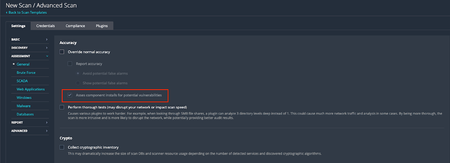
Apache Log4j Detection for Windows - Manifest / Properties Detection Update Summary: In the light of resource requirements to scan entire file systems along with inspecting each Java archive file in-depth while checking the manifest and properties files, we have decided to require that the following settings be enabled to leverage the detection using manifest and properties files in Apache Log4j JAR Detection (Windows) (156001): ‘Perform thorough tests’ setting must be enabled ‘Override normal accuracy’ setting must be set to ‘Show potential false alarms’ This feature was first released in Nessus plugin feed 202201080412. We are looking at ways to further optimize this feature to enable faster scans while lowering its impact on system resources. Impact: Customers may observe fewer resources being consumed on Windows scan targets during a local or Agent scan but may also observe slightly fewer Apache Log4j detections that were detected via the manifest or properties file over the past several days. Once ‘Perform thorough tests’ and ‘Override normal accuracy’ settings are configured as mentioned above, the detections should re-appear. A consequence of this change is that some Apache Log4j vulnerabilities may appear as remediated if they were previously detected via this method and subsequent scans did not have the aforementioned settings enabled. Plugin: Apache Log4j JAR Detection (Windows) (156001) References: Assessment Scan Settings - Perform thorough tests and Override normal Accuracy settings Target Release Date: January 12, 2022 (released in Nessus plugin feed 202201130817)gbetz4 years agoNot applicable602Views0likes15CommentsOverview of Callbacks in Log4j Remote Detection Plugins The...
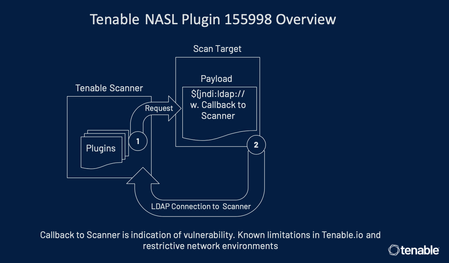
Overview of Callbacks in Log4j Remote Detection Plugins The following is an overview of callbacks in Tenable plugins for Log4Shell that perform remote detection 155998, 156014, 156016, 156017, 156035, 156056, 156115, 156132, 156157, 156158, 156162, 156166, 156197, 156232, 156256, 156257, 156258, 156375, 156445, 156559, and 156669. A HTTP request is sent by the scanner to the target being scanned with a benign payload containing a unique token. The target, if vulnerable, will act on the payload. Tenable tracks the target’s action on the payload via a callback to our hosted environment (plugins 156014, 156016, 156017, 156035, 156056, 156115, 156132, 156157, 156158, 156162, 156166,156197, 156232, 156256, 156257, 156258, 156375, 156445, 156559, and 156669) based on the unique token that was embedded in the initial request or via the LDAP connection callback to the scanner for plugin 155998. The callback is needed given the nature of the vulnerability as execution of the payload happens on the target being scanned. In plugin 155998, the callback happens to the scanner. This is the reason the plugin is not supported on Tenable.io cloud scanners In plugins 156014, 156016, 156017, 156035, 156056, 156115, 156132, 156157, 156158, 156162, 156166, 156197, 156232, 156256, 156257, 156258, 156375, 156445, 156559, and 156669 as part of execution of the payload, the target tries to resolve a domain owned by Tenable. While resolving the domain, Tenable is able to see the unique token that was sent in the initial request and thereby can track the callback. These plugins come with the major benefit that credentials are not required for scanning. However, the callbacks need to be successful for the plugin to be able to identify the exposure. Hence, communication between the target being scanned and the callback server must not be interrupted by intermediary devices. For more details: https://community.tenable.com/s/feed/0D53a00008E3hKzCAJ https://www.tenable.com/blog/cve-2021-44228-proof-of-concept-for-critical-apache-log4j-remote-code-execution-vulnerabilityibelyna4 years agoNot applicable1.1KViews0likes13Comments
Active Directory Starter Scan Background As part of our...
Active Directory Starter Scan Background As part of our endeavor to help reduce our customers’ cyber exposure, we are releasing a Starter Scan template along with plugins that will peel the onion around Active Directory Security. We hope customers will leverage these plugins as a starting point and consider an Active Directory Vulnerability Management solution for more holistic determination, given Active Directory breaches are ever-increasing and extremely devastating. Change Ten plugins checking for common Active Directory misconfigurations / vulnerabilities are being released. Active Directory controller credentials will be required for these plugins to run. Active Directory specific scan templates are also being released for Nessus Professional, Tenable.sc and Tenable.io. Dashboards for Tenable.sc and Tenable.io will also be available. Impact Customers will be able to run scans highlighting Active Directory issues. Note that these are starter Active Directory checks. For more complete coverage, we strongly recommend considering an Active Directory VM solution. Note that these plugins are not available on Nessus Agents. Plugins 150480 AD Starter Scan - Kerberoasting 150481 AD Starter Scan - Weak Kerberos encryption 150482 AD Starter Scan - Kerberos Pre-authentication Validation 150483 AD Starter Scan - Non-Expiring Account Password 150484 AD Starter Scan - Kerberos Krbtgt 150485 AD Starter Scan - Unconstrained delegation 150486 AD Starter Scan - Dangerous Trust Relationship 150487 AD Starter Scan - Primary Group ID integrity 150488 AD Starter Scan - Null sessions 150489 AD Starter Scan - Blank passwords Release Date Thursday 29 of July 2021Anonymous5 years agoNot applicable855Views0likes12Comments
Security End-of-Life Plugins Target Release Date Immediate...
Security End-of-Life Plugins Target Release Date Immediate Change Tenable Research is releasing a new dynamic and well-defined framework for detecting Security End-of-Life (SEoL) vulnerabilities. It abstracts various terminologies, such as End of Life, Unsupported, End of Support, etc., and provides a clear definition that serves as the basis for SEoL detection plugins. The new framework defines SEoL as the state in Security Maintenance Lifecycle when a product no longer receives security updates. Impact Tenable Research is implementing a new policy that informs the SEoL plugin framework design. To better inform the impact of SEoL products in our customer environments, Tenable is adopting a strategy that allows plugin severity to be more flexible and encourages scaling up instead of down. For this reason, net-new SEoL plugins will default to the INFO severity value. The new SEoL plugins can be identified by the Plugin Name attribute - it will contain “SEoL”, such as “Apache httpd SEoL (2.1.x <= x <= 2.2.x)”. Alternatively, they can be identified through the “unsupported_by_vendor: true” plugin attribute. Additional Notes Please note that any existing plugins for the SEoL use case containing “Unsupported” in the plugin name will be converted according to the new “SEoL” plugin specification or enter the deprecation process. Plugin severity will retain its originating value during these conversions. A public Knowledge Article was published to help answer any questions regarding the new plugins. For a more detailed description of the problem and Tenable’s solution, please refer to the blog - What Security Leaders Need to Know About Security End of Life: How Tenable is Leading the Way.129Views0likes12CommentsImprovement: Handling Component Installs for Vulnerability Assessment
Background On Friday, February 6, 2026, Tenable Research published a plugin update that changed the way component installs are assessed for vulnerabilities. Those changes are outlined in a previous release highlight: Component Installs Require Paranoid Checks, This update essentially reverts this change, while adding new functionality to allow users to choose whether or not they want component installs assessed for vulnerabilities. Component installs are no longer influenced by scan paranoia settings. What are “Component Installs”? Software components, such as applications or language modules/libraries, are installed and managed by a primary "parent" package or application. The crucial point is that these components often cannot be updated individually. Instead, their vulnerability assessment and upgrade are entirely dependent on an update of the parent package. For instance, the SQLite database component is installed as part of the Trend Micro Deep Security Agent and is updated only when the Agent itself is updated. Nessus uses several factors to determine if a detected product is a component, or a standalone installation, including: Was the product installed by a package manager? These products are not considered components, as they are managed by the package manager and not a “parent” application Is the component a “language library”, i.e. a library or module used by the interpreter of a programming language like Python or Node.js? These enumerated libraries are marked as components by default. Does the product reside in a directory that is recognized for installations that are not component-based? Changes By default, component installs are once again assessed for vulnerabilities, as was the case prior to the release of the aforementioned update. If users wish to turn this setting off, so that component installs will not be assessed by generic vulnerability detection plugins, they can do so via the newly created scan preference. The end result of this change should be that fewer “false positives”, i.e. reported vulnerabilities for components that are “owned” by another application, are shown in scan results. Components with vulnerabilities that cannot be addressed independently of the “parent” application will not show in scan results. However, some customers have expressed a desire to see these vulnerabilities in their scan results anyway, to ensure full awareness of the risk profile of every application in their environment. This is still possible through the updated scan configuration settings. To modify this setting in your scan policy, go to Settings > Assessment > Accuracy > Override Normal Accuracy > Assess component installs for potential vulnerabilities. This setting is ON (checkbox is ticked) by default, so users must enable the Override Normal Accuracy checkbox (which is OFF / unchecked by default) if they wish to disable the setting and ensure that component installs are not assessed by generic vulnerability detection plugins in this scan. Please note that this update makes no other changes to the existing paranoia logic, outside of what is described above. For now, “Managed”, “Managed by OS” and “Backported” installs are still controlled by the Show/Avoid potential false alarms radio button. How can I tell if the detected install is a component or not? In addition to the above, we have also updated the relevant detection plugins so they will show if the component flag is set or not. At present, this includes detection plugins for OpenSSL, Curl, LibCurl, Apache HTTPD, Apache Tomcat, SQLite, Python Packages, Node.js modules and, soon to follow, Ruby and Nuget libraries. Using plugin ID 174788, SQLite Detection (Windows), here is a before and after example of the expected plugin output. Before: After: Expected Impact With the new default setting in place, users should anticipate an increase in vulnerability findings for the products in scope, returning to a level similar to what was observed before the first update. If users do not wish to surface these additional potential vulnerabilities, they should disable the "Assess component installs for potential vulnerabilities” setting. If the new scan preference is disabled, the volume of findings will remain consistent with current levels, when scanning with normal accuracy (paranoia) settings. Affected Plugins 12288, global_settings.nasl (updated to support the new scan policy preference) Any plugin that operates downstream of those in the list below: SQLite: 174788 - sqlite_nix_installed.nasl 171077 - sqlite_win_installed.nasl OpenSSL: 168007 - openssl_nix_installed.nasl 168149 - openssl_win_installed.nasl Curl: 182774 - curl_nix_installed.nasl 171860 - curl_win_installed.nasl LibCurl: 182848 - libcurl_nix_installed.nasl Apache HTTPD: 141394 - apache_http_server_nix_installed.nasl 141262 - apache_httpd_win_installed.nasl Apache Tomcat: 130175 - apache_tomcat_nix_installed.nasl 130590 - tomcat_win_installed.nasl Python Packages: 164122 - python_packages_installed_nix.nasl 139241 - python_win_installed.nasl Node.js Modules: 178772 - nodejs_modules_linux_installed.nasl 179440 - nodejs_modules_mac_installed.nasl 200172 - nodejs_modules_win_installed.nasl Targeted Release Date Tenable Nessus and Vulnerability Management: Monday, March 9, 2026 (ETA 22:30 Eastern Standard Time) Tenable Security Center: Monday, March 16, 20263KViews4likes11Comments